
The forwarder is a feature that supports sending copies of every email from one address to another and is done automatically.
Forwarder allows you to send a copy of all messages from one email address to another.
For example, if you have two different email accounts info@dotrungquan.info and contact@dotrungquan.info, you can forward info@dotrungquan.info to contact@dotrungquan.info, so you don’t need to check both accounts account. Note that forwarded messages will still be sent to the original address.
To set it up, do the following:
Step 1: Access to Email Management
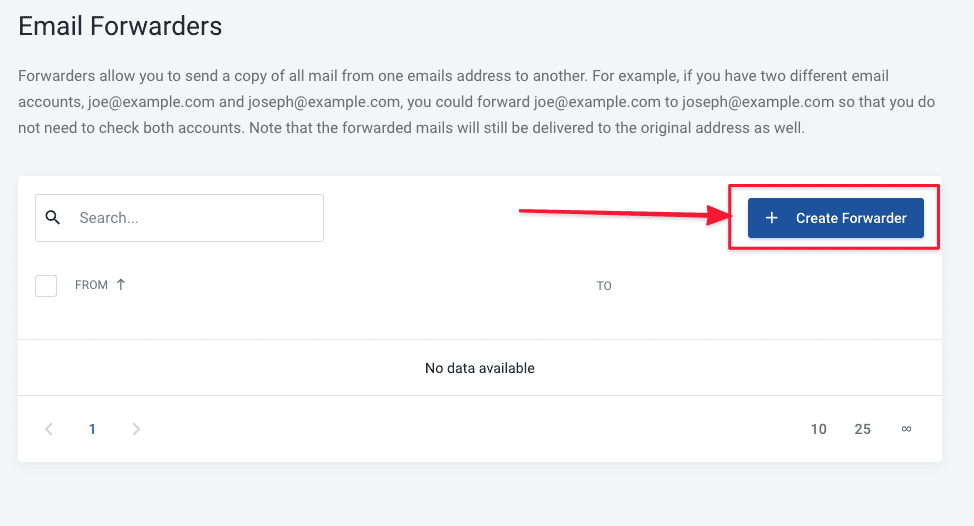
At the email interface, go to Email Management and click on Email Forwarders, as shown below:

Next, click Create Forwarders to create a new one.
Step 2: Set up mail to need Forwarders
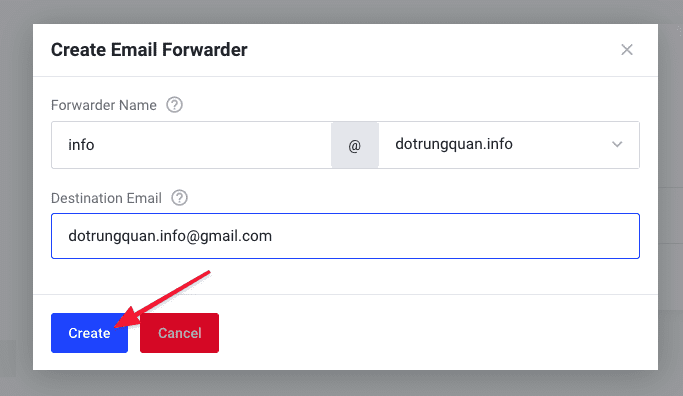
At the Create Email Forwarders interface, you need to configure the following:
- Forwarder Name: Forwarder email account
- Destination Email: The destination email to the forwarder.
With the configuration like the image below that I set up, when a mail account is sent to email info@dotrungquan.info, Then immediately a copy will be forwarded to the email account you set up as dotrungquan.info@gmail.com.
So AZDIGI has shown you to complete the email Forwarder configuration.
To refer to the documentation for using mail, you can access the Pro Mail Hosting Guide at the link below:
- Hotline 247: 028 888 24768 (Ext 0)
- Ticket/Email: You can use your email to register for the service and send it directly to: support@azdigi.com
You might also like
- How to Configure Email Forwarders on cPanel
- Pro Mail Hosting: Set up Catch-all Email
- Pro Mail Hosting: How to configure email into Outlook
- Pro Mail Hosting: How to use Autoresponders on Pro Mail Hosting
- Pro Mail Hosting: How to login mail on Outlook IOS
- Pro Mail Hosting: How to add a domain email account to Gmail
About the author

Thạch Phạm
Đồng sáng lập và Giám đốc điều hành của AZDIGI. Có hơn 15 năm kinh nghiệm trong phổ biến kiến thức liên quan đến WordPress tại thachpham.com, phát triển website và phát triển hệ thống.