Email Forwarders is a function that allows forwarding emails to another email address. For example:
- Configure Email Forwarders from an email address info@linuxcanban.com to an email admin@linuxcanban.com. When an email is sent to the email address info@linuxcanban.com, a copy will be forwarded to the email admin@linuxcanban.com.
And in this article, AZDIGI will show you to configure it.
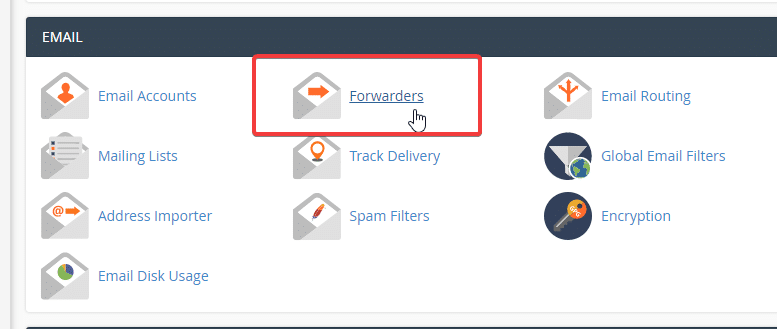
Login to cPanel, go to Forwarders.
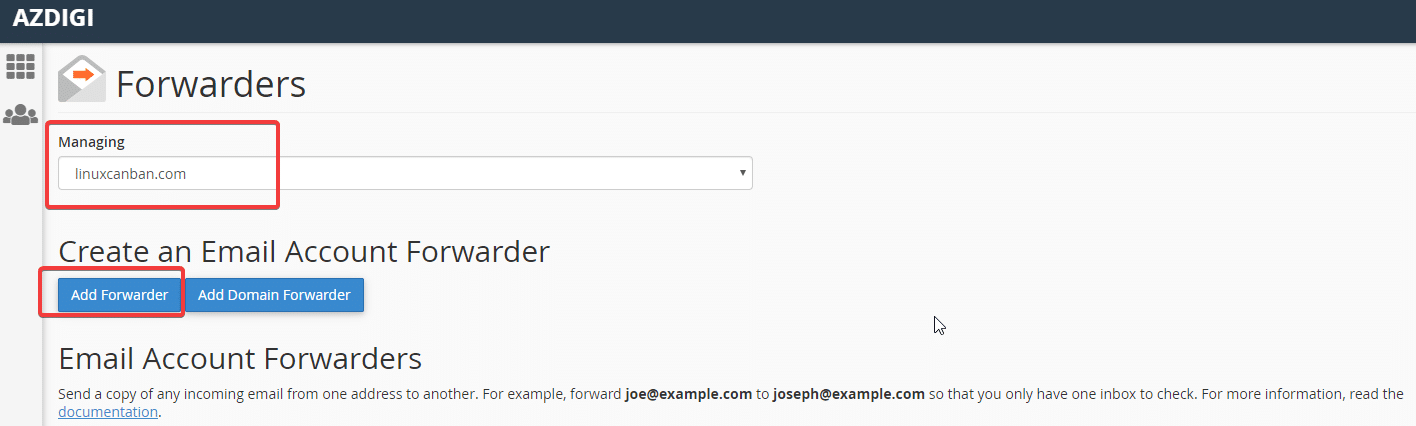
In the Managing section, select the domain name you want to transfer => click Add Forwarders
Next, you create Email Forwarders
- Address to Forwarders: enter the email address to forward (source email)
- Domain: select the domain containing the email to be forwarded
- Destination: Forwarders to Email Address: enter the email you want to forward (Destination email)

- Hotline 247: 028 888 24768 (Ext 0)
- Ticket/Email: You can use your email to register for the service and send it directly to: support@azdigi.com
- You can refer to Hosting/VPS service here!
This article has been reviewed by AZDIGI Team
About the author

Thạch Phạm
Đồng sáng lập và Giám đốc điều hành của AZDIGI. Có hơn 15 năm kinh nghiệm trong phổ biến kiến thức liên quan đến WordPress tại thachpham.com, phát triển website và phát triển hệ thống.
10+ years serving 80,000+ customers