Currently, all of AZDIGI’s Hosting service servers are guaranteed to send mail to the inbox and receive emails on the hosting so that people can use some features such as email notifications on the website .
However, due to the nature of the Shared Hosting service, there is always a situation of spam emails out (mainly due to malicious code installed in the website source code), so there are many limitations, for example, all emails sent from hosting must go through a spam filter to remove spam mail, containing malicious code before sending to users, so the time to receive mail is longer.
Due to the increasingly sophisticated nature of email-sending malware and in order to reduce the load on the email filtering system as well as minimize spam emails out, AZDIGIofficially applies the mandatory use of SMTP on the website to send mail out.
This does not affect using the Email feature on Hosting to create your own domain email, this Email feature is still used to send/receive emails as usual.
What is SMTP and how to get SMTP information?
SMTP is simply a standard for the transmission of e-mail over the Internet. That is, your website sends mail out via SMTP protocol instead of sending it directly from the Hosting server through the commandsendmail ormail on the server.
All Email accounts support SMTP, for example, your Gmail account also supports SMTP to perform sending mail through Gmail on another application.
Or if you do not like using Gmail, when creating an Email account on cPanel at AZDIGI also supports SMTP protocol.
How to create an SMTP account on Hosting at AZDIGI
If you don’t want to use external SMTP, you can create an Email account on the host at AZDIGI to have an SMTP account.
See how to get an Email account on hosting according to the instructions here.
SMTP accounts created on AZDIGI’s host will have the following information:
- SMTP Host: server host address (eg, chv4-24911.azdigi.com)
- SMTP User: user@your-domain.com
- SMTP Password: Email account password
- SMTP Port: 465 (SSL) or 587 (TLS)
How to set up SMTP on the website
For WordPress source code
You can use the WP Mail SMTP plugin by WPForms to set up SMTP for WordPress. After installing, go to WP Mail SMTP => Settings and select Other SMTP in the Mailer section.
Next, enter the following information:
- From Email: Enter your SMTP email address.
- From Name: Enter your name.
- SMTP Host: Enter the SMTP server address.
- Encryption: SSL or TLS
- SMTP Username: SMTP account information.
- SMTP Password: SMTP Password
Then click Save to complete.
For other source code or not support SMTP
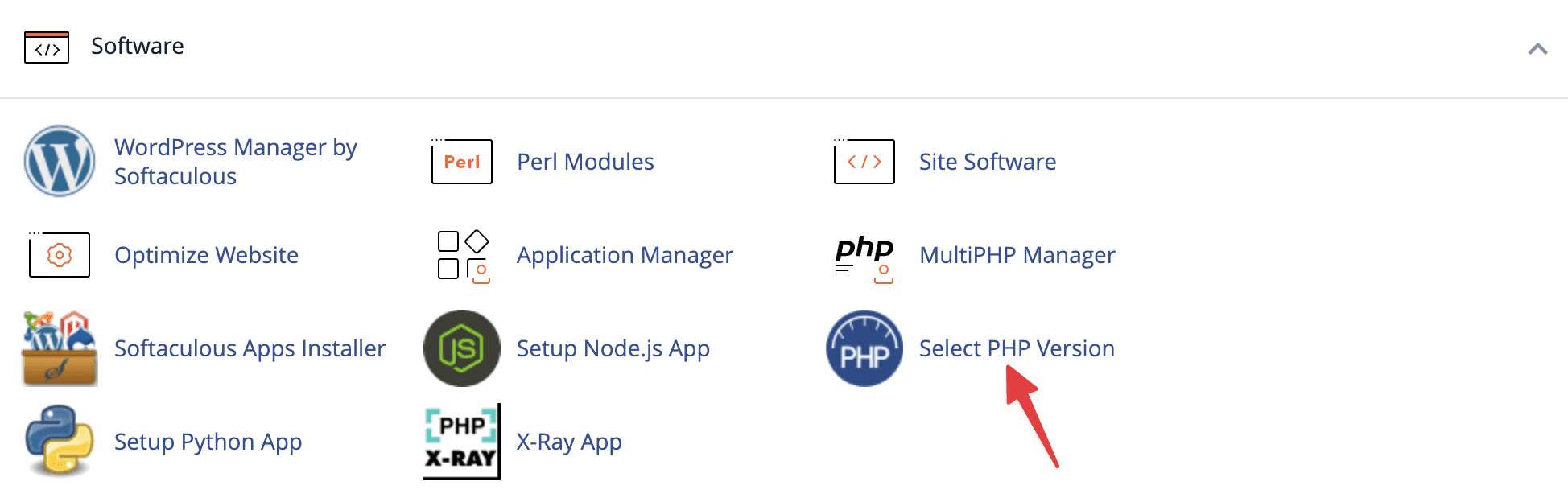
In case if the source code does not support SMTP, customers can turn on sending mail on the host by accessing the cPanel interface, looking for Select PHP Version.
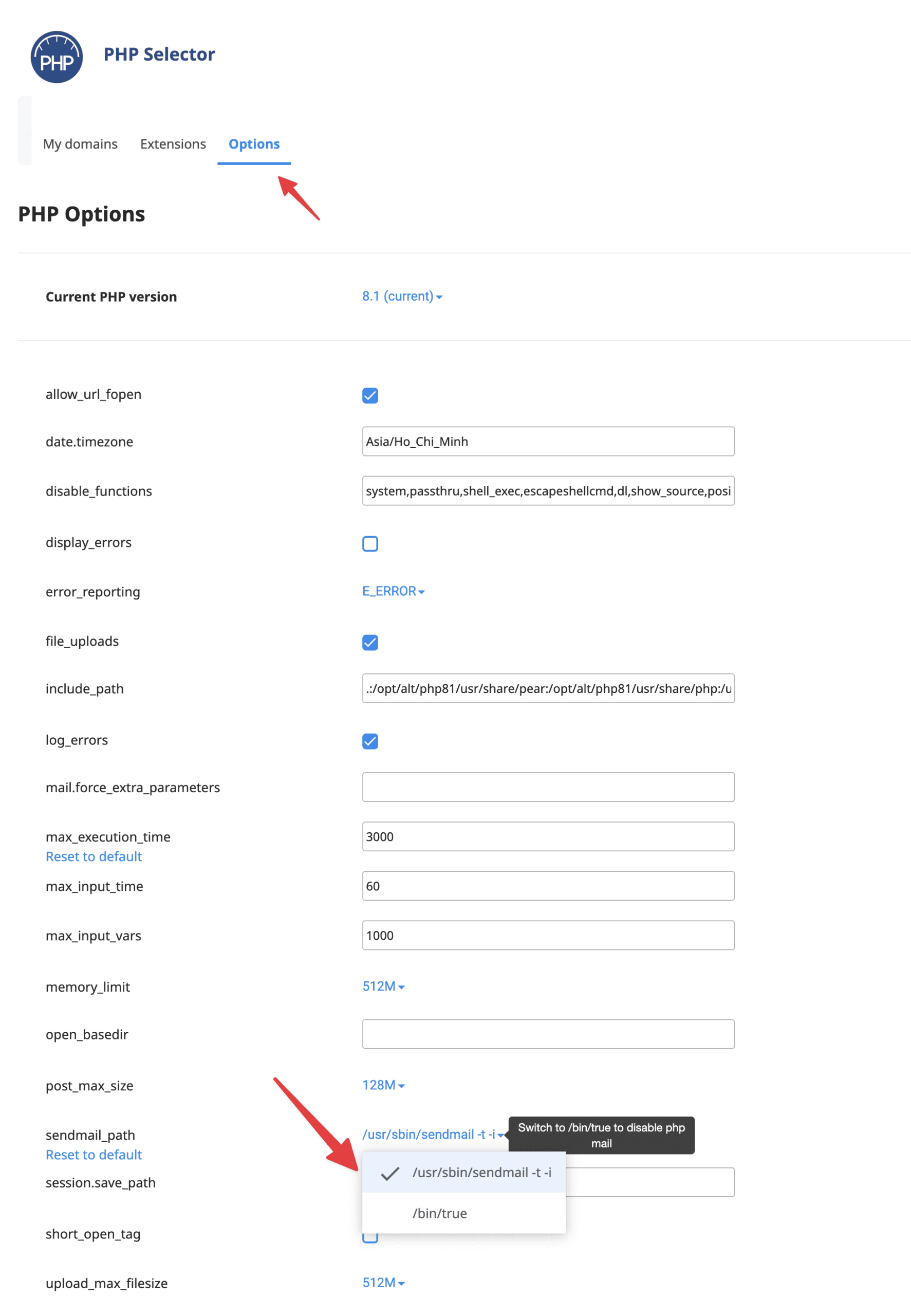
Then select the Options tab, find the itemsendmail_path and change the value to/usr/sbin/sendmail -t -i to enable sending mail.
Wishing you success!
You might also like
- Required to use SMTP to send mail on Hosting service at AZDIGI
- Pro Mail Hosting: How to add a domain email account to Gmail
- Pro Mail Hosting: How to configure email into Outlook
- How to configure mail Relay on aaPanel
- Configure SMTP with G Suite for the WordPress website
- Pro Mail Hosting: How to login mail on Outlook IOS
About the author

Thạch Phạm
Đồng sáng lập và Giám đốc điều hành của AZDIGI. Có hơn 15 năm kinh nghiệm trong phổ biến kiến thức liên quan đến WordPress tại thachpham.com, phát triển website và phát triển hệ thống.