In previous articles, AZDIGI showed you how to install and configure the Pro Mail Hosting service email at AZDIGI into Outlook, so in this article, AZDIGI will guide you on how to delete an email account from Outlook with just a few simple steps, please follow along.
Implementation guide
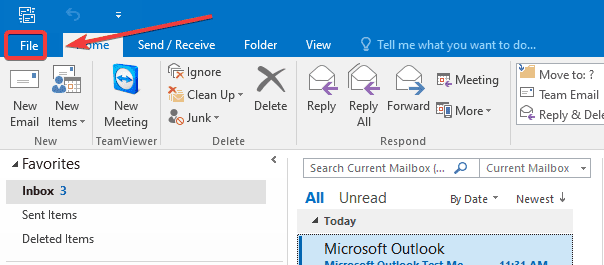
Step 1: Access Account Information.

Step 2: Access Account Settings

Step 3: Create a local storage account
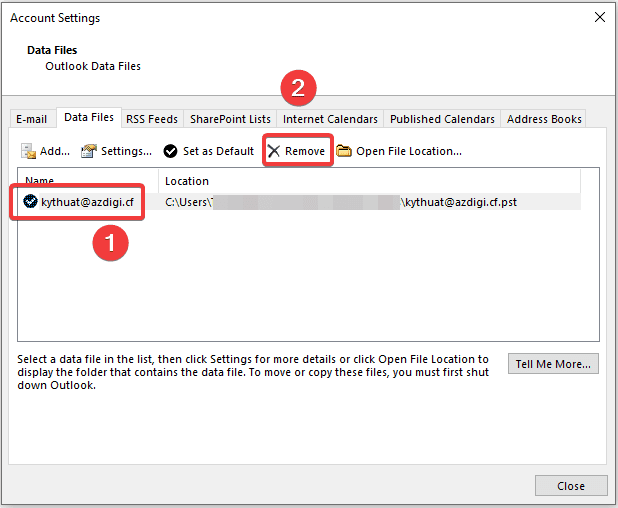
At the interface below, select the Email to delete (1) and click Remove (2).
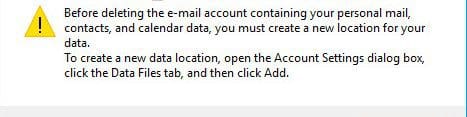
If the system allows deletion, you continue in Step 4 and if the system displays a message as shown below, it means that the system warns when you need to delete information related to email, contact, or calendar…, you need to create a local account to save the above information.
To create a local data storage account, click on the Data Files tab (1) => select Add (2).

The system will automatically create a local file named My Outlook Data File.pst => click OK.

After creating, the file will display with the path as below:

Step 4: Remove email account
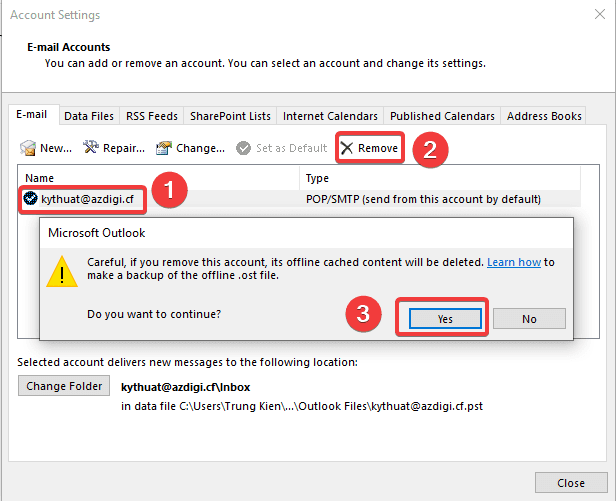
Now, go back to the E-mail tab and delete it, select the email you want to delete (1) => Remove (2) => Yes (3) to confirm that you have agreed to delete all data.
After successful deletion, you may find that the email is no longer displayed in the list.

Summary
So in this article, AZDIGI has shown you how to delete an Email account on Outlook with a few simple steps. In the next articles, AZDIGI will guide you through adding some Outlook tips to manage your email better. If you find the article helpful, please share it widely.
Wishing you success!
If you need assistance, you can contact support in the ways below:
About the author

Thạch Phạm
Đồng sáng lập và Giám đốc điều hành của AZDIGI. Có hơn 15 năm kinh nghiệm trong phổ biến kiến thức liên quan đến WordPress tại thachpham.com, phát triển website và phát triển hệ thống.