Introduction
In this article, AZDIGI will show you how to change and customize the Document root path for Subdomains on DirectAdmin to look more professional than the boring default Document root.
Then by default, when you create a subdomain on DirectAdmin, the path structure will be as follows:
/home/USERNAME/domains/DOMAIN.COM/public_html/SUBDOMAINAnd now I will change the Document root for the subdomain:
/home/USERNAME/domains/SUBDOMAIN.DOMAIN.COM/Implementation Guide
For example:
- The primary domain: thegioibecon.com
- Subdomain: directadmin.thegioibecon.com
Step 1: Create Subdomain
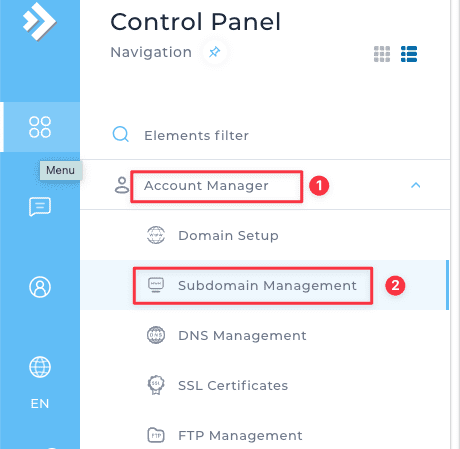
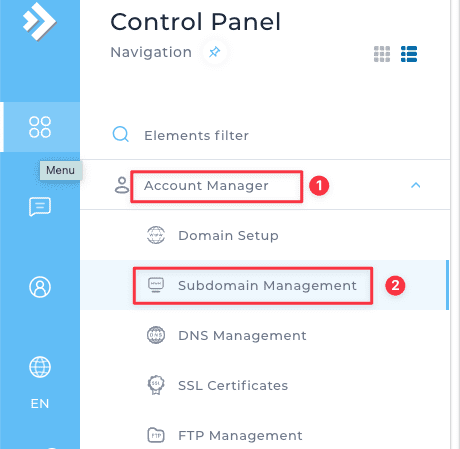
First, log in to DirectAdmin => access Account Manager => Subdomain Management
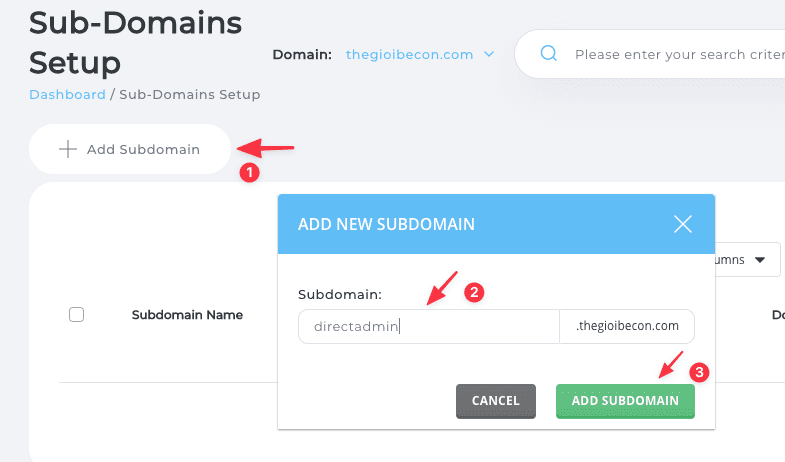
Next, select Add Subdomain => enter the Subdomain you need to add => click ADD SUBDOMAIN.
Step 2: Edit Document root for a subdomain
Note: Before editing the Document root for the subdomain, you need to determine the new path to create and proceed to create that path first, then edit the Document root.
In my example, the default Document root path of the Subdomain is:
/home/USERNAME/domains/thegioibecon.com/public_html/directadminI will edit it to:
/home/USERNAME/domains/directadmin.thegioibecon.comAnd before editing the path, I will create the folder directadmin.thegioibecon.com according to the path I need first. You can watch the video below to make it easier to manipulate.
Above are details on changing the Document root for a Subdomain on DirectAdmin. Hopefully, this article will help you customize the Document root for the Subdomain to look more professional and easier to manage.
You can refer to other instructions at the link below:
If you need assistance, you can contact support in the ways below:
- Hotline 247: 028 888 24768 (Ext 0)
- Ticket/Email: You use the email to register for the service and send it directly to: support@azdigi.com .
About the author

Thạch Phạm
Đồng sáng lập và Giám đốc điều hành của AZDIGI. Có hơn 15 năm kinh nghiệm trong phổ biến kiến thức liên quan đến WordPress tại thachpham.com, phát triển website và phát triển hệ thống.