When using VPS or Hosting using the DirectAdmin control panel, you should consider proactive data backup at some point when you need to back up data. In this article, AZDIGI will show you how to use the Backups feature on DirectAdmin to create backups.
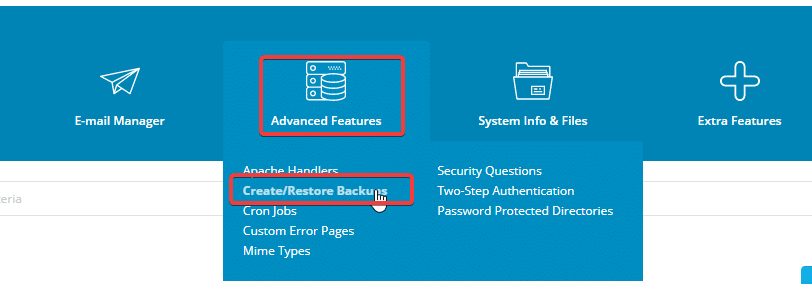
Log in to the DirectAdmin interface, go to Advanced Features > Create/Restore Backups
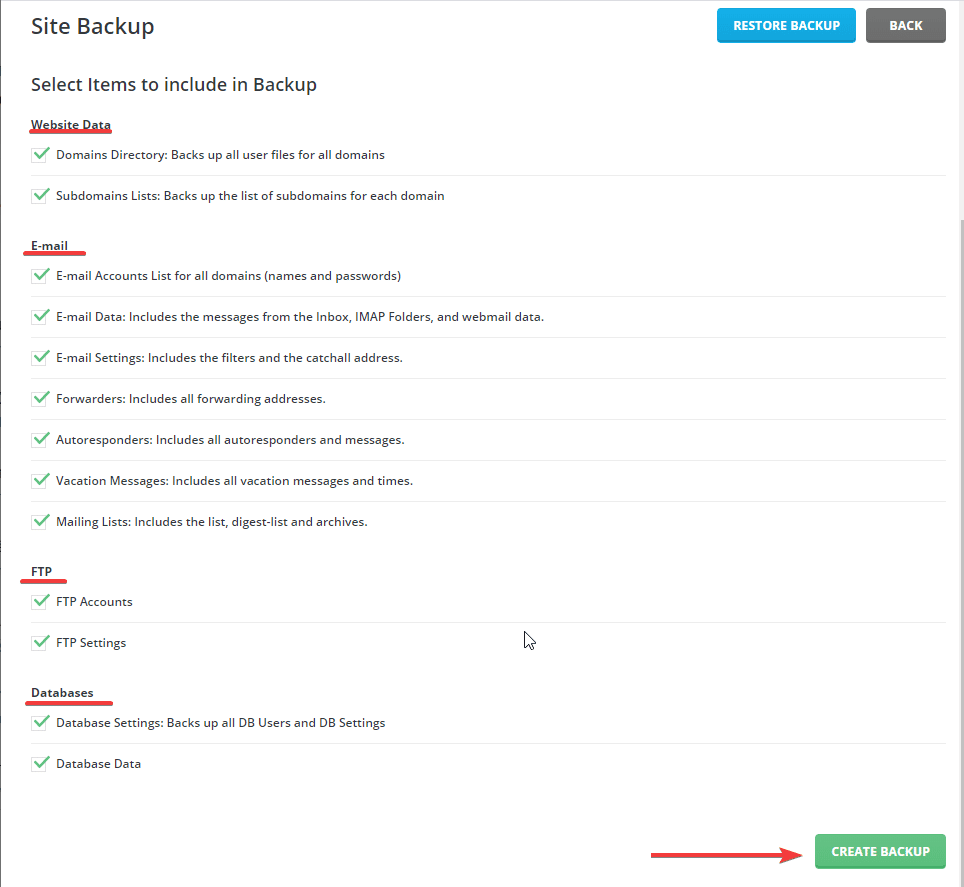
Next, DirectAdmin will display an optional interface, where you can backup each part as follows:
- Website Data: backup source code of website
- Email: Backup all emails
- FTP: Backup the FTP accounts you have created
- Databases: Backup the entire database
If you need a full backup, then tick all => click CREATE BACKUP. Depending on the size of the data will determine the time of the backup process. Once completed, a notification will be sent to you. And you can go to File Manager to download the backup file.
Wishing you success!
About the author

Thạch Phạm
Đồng sáng lập và Giám đốc điều hành của AZDIGI. Có hơn 15 năm kinh nghiệm trong phổ biến kiến thức liên quan đến WordPress tại thachpham.com, phát triển website và phát triển hệ thống.