How to unblock an IP address using CSF on DirectAdmin
CSF or ConfigServer Security & Firewall is a popular Stateful Packet Inspection (SPI) firewall distributed as open source. CSF is very widely used and popular, most server services, control panels are equipped with this application to prevent security risks as well as restrict attacks.
CSF features intrusion detection and application security for Linux host systems set up in csf.conf. For example, CSF will immediately block that IP to protect the server if someone tries to log in to your server or SSH into the wrong server many times.
However, in some cases where you forget your login information, log in incorrectly many times and CSF itself blocks your IP, making you unable to log in, in this article, AZDIGI will guide you to unblock IP in CSF on DirectAdmin using the interface and in SSH.
Note: If your IP is blocked, you cannot access DirectAdmin or SSH. Please use another network (different wifi, 3-4G) to access and remove the old IP that is being blocked.
1. Unlock IP on the DirectAdmin dashboard
This will help you find and unlock the IP directly on the DirectAdmin interface.
Step 1: Login to DirectAdmin
Please log in to DirectAdmin with an admin account.
Step 2: Find and select ConfigServer Security & Firewall (CSF)
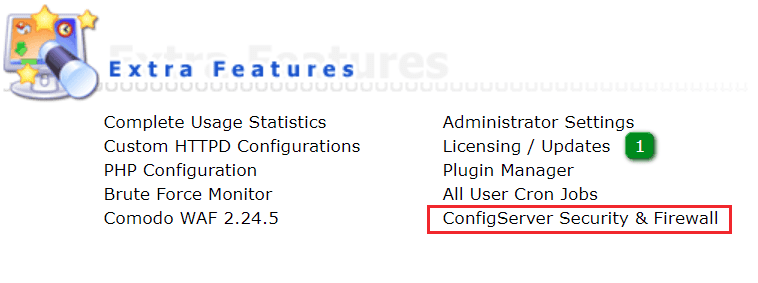
Once logged in within DirectAdmin, find the ConfigServer Security & Firewall function. (you can find it in the Extra Features menu or use the search box)
- For the new DirectAdmin interface


- For the old DirectAdmin interface
Step 3: Find the IP and remove the blocked IP
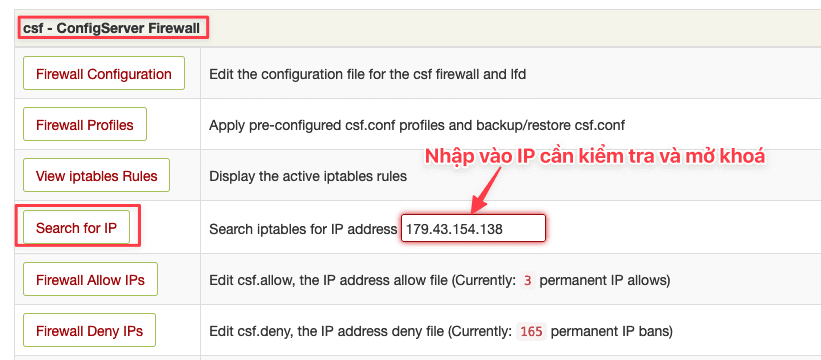
After entering ConfigServer Security & Firewall, go to the Search for IP section, enter the IP you want to open and press the Enter button on the keyboard.
If you do not know which IP is being locked, at the locked device, you access the IP check link below, you will see an IP address appear on the screen.
- Link to check IP: https://ipecho.net/
Then you will see a message line including the IP address, cause and time of blocking. To remove this IP from the block list, click the green button with the line Remove IP block.

2. Unlock IP in SSH
In addition to using the interface above, another way is to SSH into the server to remove it. Usually, I use this method because it’s faster and more professional.
Step 1: SSH into the server
If you do not know how to SSH into the server, please refer to the following article:
Step 2: Check IP
To check if any IP is locked on CSF, you can check with the command csf -g xx.xx.xx.xx and xx.xxx.xx.xx is the IP to check.
- For example:
[root@sv ~]# csf -g 179.43.154.138Table Chain num pkts bytes target prot opt in out source destination
filter DENYIN 157 3 120 DROP all -- !lo * 179.43.154.138 0.0.0.0/0
filter DENYOUT 157 0 0 LOGDROPOUT all -- * !lo 0.0.0.0/0 179.43.154.138
ip6tables:
Table Chain num pkts bytes target prot opt in out source destination No matches found for 179.43.154.138 in ip6tables
csf.deny: 179.43.154.138 # lfd: (sshd) Failed SSH login from 179.43.154.138 (IT/Italy/-): 5 in the last 3600 secs - Wed Apr 27 06:35:15 2022
Step 3: Remove blocked IP from CSF
To remove blocked IP from CSF you use the command syntax csf -dr xx.xx.xx.xx (xx.xx.xx.xx is the IP to remove)
[root@sv ~]# csf -dr 179.43.154.138
Removing rule...
DROP  all opt -- in !lo out *  179.43.154.138  -> 0.0.0.0/0
LOGDROPOUT  all opt -- in * out !lo  0.0.0.0/0  -> 179.43.154.138
So AZDIGI has completed instructions on unlocking IP using CSF on DirectAdmin with 2 methods for you. Wishing you success!
- See more articles about CSF here.
If you need support, you can contact support in the ways below:
- Hotline 247: 028 888 24768 (Ext 0)
- Ticket/Email: You use the email to register for the service and send it directly to: support@azdigi.com .
About the author

Thạch Phạm
Đồng sáng lập và Giám đốc điều hành của AZDIGI. Có hơn 15 năm kinh nghiệm trong phổ biến kiến thức liên quan đến WordPress tại thachpham.com, phát triển website và phát triển hệ thống.