
There are many ways for you to create a new WordPress user and assign permissions to the user, such as creating a new one from the WordPress admin page, creating in phpMyAdmin or creating a new one from the functions.php file in themes.
And today, AZDIGI will show you how to create a new user using WP CLI
Step 1: Access Terminal
Step 2: cd into the website directory where you need to create a user
I will create a new user for the linuxcanban.com website. I will access the directory containing the source code linuxcanban.com with the cd command
Note:
- With the Primary Domain the directory containing the source code will be public_html
- With addon domain: the directory containing the source code will be in the directory named domain (if the original is unchanged)

Step 3: Create a user
After accessing the folder containing the website source code to create a user, enter the following command to create a new user:
wp user create usercantao emailtheouser --role=administrator
For example: wp user create dotrungquan dotrungquan@linuxcanban.com – -role=administrator
Note:
- wp user create: command to create a user
- dotrungquan: username to create
- dotrungquan@linuxcanban.com: that user management email
- –role=administrator: user rights
- In addition to administrator rights, there are also rights such as administrator, editor, author, contributor
After creating a user, the system will automatically create a new password like item 2 is shown below:

You can check again by listing the users with the wp user list command
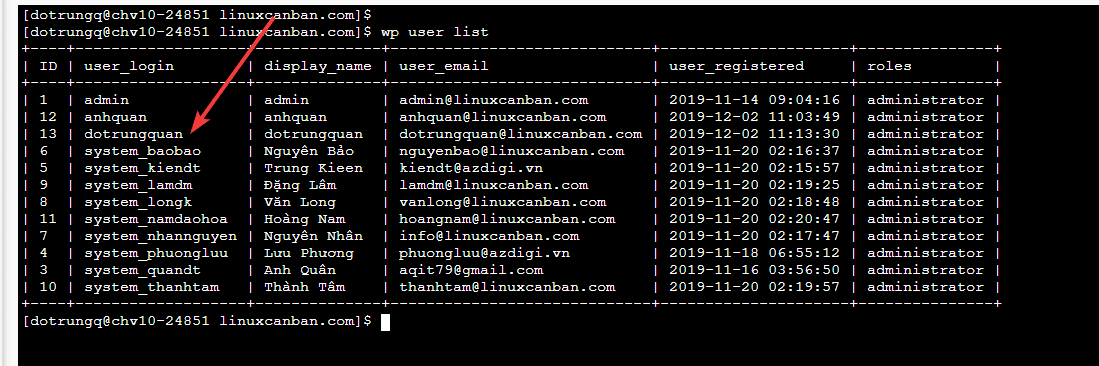
Wishing you success!
About the author

Thạch Phạm
Đồng sáng lập và Giám đốc điều hành của AZDIGI. Có hơn 15 năm kinh nghiệm trong phổ biến kiến thức liên quan đến WordPress tại thachpham.com, phát triển website và phát triển hệ thống.