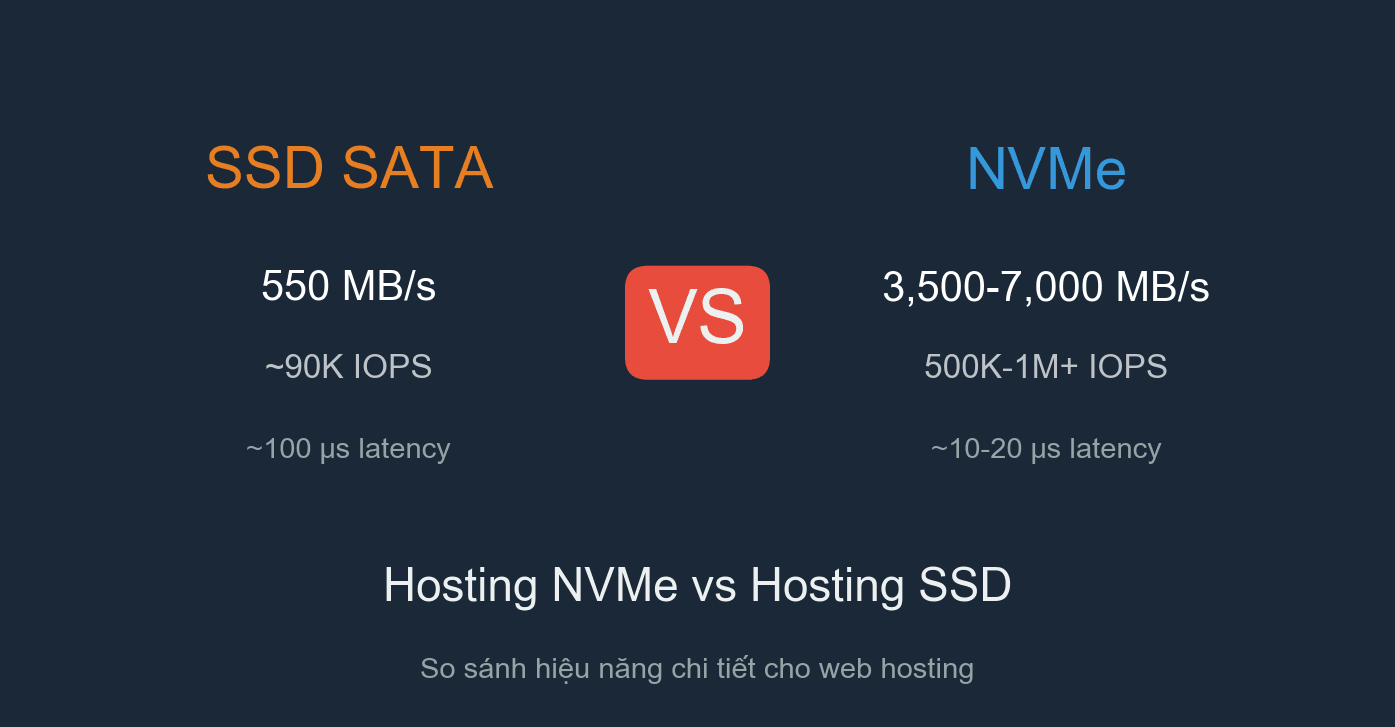
When choosing hosting for your website, you will encounter two common options: SSD Hosting (using SATA SSDs) and NVMe Hosting (using NVMe drives via PCIe). Both are significantly faster than traditional HDDs, but there is a substantial performance gap between them. This article provides a detailed comparison from architecture and technical specifications to real-world impact on website speed, helping you understand which one to choose.
What is a SATA SSD?
A SATA SSD (Solid State Drive, SATA standard) is a storage drive that uses NAND flash memory chips, connecting to the system via the SATA III interface with a maximum bandwidth of 6 Gbps (approximately 550 MB/s in practice). SATA SSDs use the AHCI (Advanced Host Controller Interface) protocol, which was originally designed for mechanical hard drives (HDDs).
The most common form factor for SATA SSDs is the 2.5-inch enclosure, similar to traditional laptop hard drives. Compared to HDDs, SATA SSDs are 5-10 times faster since they have no mechanical spinning components, reducing latency and significantly increasing IOPS. However, SATA remains an older interface that is becoming a bottleneck for modern flash memory chips.
If you are not familiar with how hosting works, you can read the article What is Hosting to understand the fundamentals.
What is NVMe?
NVMe (Non-Volatile Memory Express) is a storage protocol designed specifically for flash memory, connecting directly to the CPU via the PCIe (PCI Express) bus. Instead of going through a SATA controller before reaching the CPU, NVMe communicates directly with the processor, completely eliminating the SATA interface bottleneck.
NVMe SSDs come in multiple form factors: M.2 (a small stick format, common on laptops/PCs) and U.2 (a 2.5-inch enclosure but with a dedicated connector, common in enterprise servers). In terms of speed, NVMe PCIe Gen3 reaches approximately 3,500 MB/s, while Gen4 reaches up to 7,000 MB/s. That is 6 to 12 times faster than SATA SSDs.
The biggest difference lies in parallel processing capability: NVMe supports up to 65,535 command queues, with each queue capable of holding 65,536 commands. Meanwhile, AHCI/SATA only has 1 queue with 32 commands. This architecture allows NVMe to process millions of I/O operations per second, making it ideal for server environments with many concurrent users.
Technical Comparison: SATA SSD vs NVMe
Below is a summary table of the most important specifications when comparing these two storage types in a server hosting environment:
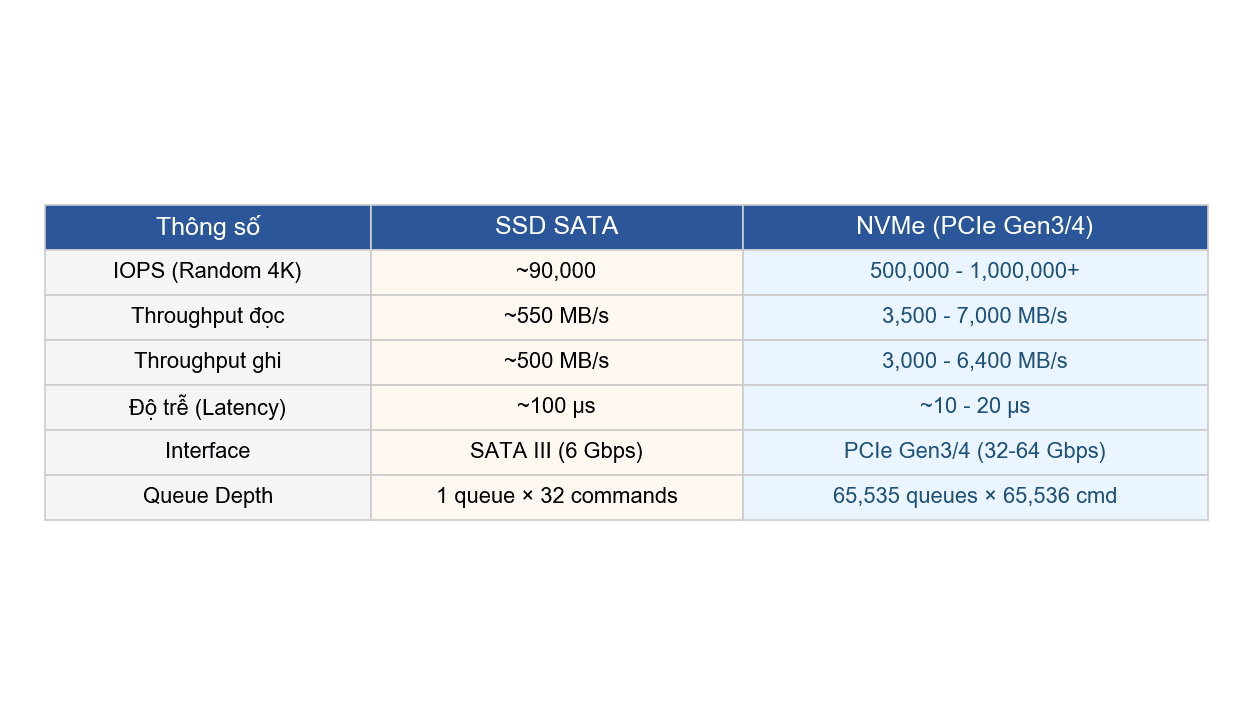
Looking at the table above, NVMe outperforms in every metric. In particular, IOPS (random read/write operations per second) and latency are the two metrics that directly affect hosting performance. NVMe IOPS is 5-10 times higher, while latency is 5-10 times lower compared to SATA SSDs. This is why NVMe hosting delivers noticeably faster response times when websites have many concurrent queries.
How Much Faster is NVMe Than SATA SSD? Real Benchmarks
Benchmarks on actual servers (enterprise SATA SSD vs enterprise NVMe PCIe 4.0, with identical CPU and RAM configurations) show very clear results:
- Sequential Read: SATA SSD achieves ~540 MB/s, NVMe achieves ~7,000 MB/s (13 times faster)
- Random Read IOPS (4K): SATA SSD ~90,000, NVMe ~1,000,000+ (10 times faster)
- Read Latency: SATA SSD ~100-120 microseconds, NVMe ~10-15 microseconds (8 times lower)
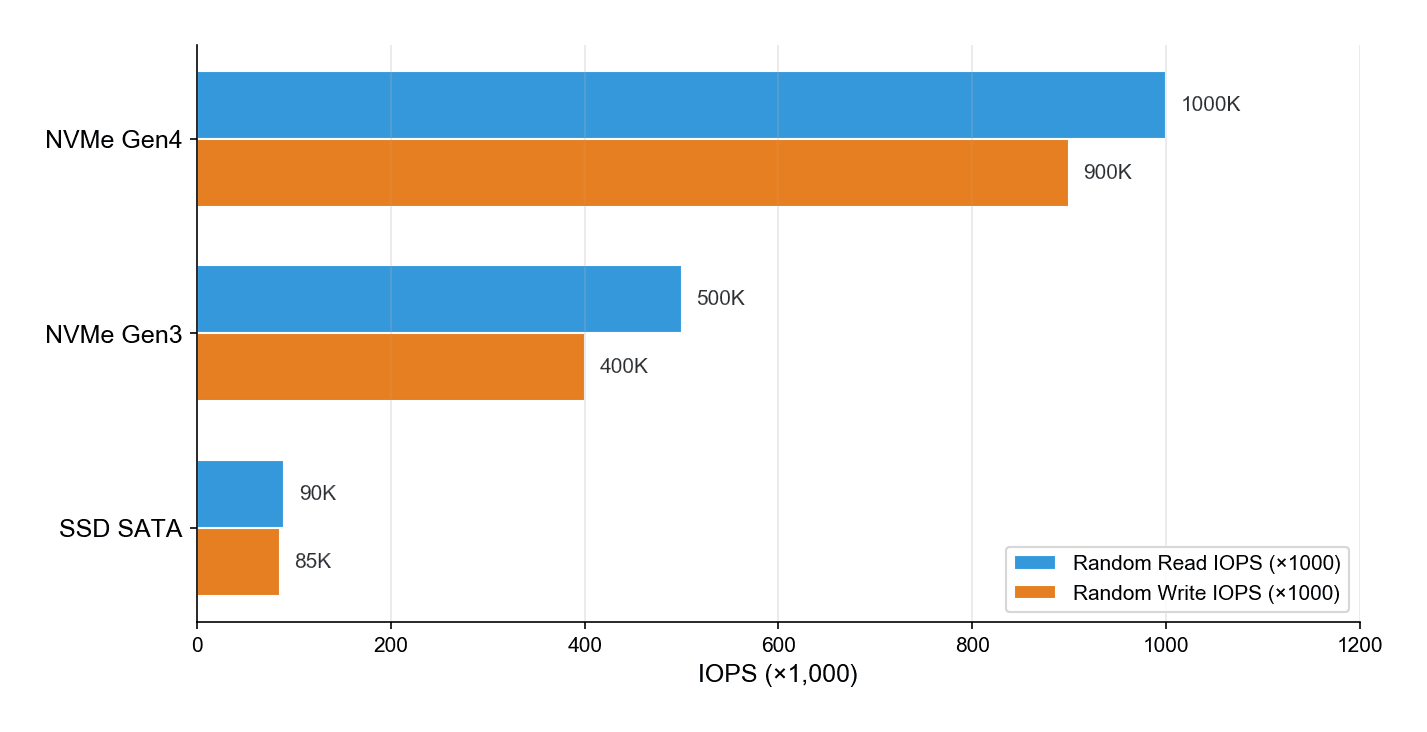
The chart above illustrates the IOPS gap between SATA SSDs and NVMe. With NVMe Gen4, random read IOPS reaches 1 million, over 10 times that of SATA SSDs. In a hosting environment, this means the server can serve many users simultaneously without I/O congestion.
Real-World Impact on Website Speed
Benchmark numbers are one thing, but what users care about most is: does the website actually load faster? The short answer: yes, and the difference is most noticeable on websites with heavy database interaction.
TTFB and Page Load Time
TTFB (Time to First Byte) is the time from when the browser sends a request to when it receives the first byte of data from the server. Faster storage allows the server to retrieve files, read the database, and return results more quickly, thereby reducing TTFB. NVMe hosting typically delivers significantly lower TTFB compared to SATA SSD hosting, especially for dynamic pages (WordPress, WooCommerce).
Website speed does not depend solely on storage, but storage is the foundation. If the storage layer is slow, no matter how powerful the CPU and RAM are, the server will still be held back.
Database Queries (MySQL/MariaDB)
WordPress and most CMS platforms are heavily dependent on databases. Each page load requires dozens of MySQL queries to retrieve content, menus, widgets, and plugin data. With NVMe, the time for each query decreases thanks to high IOPS and low latency. Real-world tests show that NVMe helps MySQL queries run 4-5 times faster than SATA SSDs under the same configuration.
For WooCommerce websites with thousands of products, or blogs with many posts and heavy plugins, this improvement is very significant. Category pages, search pages, and collection filter pages all load faster.
Handling Many Concurrent Users
This is NVMe’s strongest advantage over SATA SSDs. Thanks to the multi-queue architecture (65,535 queues), NVMe processes millions of I/O operations simultaneously without congestion. Meanwhile, AHCI/SATA has only 1 queue and easily becomes bottlenecked when many users access the server concurrently.
In practice, during major sales events or when content goes viral, servers using NVMe maintain stable response times. Users do not experience slow page loads or timeout errors. If you are running a high-traffic website, this is an important factor to consider.
WordPress Performance
WordPress particularly benefits from NVMe due to its database-intensive nature. Each page load requires querying wp_posts, wp_options, wp_postmeta, plus additional queries from plugins. NVMe speeds up all these operations, from the frontend to the backend (the admin dashboard also becomes noticeably smoother).
Combining NVMe with LiteSpeed web server and Redis Object Cache gives you an optimal hosting stack for WordPress. LiteSpeed handles requests quickly, Redis caches database queries, and NVMe ensures all read/write operations run at maximum speed.
NVMe RAID-10: Why Production Servers Must Use RAID
In hosting/server production environments, drives are never used individually. Reputable providers configure RAID-10 (combining mirror + stripe) to achieve both speed and data safety.
RAID-10 with NVMe provides:
- Double the read speed compared to a single drive thanks to striping (data is distributed and read in parallel)
- Data redundancy: if one drive fails, data remains safe thanks to mirroring
- No downtime when replacing a failed drive (hot-swap)
With NVMe U.2, enterprise drives support hot-swap so replacements do not require shutting down the server. This is why RAID-10 + NVMe U.2 has become the standard for modern hosting servers. Learn more about this configuration in the articles What is RAID and NVMe U.2 RAID-10 at AZDIGI.
NVMe U.2 vs NVMe M.2: What is the Difference?
Both are NVMe, but U.2 and M.2 have several important differences, especially in server environments:
- NVMe M.2: A small stick form factor that plugs directly into the motherboard. Common on laptops and desktop PCs. Typical capacities range from 256GB to 4TB. Poorer heat dissipation due to small surface area, prone to throttling during sustained writes. Does not support hot-swap.
- NVMe U.2: A 2.5-inch form factor (externally similar to SATA SSDs) but internally using PCIe via a dedicated connector. Designed for enterprise servers: better heat dissipation, capacities up to 30TB+, hot-swap support, and higher endurance (DWPD). This is the type used by data centers.
When choosing hosting, you should prioritize providers that use enterprise NVMe U.2 rather than consumer NVMe M.2. The reason: NVMe U.2 has higher endurance (3-10 DWPD compared to 0.3-1 DWPD for consumer M.2), better heat dissipation in server racks, and hot-swap support for replacing drives without server downtime.
Is SATA SSD Hosting Still Worth Using?
The answer: yes, it still is, depending on your needs.
SATA SSDs are still much faster than HDDs. For small websites, personal blogs with low traffic, or simple landing pages, SATA SSDs are perfectly adequate. Speeds of 550 MB/s and IOPS of ~90K are sufficient for most websites that do not have extremely high traffic.
However, the price gap between NVMe hosting and SATA SSD hosting is narrowing. Many providers have already switched entirely to NVMe without significant price increases. If you have the choice, NVMe is always the better option, even for small websites, because you are investing in a foundation ready to scale in the future.
See also: Top budget hosting for a comparison of popular hosting plans.
NVMe Hosting in Vietnam: Who Uses NVMe Across the Board?
The Vietnamese hosting market currently has many providers advertising “NVMe hosting”, but there are significant differences in practice:
- Some providers use NVMe only for cache/OS, while website data still resides on SATA SSDs or even HDDs. This is called “mixed storage”, and you do not truly enjoy the full benefits of NVMe.
- Some use consumer NVMe M.2 instead of enterprise drives. Initial speeds may be comparable, but durability and performance under heavy loads are inferior.
- AZDIGI uses Enterprise NVMe U.2 RAID-10 across their entire infrastructure, from shared hosting and business hosting to VPS and cloud servers. All website data resides on NVMe, with no mixing of SATA SSDs or HDDs. The server systems are located in 2 data centers in Ho Chi Minh City, combined with Intel Xeon Platinum CPUs and 10Gbps networking.
You can read more in the article How NVMe drives speed up websites to understand in detail how enterprise NVMe drives work within hosting systems.
See also the review of top hosting providers in Vietnam to compare current providers.
Should You Choose NVMe Hosting or SSD Hosting?
In summary, choosing between NVMe hosting and SATA SSD hosting depends on your specific needs:
- Choose NVMe if: You run a WordPress/WooCommerce site with many products, a high-traffic blog, web applications requiring many database queries, or you simply want the best foundation for the future.
- SATA SSD is still fine if: You have a static website, a simple landing page, or a personal blog with low traffic. However, with NVMe hosting prices becoming increasingly affordable, SATA SSDs are gradually being replaced.
If you are looking for NVMe hosting at a reasonable price, AZDIGI’s Pro Platinum Hosting NVMe is worth considering, starting from 55,000 VND/month with Intel Xeon Platinum CPU, NVMe RAID-10, and LiteSpeed Enterprise. For higher demands, the guide to choosing NVMe hosting will help you evaluate important technical criteria.
With performance differences of up to 10 times between NVMe and SATA SSDs, particularly in IOPS and latency, NVMe hosting is quickly becoming the new standard for web hosting. You can also refer to the SSD VPS vs NVMe VPS comparison if you are considering upgrading to a VPS.
You might also like
- VPS SSD vs VPS NVMe: What's the difference, which one to choose?
- How does an NVMe SSD accelerate website speed?
- The features of NVMe U.2 RAID-10 technology at AZDIGI
- How to Choose and Purchase Reliable and High-Quality NVMe Hosting Services
- AZDIGI vs Hawk Host: configuration, speed, and real-world performance comparison
- Turbo Business Hosting - Powerful with Intel Xeon Platinum, NVMe U.2 RAID-10
About the author

Thạch Phạm
Đồng sáng lập và Giám đốc điều hành của AZDIGI. Có hơn 15 năm kinh nghiệm trong phổ biến kiến thức liên quan đến WordPress tại thachpham.com, phát triển website và phát triển hệ thống.