
vLLM is an open source inference engine built to serve language models with high throughput and low latency. If Ollama is popular because it is quick to install, simple to run, and ideal for early experiments, vLLM takes a different path: it is designed for serious API serving, concurrent requests, and larger models.
That is also why many teams start with Ollama and then eventually ask “what is vLLM” or “vLLM vs Ollama.” Once an AI application starts serving real users, requirements change fast. You may need an OpenAI-compatible API, better batching, more efficient GPU use, multi-GPU scaling, or a smoother path for larger models.
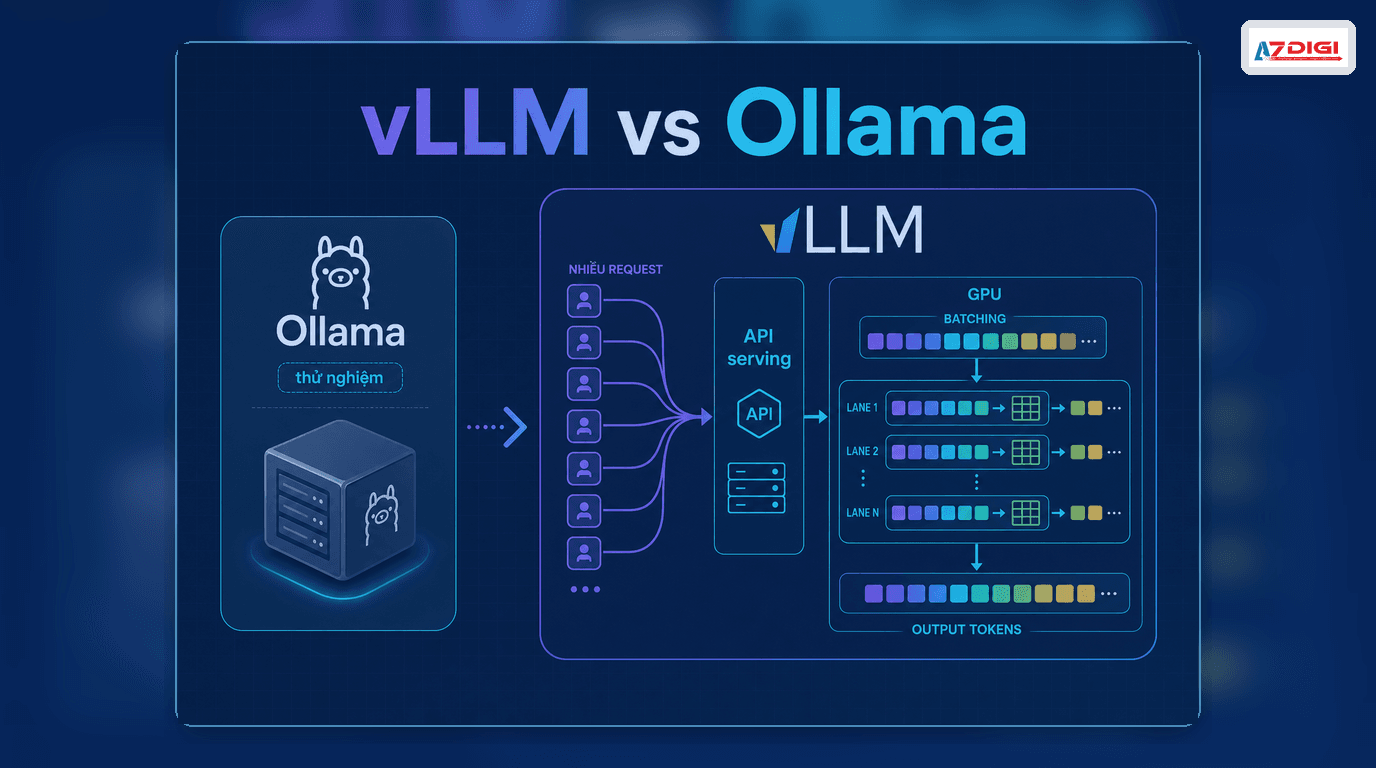
Table of contents
- What vLLM is
- Where vLLM is strong
- vLLM vs Ollama
- When to choose vLLM over Ollama
- When Ollama is still the better fit
- Infrastructure options for vLLM
- Frequently asked questions
What is vLLM
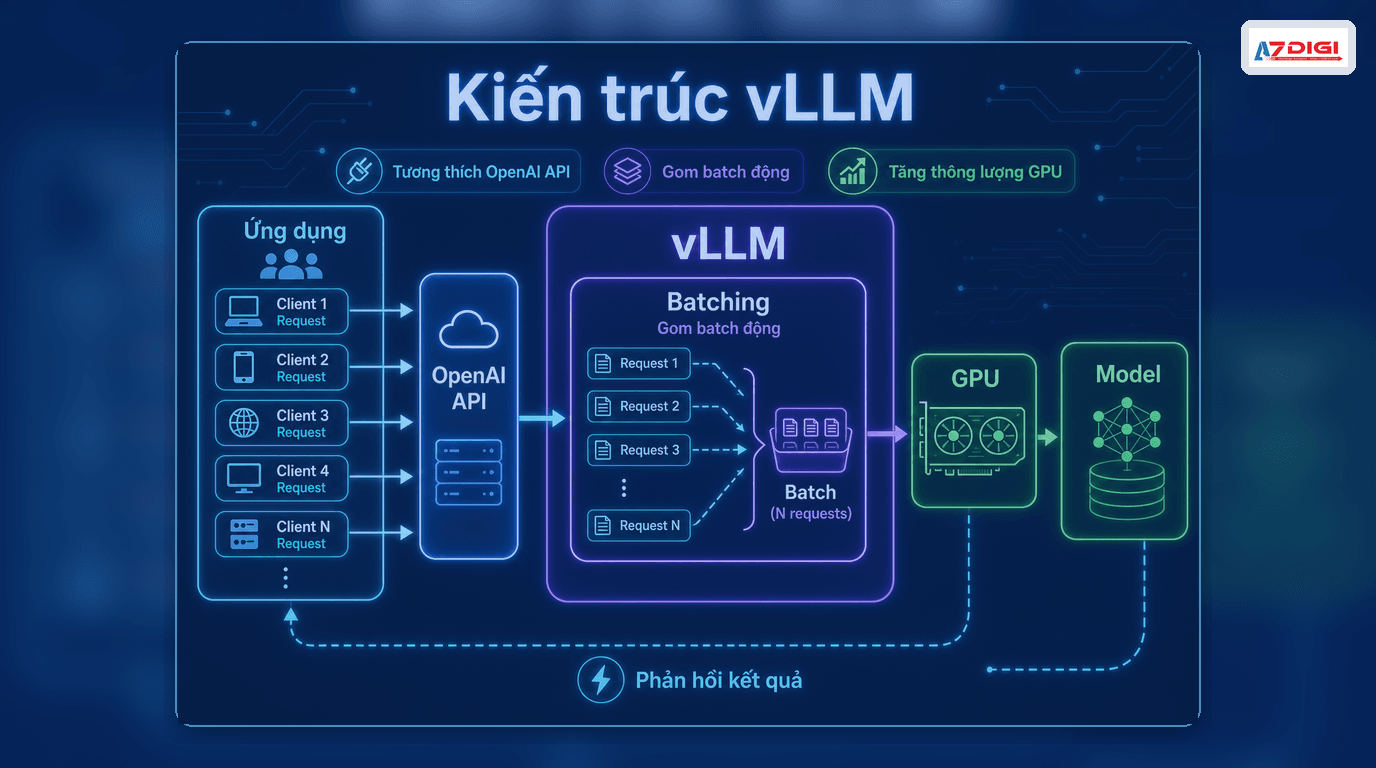
vLLM is an LLM serving engine focused on inference performance. The project provides an HTTP server compatible with the OpenAI API and can serve models through chat/completions endpoints and other APIs. Put more practically, vLLM sits between your model and your application, handling request intake, batching, GPU memory efficiency, and API responses.
The official vLLM documentation highlights two things operators care about immediately: the OpenAI-compatible server and a set of serving optimizations, including PagedAttention, continuous batching, tensor parallelism, and quantization support.
ℹ️ The quick mental model is this: Ollama is more about running a model quickly, while vLLM is more about turning that model into a proper API service.
Where vLLM is strong
- PagedAttention: uses KV cache memory more efficiently, especially for longer contexts.
- Continuous batching: new requests can be merged into an active batch, improving GPU utilization.
- Tensor parallelism: distributes a model across multiple GPUs when one GPU is not enough.
- Quantization: reduces model size and VRAM pressure with formats such as INT4, INT8, and FP8 depending on the use case.
- OpenAI-compatible server: applications already built around the OpenAI API can switch over with much less friction.
That is why vLLM often shows up in higher-traffic chatbot workloads, internal AI APIs, real-world RAG systems, and inference services that need better control over GPU cost.
vLLM vs Ollama: What is different
| Criteria | Ollama | vLLM |
|---|---|---|
| Main goal | Run models quickly and simply | Serve models efficiently at production level |
| Best fit | Individual developers, small labs, prototyping | ML engineers, AI backend teams, operators |
| Throughput | Moderate | Higher under concurrent traffic |
| Scaling | Simple, less tuning | Better for multi-GPU and performance tuning |
| API compatibility | Ollama-specific API | OpenAI-compatible API |
| Best use case | Testing models, lightweight internal apps | Self-hosted APIs, real-world RAG, apps with many users |
The article Install Ollama on VPS Ubuntu is a strong fit if you are just getting started. Once you need to expose an API for a web application, it also helps to read Ollama API so you can see where a simpler stack starts to reach its natural limits before moving to vLLM.
When to choose vLLM over Ollama
This is the part most people care about. In practical deployments, vLLM becomes the better fit when you run into one of these situations.
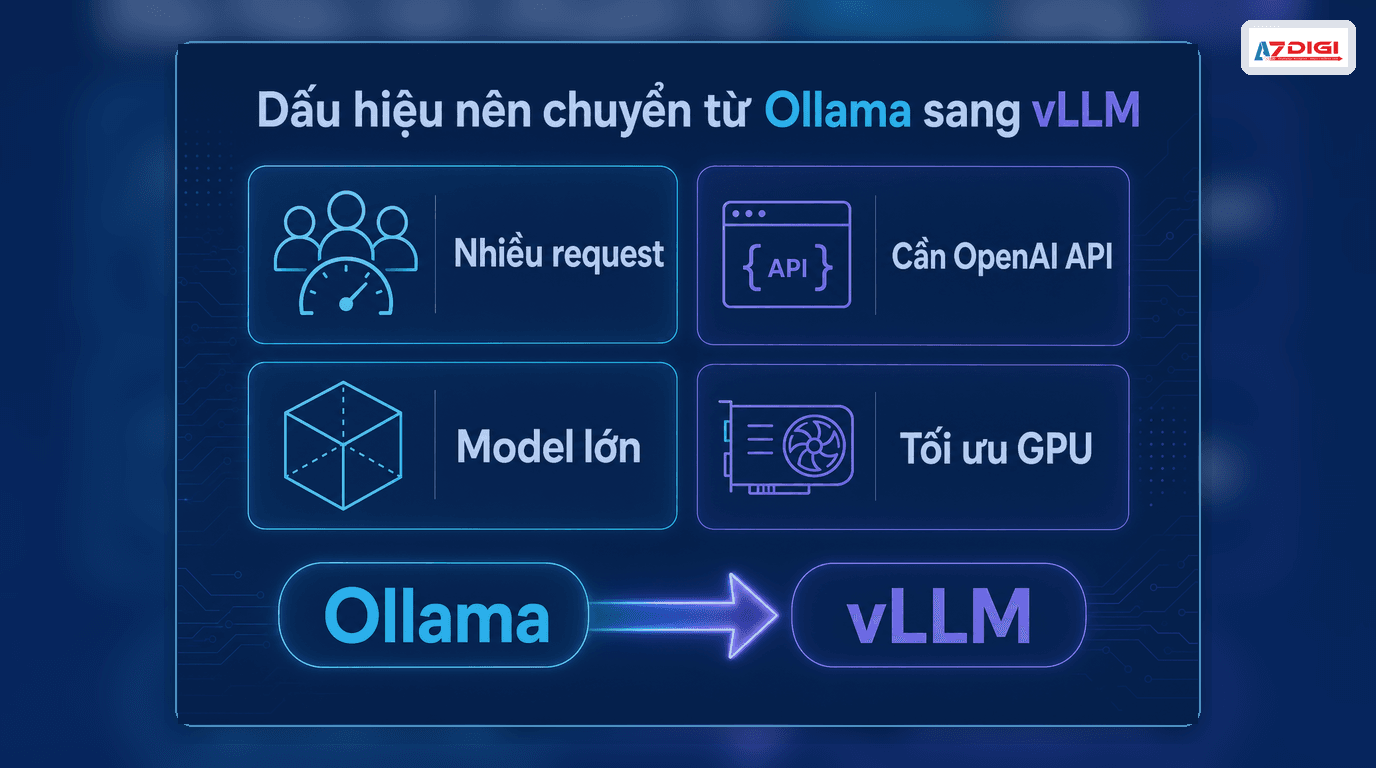
- Your application already has real users: more concurrent requests start to expose Ollama’s limits.
- You need an OpenAI-compatible server: applications already using the OpenAI SDK can switch endpoints with less effort.
- You want better GPU efficiency: vLLM is built to extract serving performance, not merely to run a model.
- You need larger models or multi-GPU execution: vLLM has a clearer advantage once the model no longer fits comfortably in a smaller environment.
- You need better inference cost optimization: batching and quantization can improve output on the same hardware budget.
⚠️ If your workload is just one user, a few test prompts per day, or a very lightweight internal chatbot, moving to vLLM too early may add complexity before you get much value back.
When Ollama is still the better choice
Ollama is still a very good option when the goal is speed, simplicity, and low operational overhead. More specifically, stay with Ollama if:
- You are testing prompts, evaluating models, or building an internal demo.
- You want to set things up quickly on a CPU VPS or your own machine.
- You do not yet need batching, concurrent traffic, or deep performance tuning.
- You want a fast connection with Open WebUI, n8n, or a small application.
That is the honest version: Ollama wins at getting started, while vLLM wins once you care seriously about serving.
Does running vLLM on a VPS make sense
Yes, but expectations matter. If you only want to test an OpenAI-compatible server, validate routing, or serve a small model, you can start with X-Platinum VPS or AMD Cloud Server to build the API layer and operational workflow. If the goal is to unlock the full benefits of vLLM, especially for larger models and higher concurrency, then a GPU-backed environment is where vLLM really shows its strengths.
On AZDIGI, a safe path is to start with VPS or cloud server resources for the self-hosted stack, reverse proxy, authentication, and logging, then separate the inference layer as load grows. You should also read AI self-hosted security and reverse proxy for Ollama, because most API operation principles remain the same when moving to vLLM.
A safer migration path from Ollama to vLLM
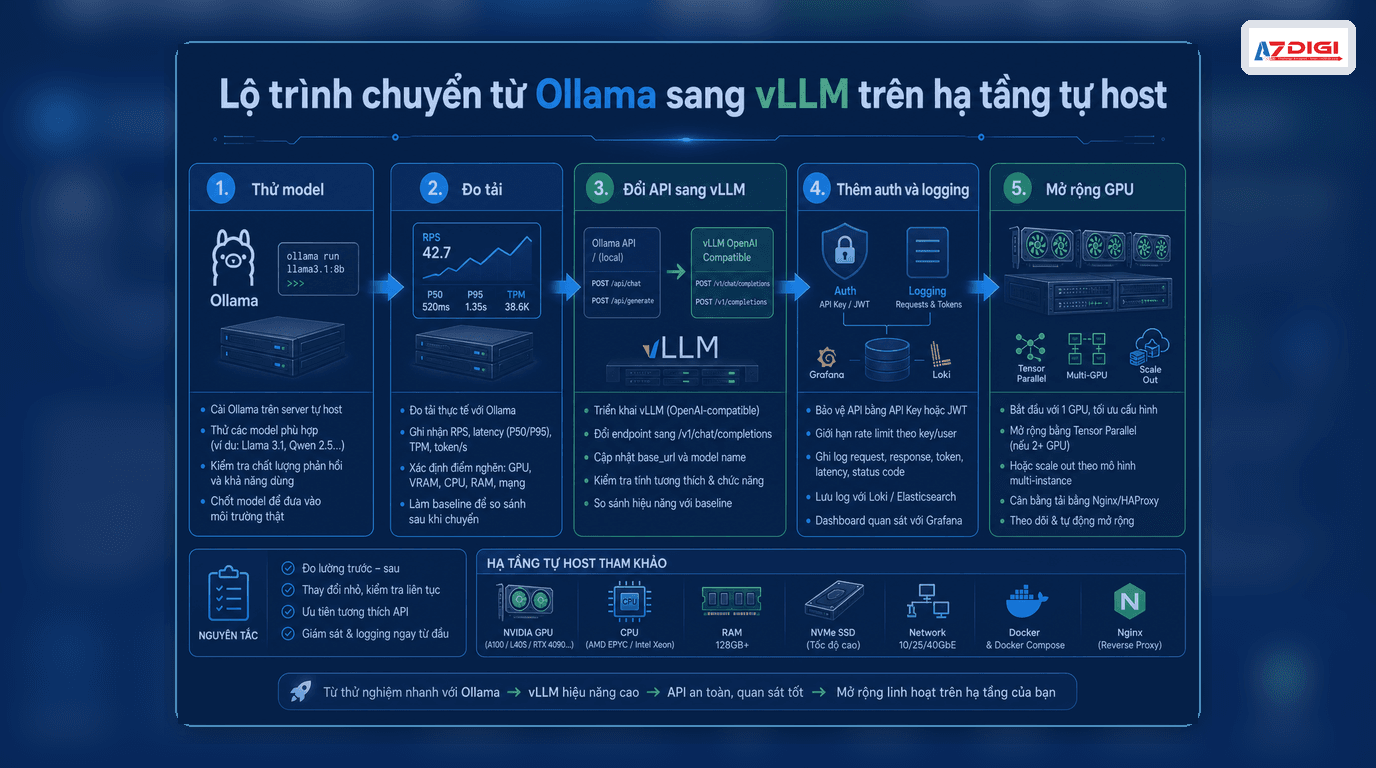
- Finalize the model and prompt workflow with Ollama first.
- Measure the real need: user count, request count, context length, output tokens.
- Move the serving layer to vLLM to gain the OpenAI-compatible API.
- Add reverse proxy, authentication, monitoring, and rate limiting.
- If models get larger or traffic rises sharply, then plan for GPU or multi-GPU expansion.
This path is usually cheaper than switching to vLLM on day one just because it sounds more advanced. Most AI projects do not fail because the inference engine was not powerful enough. They fail because the real workload was never measured properly.
Frequently asked questions about vLLM
Does vLLM completely replace Ollama
Not exactly. The two tools solve different stages of the lifecycle. Ollama is excellent for fast starts. vLLM is a better fit once you need serious API serving.
Can vLLM run on CPU
Some levels of support may exist depending on the environment, but the biggest advantages of vLLM usually show up with GPUs. If you are only running a light CPU workload, Ollama is often the easier starting point.
Why is the OpenAI-compatible server useful
It helps applications already built around the OpenAI SDK or request format switch to a self-hosted model backend with much less friction. That is one of the biggest reasons vLLM is chosen for production deployments.
Closing thoughts
If you want the short answer to “what is vLLM,” it is an inference engine optimized for serving models through an API. For the question “when should you use vLLM instead of Ollama,” the practical answer is: once you are beyond prototyping and start needing better performance, concurrency, scaling, and a more OpenAI-like integration path.
If you are still early, Ollama is the faster path. If you are already serving real application traffic, vLLM is absolutely worth testing. And if you want to self-host the full stack on AZDIGI, it makes sense to begin with VPS or cloud server infrastructure first, then grow the inference layer when the workload justifies it.
You might also like
- What is vLLM? When should you use vLLM instead of Ollama
- What is MCP? How AI agents connect to tools and external data
- Running DeepSeek on VPS without GPU - Detailed guide with Ollama
- n8n + Ollama - Automate Workflows with AI Running on Your Own VPS
- Ollama API - Integrating Self-Hosted AI into Web Applications
- What is Flowise? When Should You Self-Host It on a VPS?
About the author

Trần Thắng
Expert at AZDIGI with years of experience in web hosting and system administration.