In today’s article, AZDIGI will show you to log in to email on Outlook. In order to log in to your email, you must create that email first.
Hướng dẫn tạo email trên hosting
Note: To use email, the domain name must have full email records.
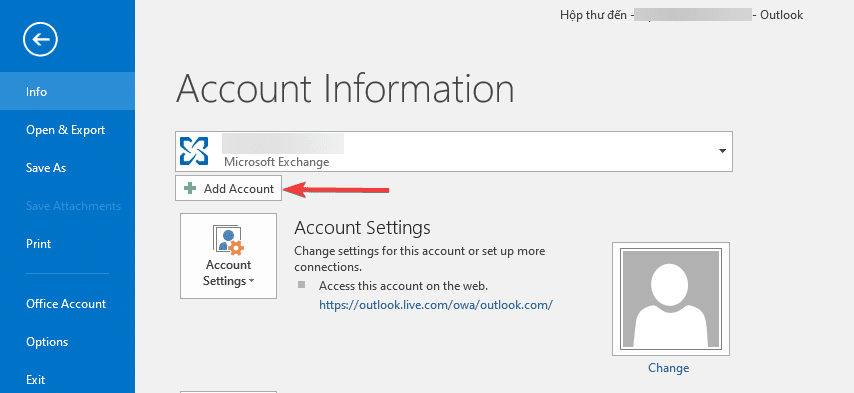
Step 1: Open Outlook and click Add Account
Click Manual setup or additional server types => Next

In this section, select POP or IMAP

Step 2: Enter account information
You enter your full account information
Note:
- Enter your display name and email account
- Box 2: you choose POP or IMAP
- Incoming mail server: Enter your hosting IP address
- Outgoing mail server (SMTP): you also enter your hosting IP address
- Box 3: You re-enter your email account and email account password
Then click More Settings to further set up the account

In the Outgoing server table, you tick as shown below:

At the Advanced tab
- Incoming server: tick on SSL
- If you initially choose the POP type, enter the port as 995
- If you initially choose the IMAP type, then enter the port as 993
- Outgoing server (SMTP): you choose SSL and enter port 465

Next, click OK and Next to complete. If the system displays Completed as shown below, the setup is successful.

- Hotline 247: 028 888 24768 (Ext 0)
- Ticket/Email: You can use your email to register for the service and send it directly to: support@azdigi.com
- Visit the AZDIGI website to refer to the best hosting/VPS service in Vietnam.
You might also like
- Pro Mail Hosting: How to configure email into Outlook
- Pro Mail Hosting: How to login mail on Outlook IOS
- Pro Mail Hosting: How to add a domain email account to Gmail
- How to login email on Mail Windows application
- Add an Email Account to the Gmail Application
- Configure SMTP with G Suite for the WordPress website
About the author

Thạch Phạm
Đồng sáng lập và Giám đốc điều hành của AZDIGI. Có hơn 15 năm kinh nghiệm trong phổ biến kiến thức liên quan đến WordPress tại thachpham.com, phát triển website và phát triển hệ thống.