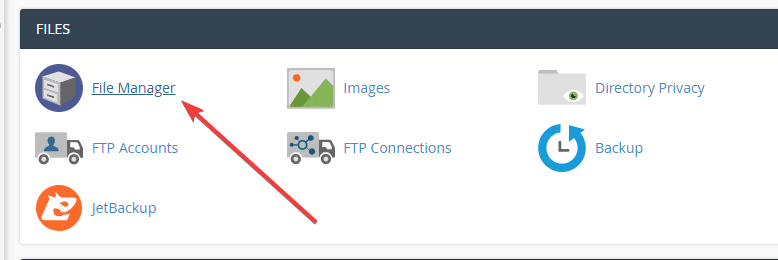
There are many ways to change the parameters in PHP, such as direct customization in Select PHP Version, editing the php.ini file. And today AZDIGI would like to guide you to customize the htaccess file to change this parameter. To do this, you can follow the steps below.
Step 1: Log in to cPanel and go to the folder containing the source code

Step 2: Configure the .htaccess file
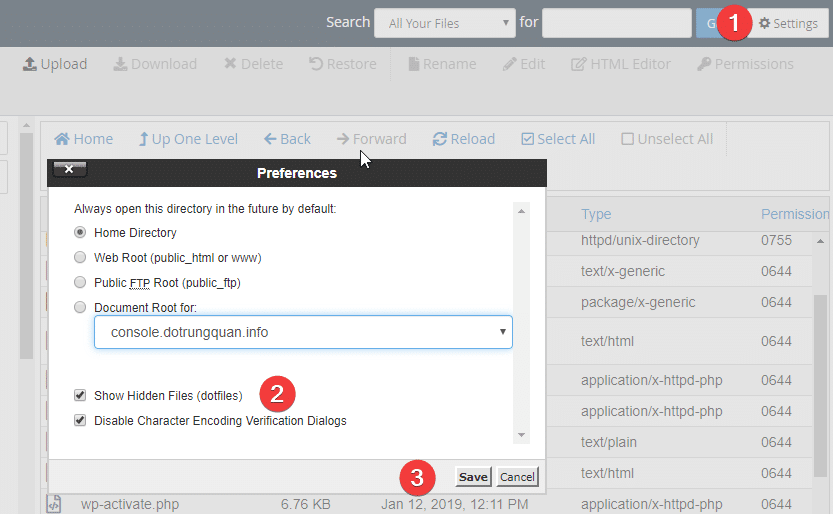
Because .htaccess is a hidden file, you need to show hidden files by doing as shown below
If you do not have a .htaccess file, you need to create a new file by clicking New file => .htaccess
Next, open the .htaccess file and add the following lines and save (the parameters below you can customize)
php_value upload_max_filesize 512M
php_value post_max_size 512M
php_value memory_limit 512M
php_value max_execution_time 300
php_value max_input_time 300
After the save is complete, you can check it with the info.php file to show all the info
Step 3: Create the info.php file to check
You create an info.php file and paste the code below, then go to https://domain/info.php
<?php
phpinfo();
?>
Wishing you success!
You might also like
About the author

Thạch Phạm
Đồng sáng lập và Giám đốc điều hành của AZDIGI. Có hơn 15 năm kinh nghiệm trong phổ biến kiến thức liên quan đến WordPress tại thachpham.com, phát triển website và phát triển hệ thống.