By default, phpMyAdmin only allows importing 2MB databases, and this causes many difficulties when your database is too large.
However, do not worry, this article will help you change that parameter.
You do SSH into the VPS and find the Loaded Configuration File
Find the php.ini file and edit
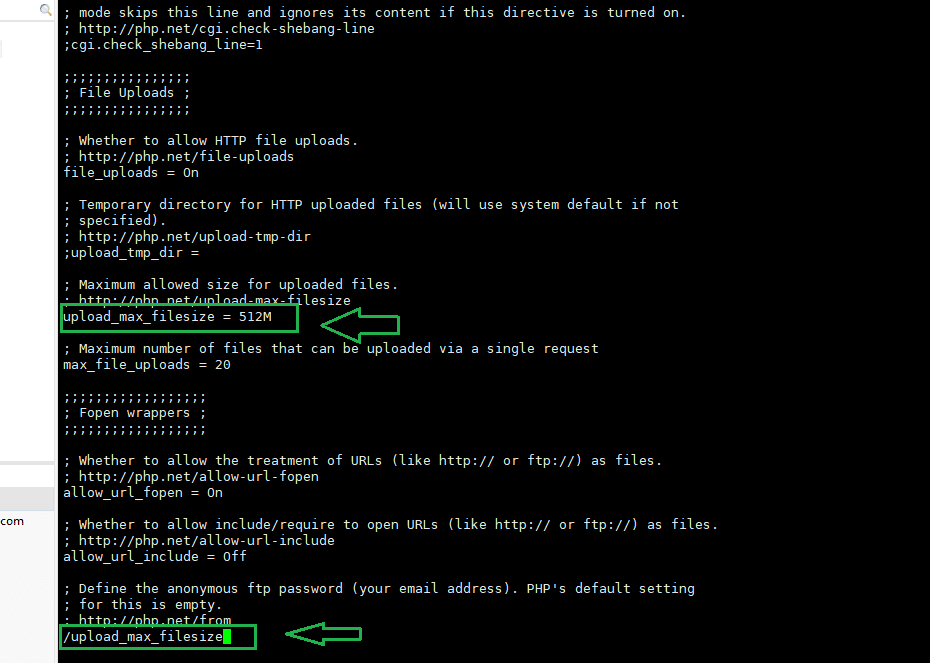
php -i | grep php.iniOpen the php.ini file and find the following and edit it.
vi /usr/local/lib/php.iniEnter a / and the name to search for; After editing, enter :wq to save.
You need to adjust the parameters as follows
upload_max_filesize 512M
post_max_size 512M
memory_limit 512M
max_execution_time 300
max_input_time 300
Note: If you use Apache, restart httpd; if you use Nginx, restart php-fpm.
Or edit in the config file of phpMyAdmin at the path:
/usr/share/phpMyAdmin/libraries/config.default.phpRecommendation: Sometimes, when you need to import files up to a few hundred MB, you should use Linux cmd for fast and safe processing.
Wishing you success!
You might also like
- Increase file upload/import limit on phpMyadmin DirectAdmin with 3 steps
- Change PHP parameters with .htaccess on cPanel Hosting
- Increase phpMyAdmin upload/import limit on CyberPanel
- How to change php.ini parameters on OpenLiteSpeed using Docker Compose
- Fix the error: can not be uploaded Error message CyberPanel
- How to install NGINX Proxy Apache 2.x
About the author

Thạch Phạm
Đồng sáng lập và Giám đốc điều hành của AZDIGI. Có hơn 15 năm kinh nghiệm trong phổ biến kiến thức liên quan đến WordPress tại thachpham.com, phát triển website và phát triển hệ thống.