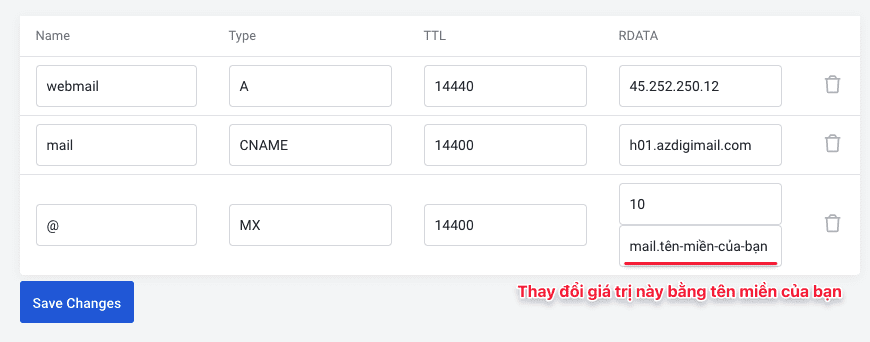
When completing the registration of the Email Hosting service, the system will send you a welcome email with Email server information and DNS records you need to point to. Which includes two main records, MX and CNAME records. In this tutorial, AZDIGI will guide you on how to point those records.
For example, my Email Hosting server is h01.azdigimail.com, then I will point the record as follows:
| Name/Host/Alias | Record type | Value |
| CNAME | h01.azdigimail.com | |
| @ or enter-your-domain | MX | mail.domain-name |
| webmail | A | 45.252.250.12 |
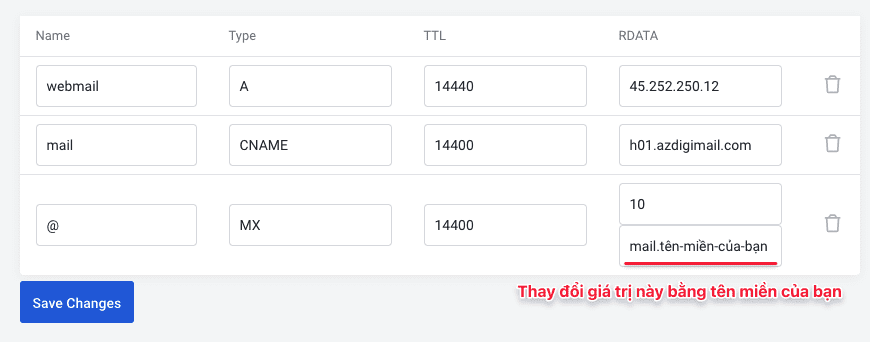
If you are using AZDIGI‘s Hosting service and the domain name using the nameserver is ns3.azdigi.com and ns4.azdigi.com, you can edit this DNS record in the Zone Editor in the host’s cPanel interface, refer to details here.
In case you are using nameservers ns1.azdigi.com and ns2.azdigi.com, you can edit it through the DNS Manager feature on the https://my.azdigi.com interface.
Or if you have any difficulty in editing DNS records, you can contact technical support for the fastest support.
About the author

Thạch Phạm
Đồng sáng lập và Giám đốc điều hành của AZDIGI. Có hơn 15 năm kinh nghiệm trong phổ biến kiến thức liên quan đến WordPress tại thachpham.com, phát triển website và phát triển hệ thống.