Sometimes you need to import files up to a few hundred MB that you use the interface to export/import will take time and the operation is easy to fail, then you should use Linux’s cmd to process it quickly and safely. To do this, you can follow the steps below.
First, you need to log in to Linux VPS via SSH protocol. Then use the corresponding commands as below to backup and restore the database.
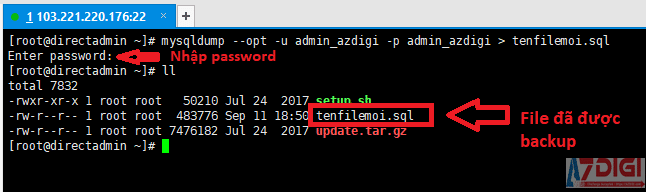
The mysqldump command to backup the database
To back up the database, you need to have all the database information to be backed up, including the user, database name, and password of the database.
Once you have all the information, run the command:
mysqldump --opt -u admin_azdigi -p admin_azdigi > tenfilemoi.sql

In there:
admin_azdigi: User of the databaseadmin_azdigi: Database nametenfilemoi.sql: File name to save, this file must have the extension.sql.–opt: mysqldump options
The mysql command to restore the database
To restore the database, you need to create a new database including a user database, database name, and password.
Once you have all the information, run the command:
mysql -u admin_azdigi1 -p admin_azdigi1 < tenfile.sql

In there:
admin_azdigi1: User of the databaseadmin_azdigi1: Database nametenfile.sql: The path to the .sql file is to be restored.
Wishing you success!
You might also like
About the author

Thạch Phạm
Đồng sáng lập và Giám đốc điều hành của AZDIGI. Có hơn 15 năm kinh nghiệm trong phổ biến kiến thức liên quan đến WordPress tại thachpham.com, phát triển website và phát triển hệ thống.