
In some cases where your website is spammed with comments too, leading to the comment table in the database being too much to swell the database, or for some reason, you need to empty a database table, this tutorial will help you do it.
This operation is very sensitive, you need to be sure to manipulate the data table correctly and understand that after emptying, all the data of that table will be lost.
Step 1: Access to phpMyAdmin

Step 2: Find the database and select the table to empty
After selecting the database, it will show the tables of that database, you just need to click on the table to be empty and click Empty.
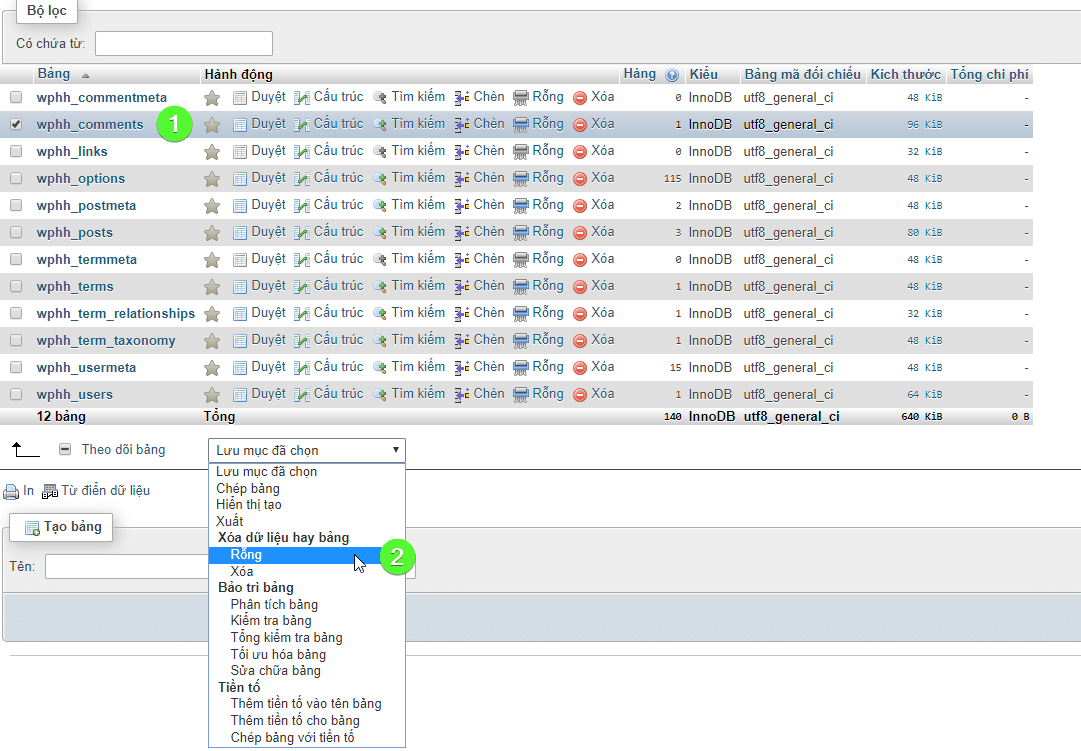
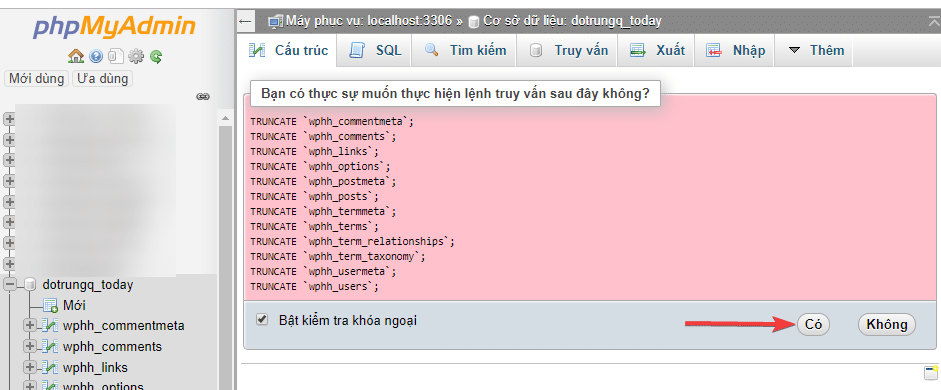
Then the system will ask if you are sure you want to empty, you choose “Yes” is finished.
Wishing you success!
About the author

Thạch Phạm
Đồng sáng lập và Giám đốc điều hành của AZDIGI. Có hơn 15 năm kinh nghiệm trong phổ biến kiến thức liên quan đến WordPress tại thachpham.com, phát triển website và phát triển hệ thống.