![Fixes[ERROR] Can’t init tc log on MySQL service](https://img.azdigi.com/2026/01/sua-loi-error-cant-init-tc-log-tren-dich-vu-mysql-1768586667.jpg)
Today’s article AZDIGI will guide you to fix the error of MySQL not starting because of the line[ERROR] Can't init tc log . This error often occurs when your VPS Server is full. And after you handle the full capacity, you need to delete the following file to restart the service.
The image below is the message when checking the status of the mysql service
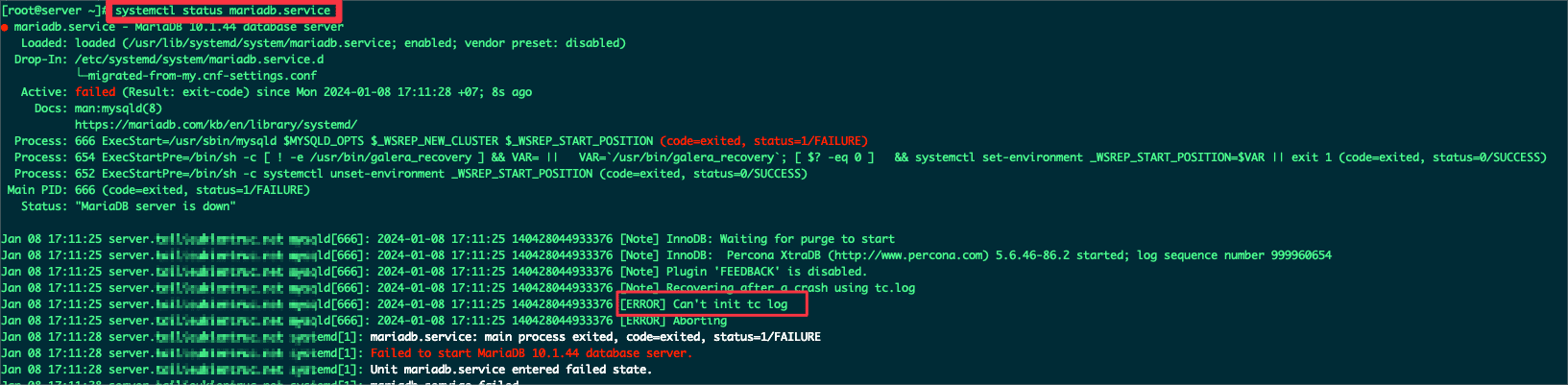
Please delete the tc.log file with the following command
rm -rf /var/lib/mysql/tc.log
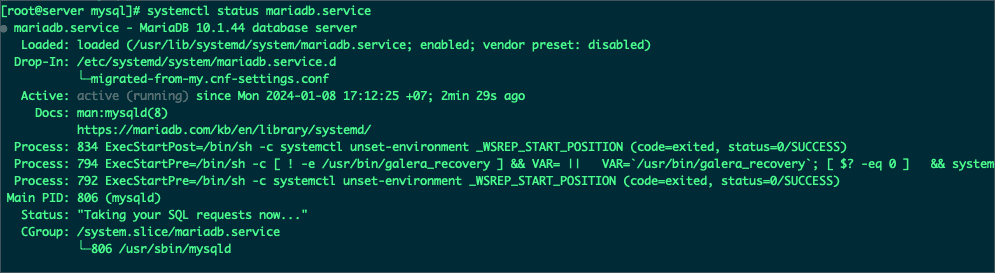
Then perform a restart of the mysql/mariadb service. And the result was to fix this error.
systemctl restart mariadb.service
systemctl status mariadb.service
Wishing you success!
If you need assistance, you can contact support in the ways below:
- Hotline 247: 028 888 24768
- Ticket/Email: You use the email to register for the service and send it directly to: support@azdigi.com.
You might also like
- Troubleshooting Linux VPS - How to Handle Common VPS Issues
- Create a script to restart MySQL when it stops on the Linux server
- Fix Roundcube Database Error on DirectAdmin
- Disable mysql-bin on DirectAdmin
- How to fix the Security Error No valid session key error on CSF DirectAdmin
- Upgrade the MariaDB version on CentOS Web Panel
About the author

Thạch Phạm
Đồng sáng lập và Giám đốc điều hành của AZDIGI. Có hơn 15 năm kinh nghiệm trong phổ biến kiến thức liên quan đến WordPress tại thachpham.com, phát triển website và phát triển hệ thống.