Overview
CyberPanel is a new control panel, which is increasingly trusted by users with an intuitive and easy-to-use management interface, in addition to the developer constantly releasing updates with many new features to help users have a better experience. Don’t stop there, in addition to having an eye-catching interface, Cyber also knows how to please users when integrating Cyber Command Line (CLI) so that users have more options to manage their VPS.
In this article, AZDIGI will introduce you to some of the most common Cyber Command Line (CLI) so that you can understand and practice most simply. Specifically, please continue to follow the instructions below.
Some basic commands to administer the website on CyberPanel.
Create website
To create a new website, execute the following command:
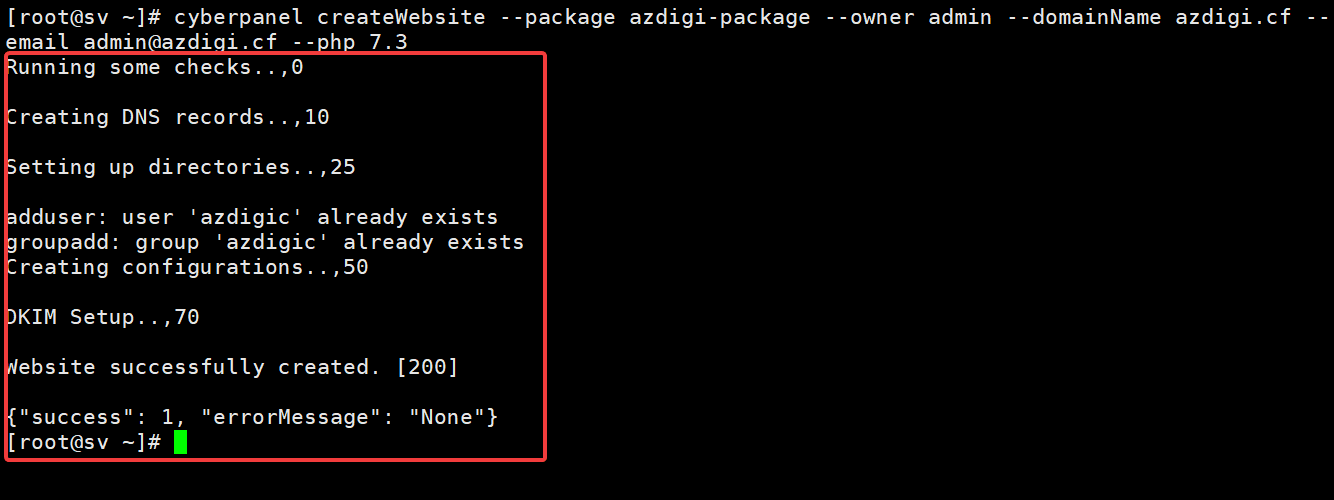
cyberpanel createWebsite --package azdigi-package --owner admin --domainName azdigi.cf --email admin@azdigi.cf --php 7.3
In there:
- Package: Select the package to set up for the website (az-package)
- Owner: Assign user rights to the website (admin)
- domainName: The name of the website to create (azdigi.cf)
- Email: Website admin email (admin@azdigi.cf)
- php: PHP version of the website
To add some options, you can add the following options like
- –ssl
- –dkim
- –openBasedir
Successful website creation you will receive a message as shown below:

Delete Website
cyberpanel deleteWebsite --domainName azdigi.cf
In there:
- domainName: Enter the name of the website to be deleted
After successfully deleting the website, you will receive a message like this:

Create Child Domain
To create a child domain, use the command below:
cyberpanel createChild --masterDomain azdigi.cf --childDomain child.azdigi.cf --owner admin --php 7.3
In there:
- masterDomain: Enter the main domain name
- Child Domain
- Owner: Assign user rights to the subdomain
- Php: Select the PHP version
To add some options, you can add the following options like
- –ssl
- –dkim
- –openBasedir
After successfully creating a child domain, you will receive a message:

Delete Child Domain
To delete a domain name, execute the following command:
cyberpanel deleteChild --childDomain child.azdigi.cf
In there:
- childDomain: Enter the child domain name to be deleted
After successfully deleting the child domain, you will receive the message:

List Websites
There are 2 methods you can list and display websites on CyberPanel as follows:
- JSON format
cyberpanel listWebsitesJson
When listing as JSON, the screen will show:

- Table Format
cyberpanel listWebsitesPretty
When listing as table, the screen will show:

Change PHP
To change the PHP version for your website, execute the following command:
cyberpanel changePHP --domainName azdigi.cf --php 7.4
In there:
- domainName: Enter the name of the website that needs to be changed PHP
- php: Enter new PHP version
After the successful change, you will receive the message:

Change Package
To change the Package, you execute the command below:
cyberpanel changePackage --domainName azdigi.cf --packageName azdigi-package1
In there:
- domainName: Website name to change
- packageName: Enter the new package name to change
After the change is successful, you will receive a message as follows:

Summary
Thus, AZDIGI has shown you how to use Cyber Command Line, hope it can make it easier for you to manage your VPS even without being in the CyberPanel interface. If you find the article interesting and useful, please share it with everyone.
If you need assistance, you can contact support in the ways below:
- Hotline 247: 028 888 24768 (Ext 0)
- Ticket/Email: You use the email to register for the service and send it directly to: support@azdigi.com
About the author

Thạch Phạm
Đồng sáng lập và Giám đốc điều hành của AZDIGI. Có hơn 15 năm kinh nghiệm trong phổ biến kiến thức liên quan đến WordPress tại thachpham.com, phát triển website và phát triển hệ thống.