SMTP – Simple Mail Transfer Protocol is a standard for transferring email messages over the Internet. SMTP helps your website to send mail or emails through a pre-set address right on your website, the mail will come to your customers and users when performing operations or orders on the website to the user’s email address.
Set up SMTP via Gmail (G Suite – Google Workspace does the same thing)
- First, you need to access Google ID here
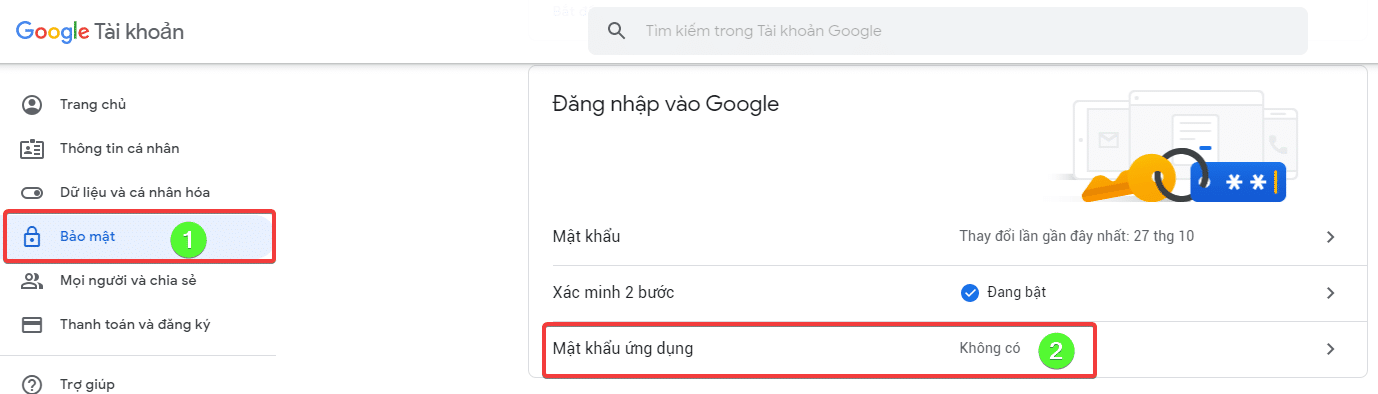
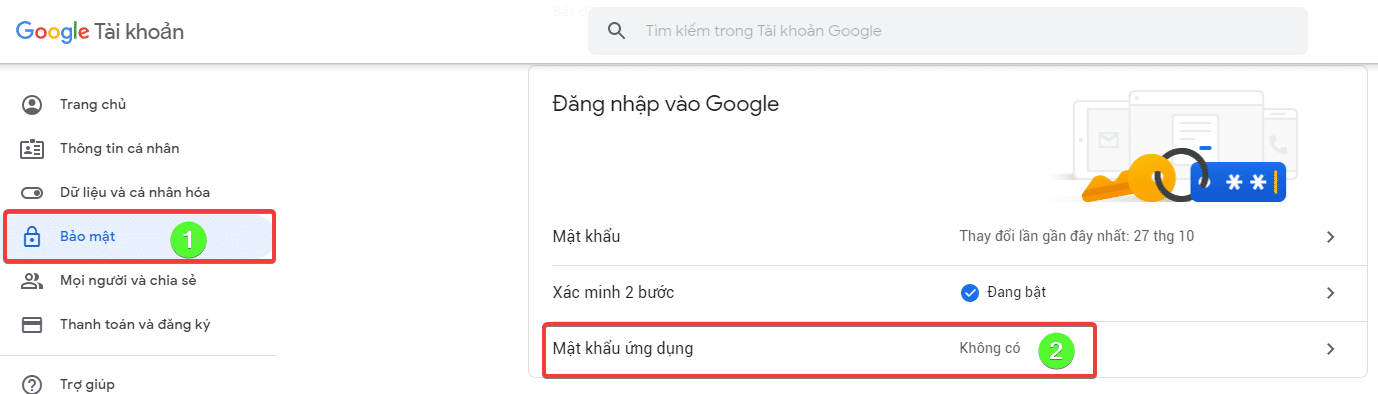
In the Menu, select Security => App Password
You choose Mail and Other to create


After creating, you will see an orange frame showing your APPLICATION PASSWORD
You can see how to do it in the video below:
After creating, you will receive password information, you copy and use for your configuration at EASY WP SMTP

Note:
- Sending Email Address: This is the Email address you use to generate the application password.
- Sending Email Name: In this section, you can name your sending email.
- Reply-To Address: The address where the recipient can reply to the message.
- SMTP Server: Gmail’s SMTP server is smtp.gmail.com
- Encryption type: You can choose your own encryption type depending on your needs.
- SMTP port: I use SSL/TLS, so it will be port 465.
- SMTP Authentication: Yes.
- SMTP Username: This username is the same as the sending email address.
- SMTP Password: The application password you created in the step above.
To be sure, go to the Check Email Tab and enter the test email as shown below

Note: SMTP Gmail is limited to 500 mails/day.
- Hotline 247: 028 888 24768 (Ext 0)
- Ticket/Email: You can use your email to register for the service and send it directly to: support@azdigi.com
You might also like
- Configure SMTP with G Suite for the WordPress website
- How to configure SMTP Relay on DirectAdmin
- Required to use SMTP to send mail on Hosting service at AZDIGI
- Turn on sending mail on Hosting service AZDIGI
- Pro Mail Hosting: How to add a domain email account to Gmail
- Pro Mail Hosting: How to configure email into Outlook
About the author

Thạch Phạm
Đồng sáng lập và Giám đốc điều hành của AZDIGI. Có hơn 15 năm kinh nghiệm trong phổ biến kiến thức liên quan đến WordPress tại thachpham.com, phát triển website và phát triển hệ thống.