Dịch vụ web hosting tại AZDIGI
Mới đây với tất cả dịch vụ Web Hosting, AZDIGI đã tiến hành bổ sung thêm một tính năng mới dành cho những người sử dụng WordPress, đó là WP-CLI.
WP CLI will make administration in WordPress faster and more convenient without having to access the admin page, especially in recovering lost passwords or accounts that have lost admin rights.
See also: Learn more about WP CLI
How to use WP CLI on Hosting service at AZDIGI
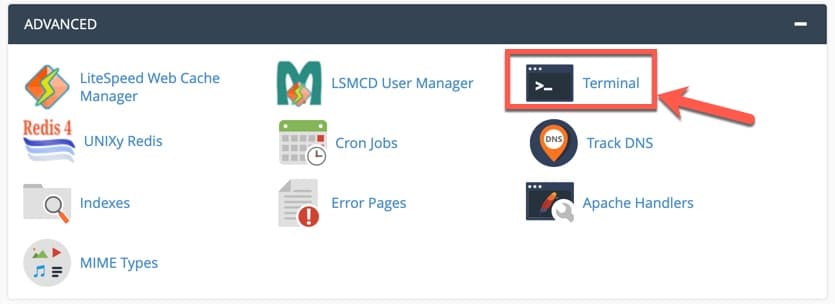
To use WP CLI, you need to access the cPanel of your Hosting => go to Terminal in the Advanced section
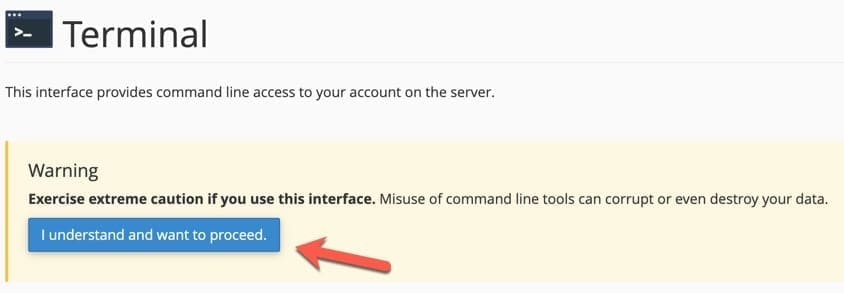
Next, you confirm SSH access that if you use Terminal incorrectly, it can affect the data on the hosting.
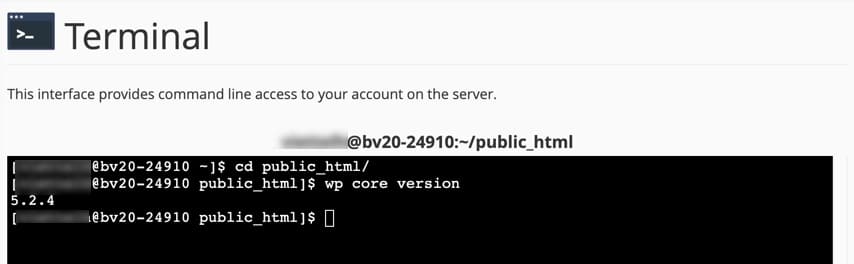
At this point, you will now be able to access the terminal interface and be able to use Linux commands. To use WP-CLI, you need to access the directory to use the command wp and start using it as usual. For example:
Hopefully, this addition will help you have a better choice in manipulating WordPress website administration when using the Hosting service at AZDIGI.
Refer to WP-CLI commands: https://developer.wordpress.org/cli/commands/
Help your hosting service own these great features by visiting here! We will always support and bring you breakthrough technology solutions with a dedicated technical team and the most enthusiastic care service.
About the author

Thạch Phạm
Đồng sáng lập và Giám đốc điều hành của AZDIGI. Có hơn 15 năm kinh nghiệm trong phổ biến kiến thức liên quan đến WordPress tại thachpham.com, phát triển website và phát triển hệ thống.