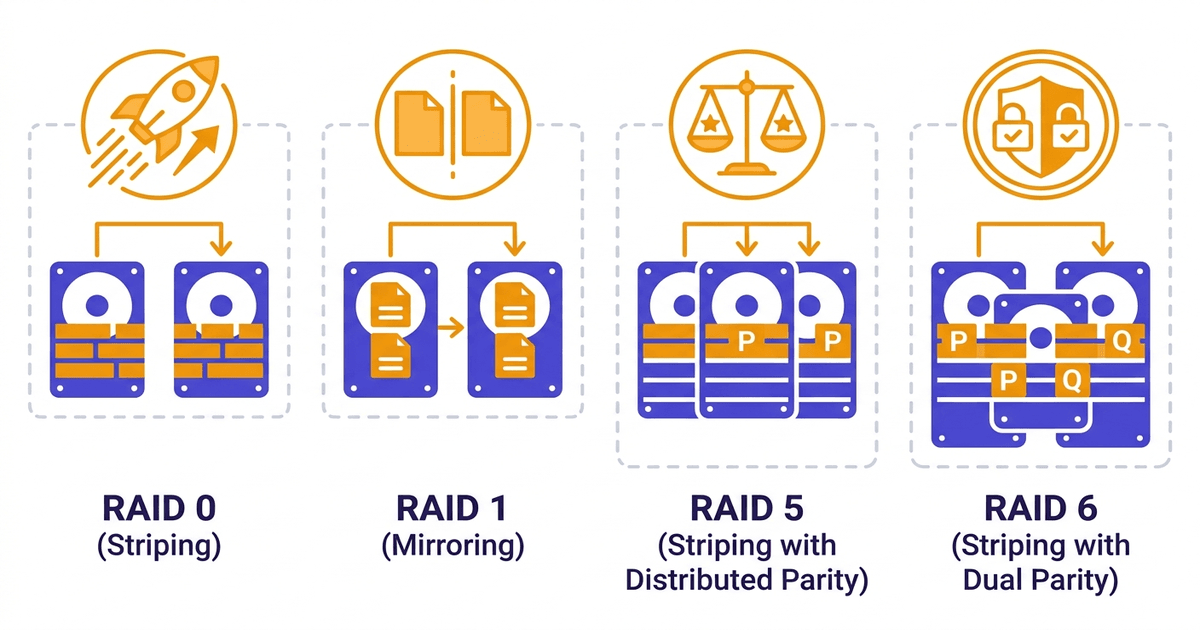
Each RAID level solves a different problem. RAID 0 prioritizes speed, RAID 1 focuses on safety, RAID 5 balances both, and RAID 6 adds an extra layer of protection for large arrays.
Choosing the wrong RAID level means either wasting money on drives or losing data when a drive fails. This article walks through each level, explains how it works, then puts them side by side in a comparison table.
RAID 0: Maximum Speed, Zero Protection
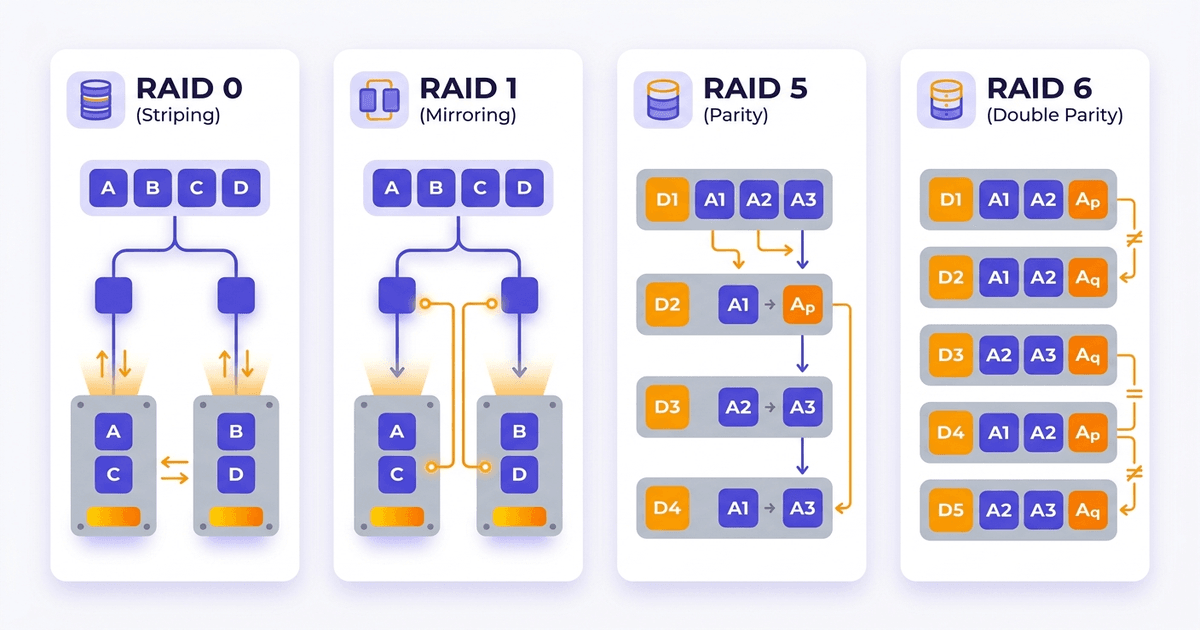
RAID 0 uses striping: it splits data into small blocks and writes them alternately across multiple drives simultaneously. With 2 drives, sequential read/write speed nearly doubles compared to a single drive. With 4 drives, it quadruples (in theory).
The trade-off is zero protection. No mirror, no parity. If any single drive in the array fails, all data is lost with no way to recover.
Moreover, failure probability increases proportionally with the number of drives. A 4-drive RAID 0 array is 4 times more likely to fail than a single drive. Adding drives for more speed also increases risk.
Minimum drives: 2
Usable capacity: 100% of total drive capacity
Best suited for: video rendering, scratch disks (temporary data that gets deleted after processing), cache servers, or any workload that needs speed where data can be recreated. Never use RAID 0 for important data under any circumstances.
Real-world example: A video production studio needs fast rendering and uses a RAID 0 SSD array as a scratch disk. Temporary render files live here, while finished files are copied to a storage server with protected RAID.
RAID 1: Safe, Simple, Expensive
RAID 1 uses mirroring: every piece of data written to drive A is also written identically to drive B. The two drives are always exact copies of each other, bit for bit.
When 1 drive fails, the remaining drive still holds all the data. The system continues running without interruption. Slot in a new drive, and the controller automatically syncs (rebuilds) from the surviving drive. The rebuild process is fast since it only needs a straight copy with no calculations involved.
Read speed can improve: the controller reads from both drives in parallel, distributing requests. Write speed does not increase because both drives must write the same data, and write time equals that of the slowest drive.
The biggest drawback is capacity: exactly 50% is lost to the mirror. Two 1TB drives give 1TB usable. This ratio stays the same regardless of how many drives you add (standard RAID 1 uses 2 drives; some controllers allow 3-way mirrors but this is rare).
Minimum drives: 2
Usable capacity: 50%
Best suited for: OS drives, boot volumes, small servers with only 2 drive bays, or anywhere simplicity and safety are the priority. Many servers use 2 small SSDs in RAID 1 dedicated to the OS, separate from a RAID 10 array for data.
Real-world example: A server has 2x 240GB SSDs in RAID 1 for the OS and boot partition, plus 4x 2TB NVMe drives in RAID 10 for data. If an OS drive fails, replace it and the server boots normally from the remaining mirror.
RAID 5: Balancing Capacity, Speed, and Protection
RAID 5 combines striping with distributed parity. Data and parity information are spread evenly across all drives in the array (there is no dedicated parity drive). If 1 drive fails, the system uses parity from the remaining drives to calculate the missing data.
What is parity? Simply put, parity is check information calculated from data on the other drives. When a drive is lost, the system uses parity and the remaining data to reconstruct the missing data. This calculation uses XOR, which is fast but still creates overhead on writes.
Read speed is good thanks to striping, nearly matching RAID 0 (minus the parity portion). Write speed is lower because for each write operation, the controller must: read the old data, read the old parity, calculate new parity, write the new data, and write the new parity. This “read-modify-write” process creates significant overhead, especially with random writes.
Usable capacity is (n-1)/n. With 3x 1TB drives: 2TB usable (67%), 4x 1TB drives: 3TB (75%), 6 drives: 5TB (83%). This ratio improves as more drives are added, making RAID 5 far more cost-effective than RAID 10.
The biggest weakness: rebuild
When 1 drive fails, the controller must read all data from the remaining drives to recalculate parity and restore the array. This process is slow, puts heavy I/O load on the entire array, and during the entire rebuild window, if another drive fails, everything is lost.
With large-capacity drives (4TB, 8TB and above), rebuild can take days. During that time, the system is both slow (rebuild consumes I/O) and unprotected.
URE (Unrecoverable Read Error) risk also increases: the controller must read terabytes of data, raising the probability of hitting an unrecoverable read error. If a URE occurs during rebuild, the entire array can be destroyed.
Minimum drives: 3
Usable capacity: (n-1)/n
Best suited for: file servers, home/small office NAS, read-heavy workloads with few writes, and scenarios needing large capacity at a reasonable cost. Not recommended for database servers or write-intensive applications.
RAID 6: Double Protection for Large Arrays
RAID 6 is similar to RAID 5 but uses double parity (2 parity blocks instead of 1). The system can tolerate 2 simultaneous drive failures without data loss.
Write speed is lower than RAID 5 because the controller must calculate and write 2 parity blocks for each write operation. Write overhead is heavier, and random write performance drops noticeably.
Usable capacity: (n-2)/n. With 4x 1TB drives: 2TB (50%, same as RAID 10), 6 drives: 4TB (67%), 8 drives: 6TB (75%). RAID 6 only becomes more cost-effective than RAID 10 when the array has 6 or more drives.
RAID 6 rebuild is slower than RAID 5 due to double parity calculations. However, during a rebuild when 1 drive has already failed, if another drive fails, data remains safe (because the array originally tolerates 2 drive failures). This is a major advantage over RAID 5.
RAID 6 is particularly valuable when the array has many drives (8, 10, 12 or more). The larger the array, the higher the probability of 2 drives failing close together, and RAID 6 handles that scenario.
Minimum drives: 4
Usable capacity: (n-2)/n
Best suited for: archive storage, large-capacity NAS with many drives, backup servers, and storage systems requiring high protection. Use when RAID 10 is not feasible (due to cost) but you need more safety than RAID 5.
Comparison Table
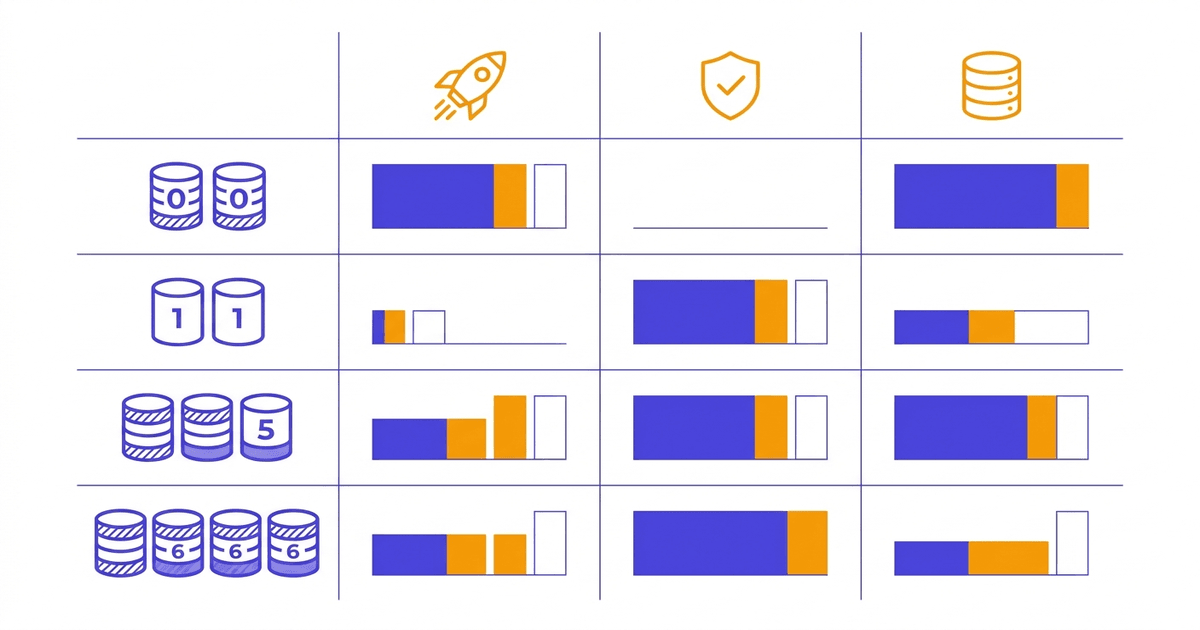
| Criteria | RAID 0 | RAID 1 | RAID 5 | RAID 6 |
|---|---|---|---|---|
| Minimum drives | 2 | 2 | 3 | 4 |
| Usable capacity | 100% | 50% | (n-1)/n | (n-2)/n |
| Drive failure tolerance | 0 | 1 | 1 | 2 |
| Sequential read speed | Very high | Good (parallel reads) | High | High |
| Sequential write speed | Very high | Same as single drive | Medium | Lower than RAID 5 |
| Random write speed | High | Same as single drive | Low (write penalty) | Very low |
| Rebuild time | N/A | Fast (mirror copy) | Slow | Very slow |
| Risk during rebuild | N/A | Very low | High (URE) | Medium |
| Primary use case | Cache, rendering | OS, boot drive | File server, NAS | Archive, large arrays |
Which RAID Level Is Best for Hosting/VPS?
Hosting servers and VPS nodes have a specific workload: mixed random read/write from hundreds of websites or dozens of virtual machines, requiring low latency and high uptime.
RAID 0 is immediately ruled out due to zero protection. One drive failure means the entire server loses data.
RAID 5 has a heavy write penalty. With high random write workloads (databases, email, many websites writing logs/sessions simultaneously), RAID 5 becomes an I/O bottleneck. The rebuild risk also makes many administrators uneasy.
RAID 6 writes slower than RAID 5. Suitable for storage, not for production hosting.
The conclusion: production hosting/VPS servers almost always use RAID 10 or RAID 1. RAID 10 delivers the best write performance with reliable protection and is the top choice when the server has 4 or more drives. RAID 1 works for small servers with only 2 drive bays. This is also why AZDIGI always uses RAID-10 as a mandatory standard for all servers in production, applied consistently from Shared Hosting to VPS services.
For Cloud Servers, RAID is typically combined with distributed storage to protect data at both the server and cluster level.
For a deeper dive into the RAID 10 vs RAID 5 debate for servers, see the RAID 10 vs RAID 5 comparison.
Nested RAID: RAID 50 and RAID 60
Beyond the basic levels, there are nested RAID configurations designed for large storage systems:
RAID 50 (RAID 5+0): Multiple RAID 5 arrays are striped together. This improves write speed and reduces rebuild time compared to a single RAID 5. Each RAID 5 sub-array tolerates 1 drive failure. Requires a minimum of 6 drives (2 sub-arrays x 3 drives).
RAID 50 is suitable for large-capacity storage servers that need decent performance while remaining more cost-effective than RAID 10.
RAID 60 (RAID 6+0): Multiple RAID 6 arrays are striped together. Very high protection, tolerating 2 drive failures per sub-array. Requires a minimum of 8 drives. Used in enterprise storage and archives with tens of terabytes or more.
Both RAID 50 and RAID 60 are complex to configure and manage. Most typical servers (web, database, VPS) do not need this level of complexity.
Frequently Asked Questions
Which RAID is the safest?
In terms of drive failure tolerance, RAID 6 handles 2 drives, while RAID 10 handles 1 drive per mirror pair (with a 6-drive array, it can tolerate up to 3 failures if they occur in different pairs).
But “safety” is not just about how many drives can fail. RAID 10 rebuilds much faster, reducing the time the system spends in a vulnerable state. RAID 10 also avoids the URE risk during rebuild that affects RAID 5/6.
Overall, RAID 10 is generally considered the safest for production servers. RAID 6 is the safest for large-capacity storage with many drives.
Is RAID 5 safe enough for production?
With small-capacity drives (under 1TB) and small arrays (3-4 drives), RAID 5 is acceptable for read-heavy workloads. But with large drives (4TB and above), rebuild time stretches from hours to days. During that window, a single URE on any drive can destroy the entire array.
Production servers running databases, email, or hosting should use RAID 10 or at minimum RAID 6.
Which RAID should I use for a home NAS?
2-bay NAS: RAID 1 is the only option with protection. Simple, easy to understand, easy to swap drives.
4-bay NAS: RAID 5 strikes a good balance between capacity and safety. 4x 4TB drives give 12TB usable, tolerating 1 drive failure.
4-bay NAS or larger with critical data (family photos, work documents): RAID 6 provides an additional layer of protection, tolerating 2 drive failures.
Regardless of which RAID level you use, external backup (external drive, cloud) is still essential. RAID only protects against drive failure, not against theft, fire, or ransomware.
You might also like
- What is RAID? Overview of Popular RAID Levels
- RAID 10 vs RAID 5: Which to choose for your server?
- NVMe Hosting vs SSD Hosting: A Detailed Performance Comparison
- The features of NVMe U.2 RAID-10 technology at AZDIGI
- Turbo Business Hosting - Powerful with Intel Xeon Platinum, NVMe U.2 RAID-10
- How to Choose a Budget VPS: Specifications, Costs and Common Traps
About the author

Trần Thắng
Expert at AZDIGI with years of experience in web hosting and system administration.