In this article, AZDIGI will show you how to use SSH Key on User DirectAdmin.
Step 1: Prepare SSH Key
First, you need to have SSH Key. If you haven’t, you can refer to the following article:
Step 2: Import SSH Key
After having SSH Key, access your DirectAdmin => Advanced Features => SSH Keys.

In this section, there will be 2 buttons for you to choose as follow:
- CREATE KEY: You can redirect generated SSH Key here.
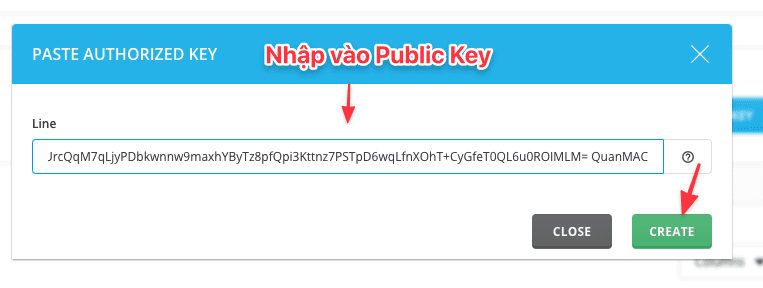
- PASTE KEY: If you already have SSH Key, please select this button. Please select this line
and copy the Public Key & paste it into this frame => click Create as shown below:
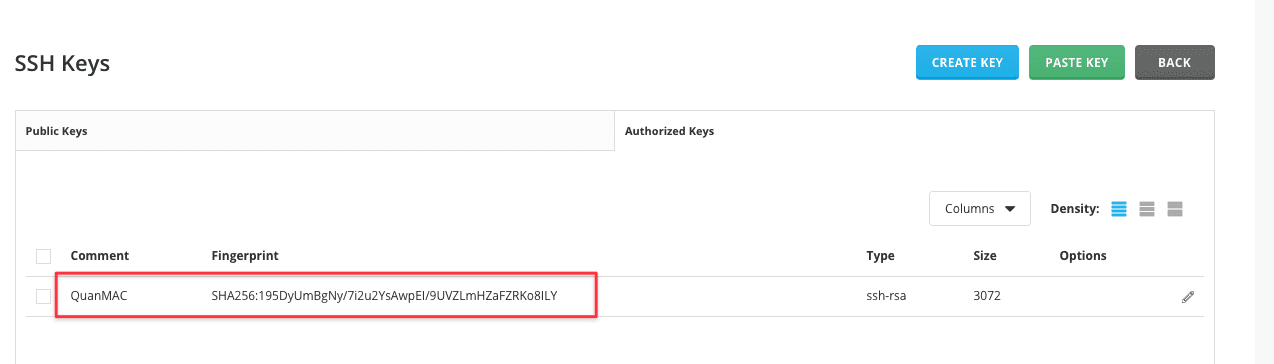
Move to the Authorized Keys Tab to check the imported Public Key.
Step 3: Using SSH KEY
Using SSH Key with Windows and Linux is completely different, you can follow the steps below.
Using SSH Keys with PuTTY
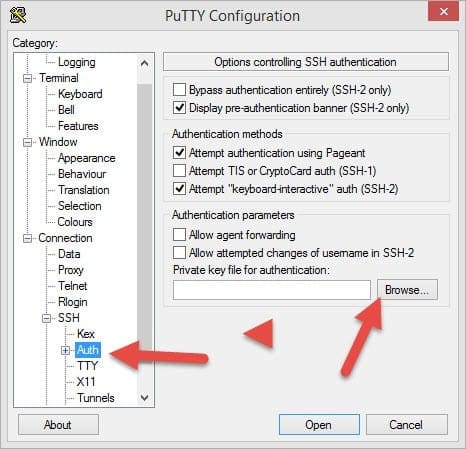
You open PuTTY and click SSH => Auth. Next, click Browse to find the Private key file created and saved in the above step. Once you have pointed to the Private file and you perform SSH, you will receive a request to enter Passphrase, please enter Passphrase to complete the SSH step.
Using SSH Key with Linux/MacOS
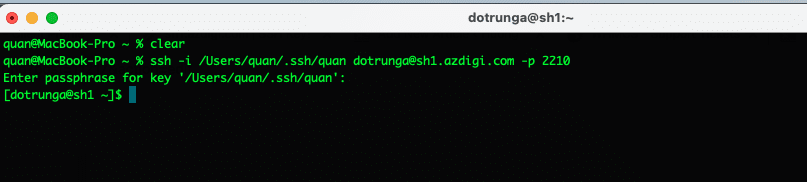
With Linux/MacOS to use the SSH key, you open Terminal and use the following command to SSH: The syntax will be as follows:
ssh -i đường-dẫn-private-key-của-bạn ten-user@sh1.azdigi.com -p 2210
Actual example: ssh -i /Users/quan/.ssh/quan dotrunga@sh1.azdigi.com -p 2210
- ssh -i: syntax using key
- /Users/quan/.ssh/quan: The path to the Key file on the computer (replace with your path)
- dotrunga: User DirectAdmin (replace with your user)
- sh1.azdigi.com: Replace with hostname or server IP
- -p 2210: Server SSH Port (replace with your server SSH Port, if the default port is 22, ignore this option)
Result:
About the author

Thạch Phạm
Đồng sáng lập và Giám đốc điều hành của AZDIGI. Có hơn 15 năm kinh nghiệm trong phổ biến kiến thức liên quan đến WordPress tại thachpham.com, phát triển website và phát triển hệ thống.