All Hosting services at AZDIGI use the world’s most popular and easy-to-use cPanel control panel, making it easy for anyone to manually manipulate data on the hosting.
In this article, AZDIGI will show you how to access the cPanel control panel to manipulate data on the host.
Method 1. Direct access by login account
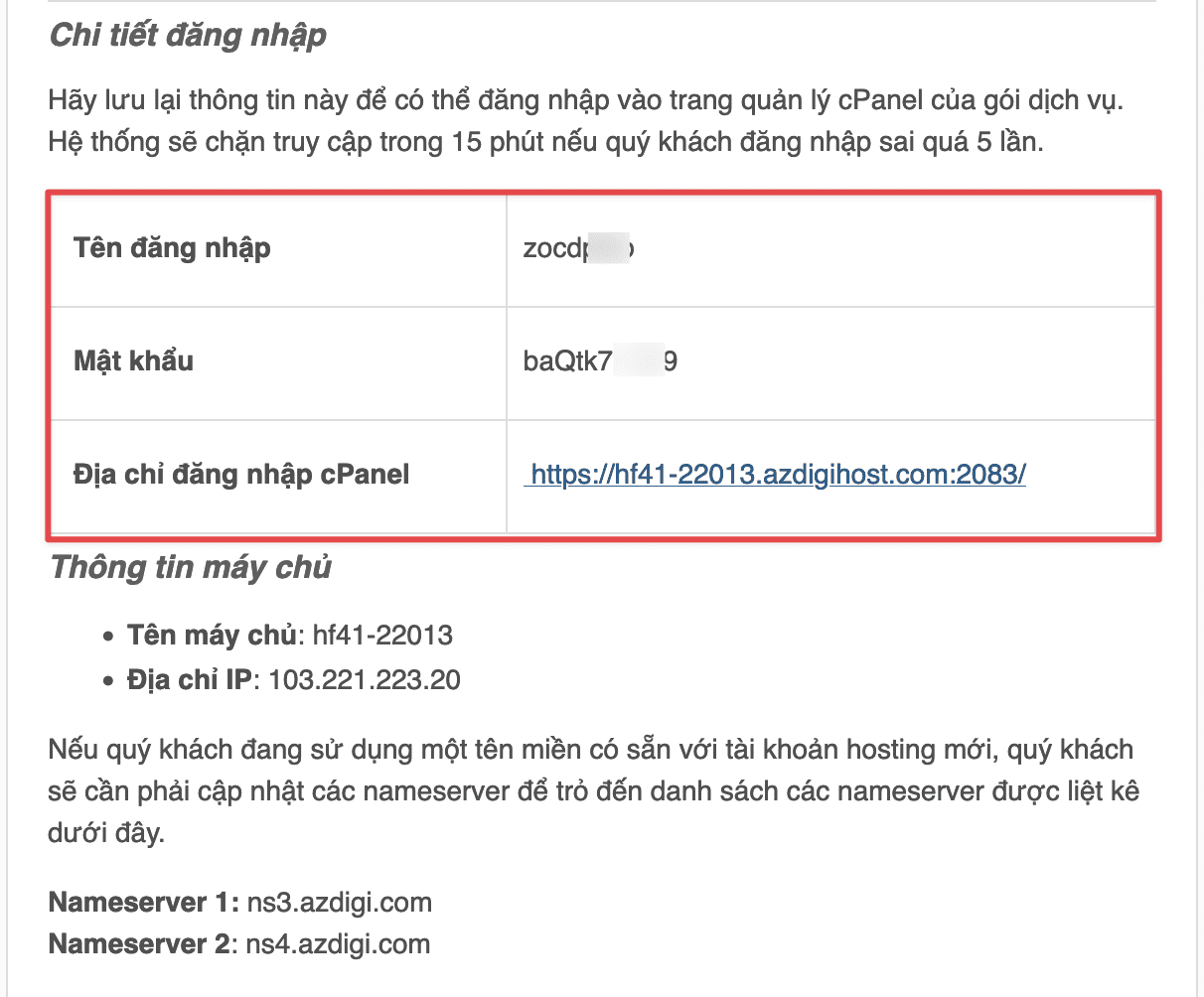
Once you have access to the host that AZDIGI sends via mail, you will have a direct link to the host’s server to be able to log in as follows:

In there, Control Panel URL means the path to access the cPanel control panel, you can click it and fill in your login information received.
Method 2. Access via AZDIGI’s customer page
Once the service is activated, you can access the My Services section of the AZDIGI customer page at https://my.azdigi.com.

You will see your Hosting service is in Active state, click to enter the service management page.
Then you click Login to cPanel, the system will automatically redirect you to the cPanel dashboard without entering login information.

So you have successfully accessed the cPanel control panel on Hosting at AZDIGI. If you need any assistance, please contact support@azdigi.com for the fastest support.
You might also like
About the author

Thạch Phạm
Đồng sáng lập và Giám đốc điều hành của AZDIGI. Có hơn 15 năm kinh nghiệm trong phổ biến kiến thức liên quan đến WordPress tại thachpham.com, phát triển website và phát triển hệ thống.