How to add an Addon/Sub Domain to Centos Web Panel (CWP)
Add an Addon/SubDomain to Centos Web Panel (CWP) with a few simple steps please follow along.
I. Overview
What is addon domain?
Addon domain is a type of domain name added to hosting, has the same function as the primary domain and works completely independently. An addon domain will help us easily manage multiple websites on the same host, saving costs compared to using a domain on each host.
Subdomain là gì?
Subdomain: is a part separated from the primary domain, the created subdomain will operate completely independent of the main domain. If you want to create a standalone website and still want this new domain to have the name of the primary domain, you should use a subdomain (e.g., kythuat.azdigi.cf).
Note: For the addon domain and subdomain to work, you need to point the addon domain and subdomain to the host IP.
So how to add an Addon domain and Subdomain on Centos Web Panel, please take a look at this article.
You can refer to the domain service at AZDIGI.
II. Implementation Guide
In this Addon or Subdomain section, you can install it through both the root user and the child user on CWP. Because in VPS, the root is the user with the highest authority, it can perform operations directly on behalf of child users. I will give specific instructions to both users.
Step 1: Create Addon Domain
Root user
To access the root user interface, follow the link: https://45.252.249.104:2087/ (remember to change your IP) and use the VPS root information to log in.
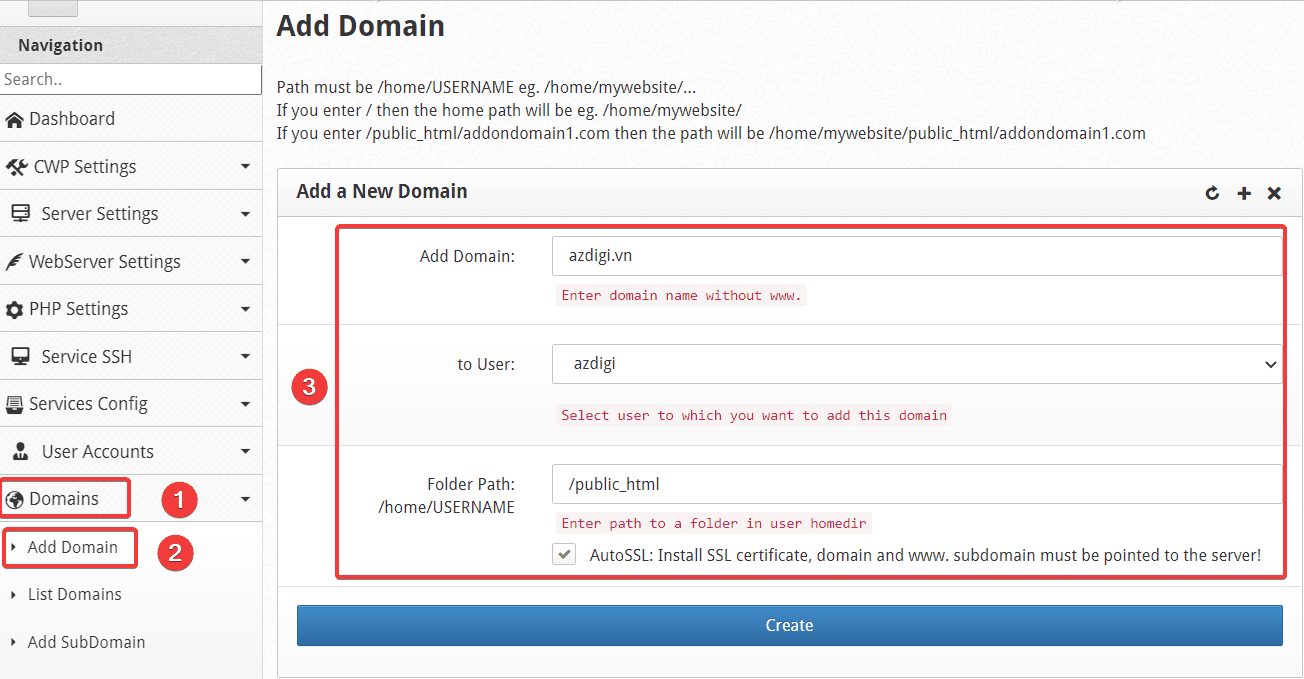
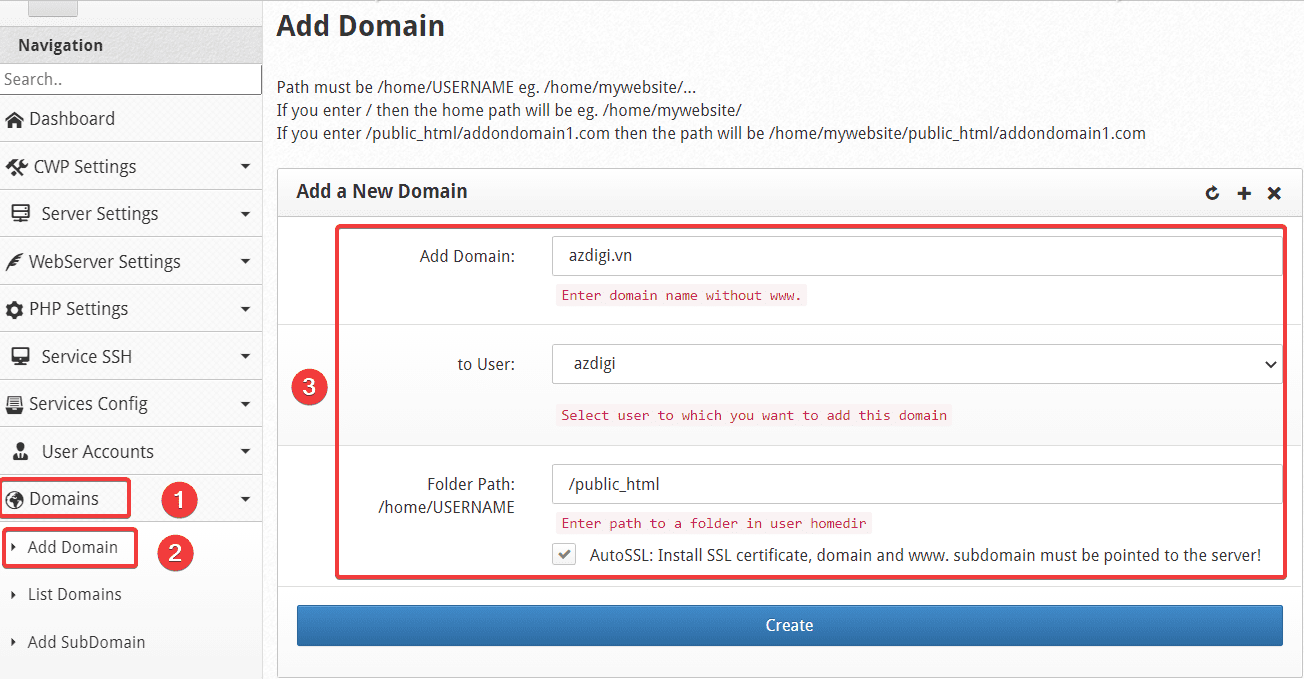
At the Root admin interface, go to Domains => Addon Domain => Add a New Domain . Here you need to fill in the following information:
In there:
- Add Domain: Enter the domain name to add.
- to User: Select the User to manage the newly added domain.
- Folder Path: The path containing the website source code (you should leave the default)
After filling in the information, click Create to add the domain.
Child user
To access Child User’s interface, follow the link: https://45.252.249.104:2083/ (remember to change your IP) and use your user information to log in.
At the User interface, go to Domains => Domains => Add a New Domain.
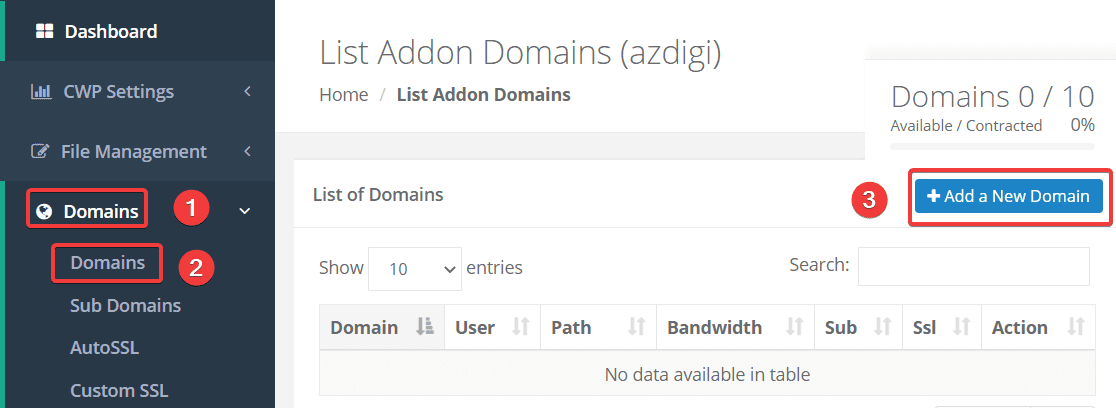
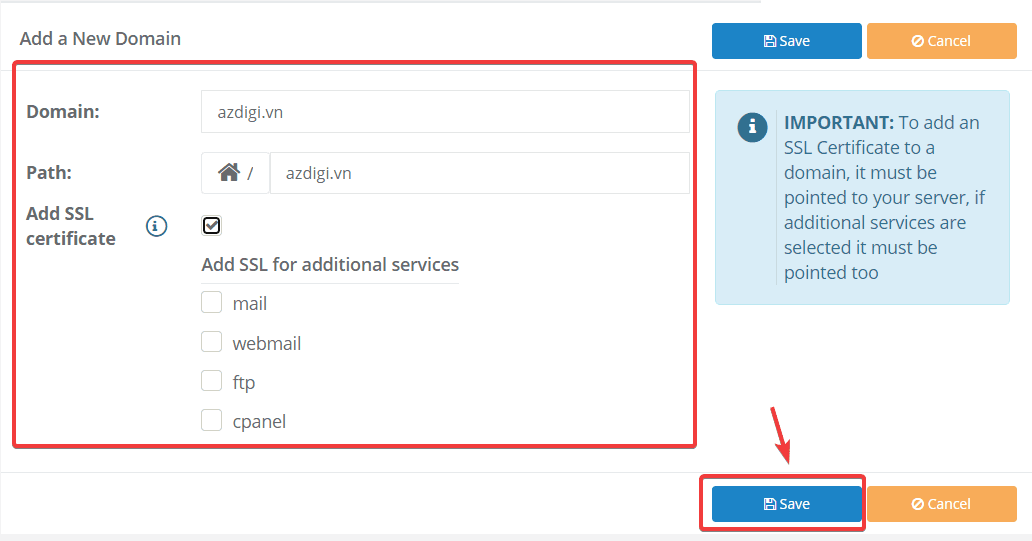
You need to fill out the following information:
In there:
- Domain: Enter the domain name to add.
- Path: The path containing the website source code (you should leave the default)
- Add SSL certificate: If you need to install SSL for your site, please tick this box.
Note: For the boxes mail, webmail, ftp, cpanel, these are the subdomains of the main domain, if you want to install SSL for any subdomain, then tick the corresponding box. However, these subdomains must be pointed to the VPS IP to be installed.
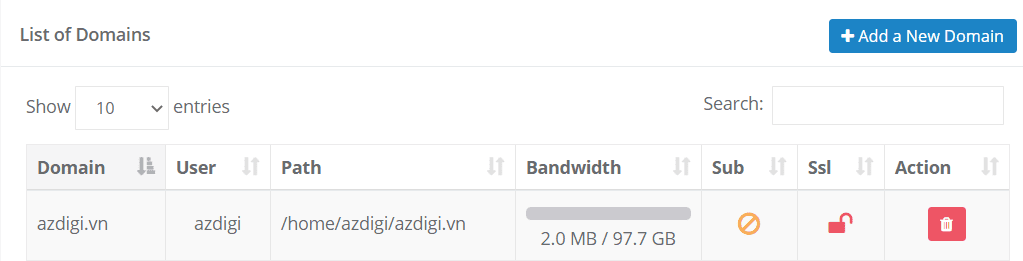
After successful creation, you will see the newly created domain displayed in the List of Domains as shown below:
Step 2: Create Subdomain
Root user
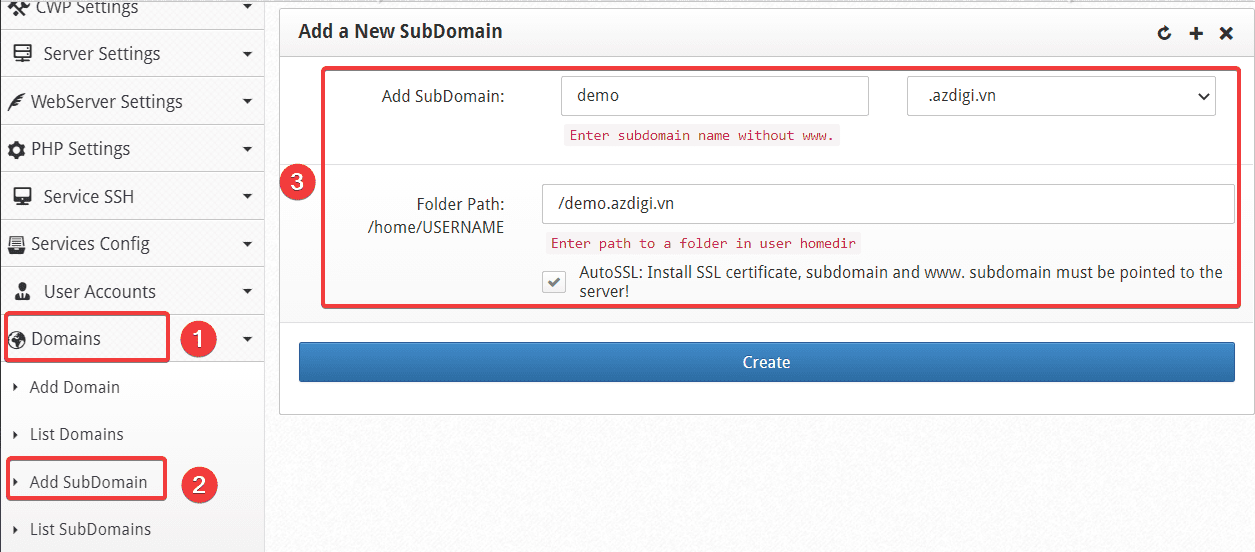
At the Root admin interface, go to Domains => Addon Domain => Add a New Domain . Here you need to fill in the following information:
In there:
- Add SubDomain: Enter the subdomain name and select the corresponding domain.
- Folder Path: The path contains the Subdomain source code (I leave the equivalent path as demo.azdigi.vn).
After filling in the information, click Create to add a SubDomain.
Child user
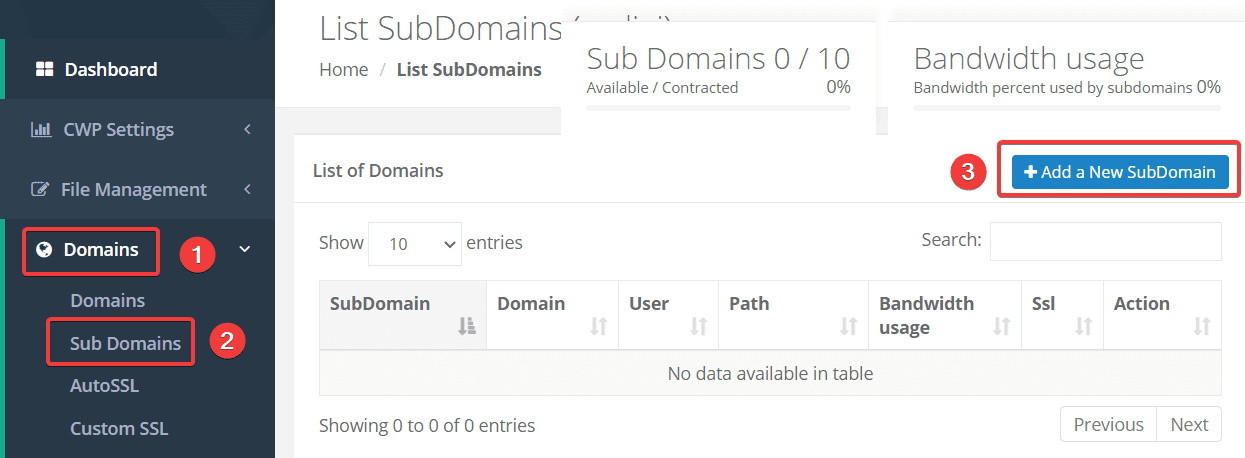
At the User interface, go to Domains => Sub Domains => Add a New SubDomain.
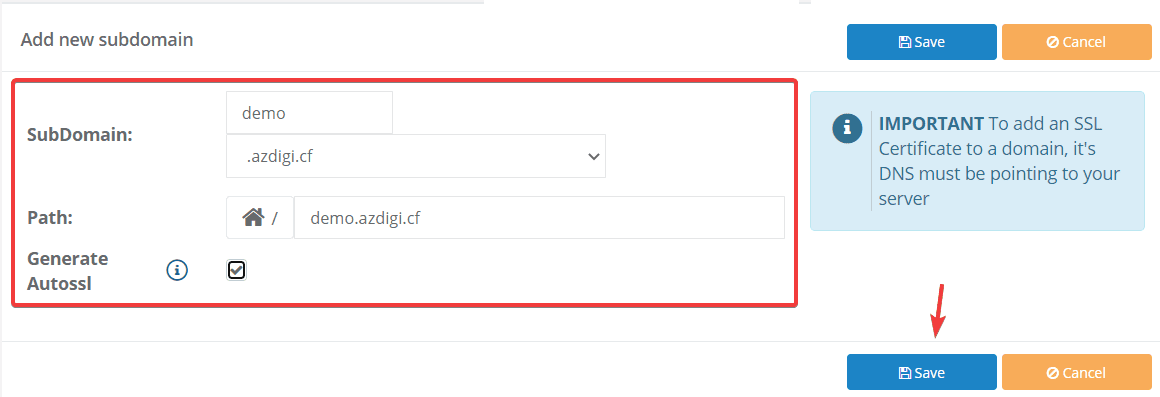
You need to fill out the following information:
In there:
- SubDomain: Enter the name of the subdomain and select the corresponding domain.
- Path: The path contains the subdomain source code (I leave the equivalent path as demo.azdigi.vn).
- Generate: If you need to install SSL for the subdomain, please tick this box.
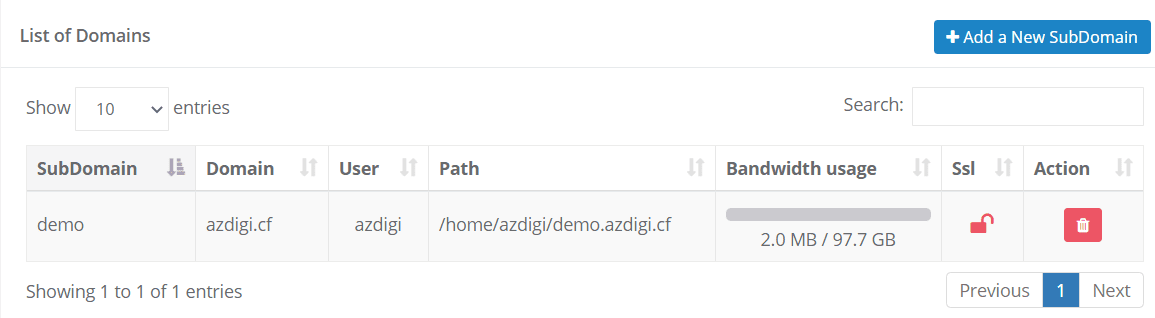
After successful creation, you will see the newly created domain displayed in the List of Domains as shown below:
III. Summary
So AZDIGI showed you how to quickly and easily add Addon domains and subdomains to Centos Web Panel. Creating more addon domains, subdomains will help you have more options in creating new websites and help you manage them more easily and scientifically.
Hope this article will help you to easily install it successfully. If you find the article helpful, please share it widely!
You can refer to other articles about CWP at the link below:
If you need assistance, you can contact support in the ways below:
- Hotline 247: 028 888 24768 (Ext 0)
- Ticket/Email: You use the email to register for the service and send it directly to: support@azdigi.com
You might also like
- How to install Let's Encrypt SSL on Centos Web Panel (CWP)
- How to add an addon domain to CentOS Web Panel (CWP)
- How to install WordPress on Centos Web Panel (CWP)
- How to create Packages on Centos Web Panel (CWP)
- Install NetData into Centos Web Panel (CWP)
- How to use File Manager on Centos Web Panel (CWP)
About the author

Thạch Phạm
Đồng sáng lập và Giám đốc điều hành của AZDIGI. Có hơn 15 năm kinh nghiệm trong phổ biến kiến thức liên quan đến WordPress tại thachpham.com, phát triển website và phát triển hệ thống.