![[Fix] [Fix] Invalid command UNIT_PROXY Apache 2.4.48 DirectAdmin](https://img.azdigi.com/wp-content/uploads/2021/06/image-3-scaled.png)
In this article, AZDIGI will guide you to fix the Invalid command UNIT_PROXY error for Apache 2.4.48 on the DirectAdmin server.
I. Introduction
Suddenly one day, you upgrade the Apache version to the latest version, currently Apache 2.4.48. But then your Apache can’t boot and receive the error message as below:
server.berrishosting.nl systemd[1]: Starting The Apache HTTP Server...
server.com httpd[12165]: AH00526: Syntax error on line 34 of /usr/local/directadmin/data/users/admin/httpd.conf:
server.berrishosting.nl httpd[12165]: Invalid command '|UNIT_PROXY|', perhaps misspelled or defined by a module not included in the server configuration
server.com systemd[1]: httpd.service: main process exited, code=exited, status=1/FAILURE
server.com systemd[1]: Failed to start The Apache HTTP Server.
server.com systemd[1]: Unit httpd.service entered failed state.
server.com systemd[1]: httpd.service failed.
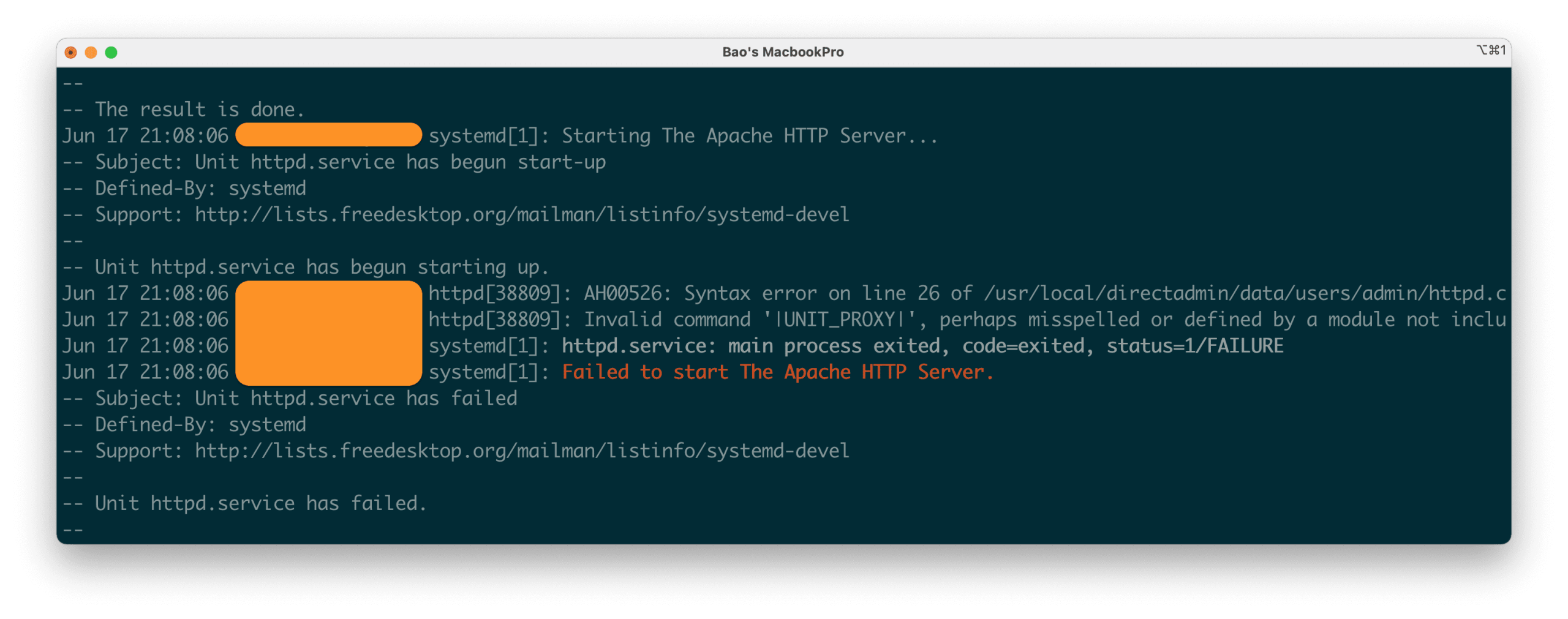
And all websites on your server will be inaccessible. So in this article, I will help you to fix this error.
II. Fix Invalid command UNIT_PROXY error on DirectAdmin
To fix the Invalid command UNIT_PROXY error on DirectAdmin, we need to do the following two steps.
Step 1: SSH into your server
To fix the Invalid command UNIT_PROXY error on DirectAdmin, we first need to SSH or access your VPS/server with root privileges . Or at least log in to the server with a user with sudo privileges. If you don’t know how to SSH into your VPS/Server, you can refer to the following tutorial:
After successfully SSH, we will continue with step 2 to execute the error processing commands.
Step 2: Commands to fix Invalid command UNIT_PROXY
This is a syntax error in Apache’s configuration, so we must remove this configuration line on all of the httpd.conf files belonging to our user.
First, we run the command below to back up our Apache configurations before we modify them, in case we need these configurations:
cp -r /usr/local/directadmin/data/users /usr/local/directadmin/data/users_bk
After that, we continue to run the following 2 commands to remove this wrong syntax configuration line:
sed -i '/|UNIT_PROXY|/d' /usr/local/directadmin/data/users/*/httpd.conf
systemctl restart httpd
By this step, your Apache 2.4.48 can work normally.
You can use the following command to check:
systemctl status httpd
If the Apache service shows active (running) as shown below, everything is working again.
So we have fixed the Invalid command UNIT_PROXY error on Apache version 2.4.48 used by the server running DirectAdmin.
There is also another simpler solution that we need to upgrade DirectAdmin to version 1.62.2 and run the following 3 commands:
cd /usr/local/directadmin/custombuild
./build update
./build rewrite_confs
III. Summary
According to my research, I found that some servers will have this error when upgrading, but others will not. I will learn more and if there is any information I will update this article.
Wishing you success. See more useful articles about DirectAdmin at the following link:
If you need assistance, you can contact support in the ways below:
- Hotline 247: 028 888 24768 (Ext 0)
- Ticket/Email: You use the email to register for the service and send it directly to: support@azdigi.com .
You might also like
- How to fix the error: Request body no files data length is larger on DirectAdmin
- How to upgrade Apache DirectAdmin to the latest version
- How to fix 'syntax error: unexpected end of file' error on DirectAdmin
- Fix "Requested icu-uc 50.1 but version of icu-uc is" error on DirectAdmin
- Fix the error: Your IP is blacklisted on DirectAdmin
- Fix Roundcube Database Error on DirectAdmin
About the author

Thạch Phạm
Đồng sáng lập và Giám đốc điều hành của AZDIGI. Có hơn 15 năm kinh nghiệm trong phổ biến kiến thức liên quan đến WordPress tại thachpham.com, phát triển website và phát triển hệ thống.