Introduction
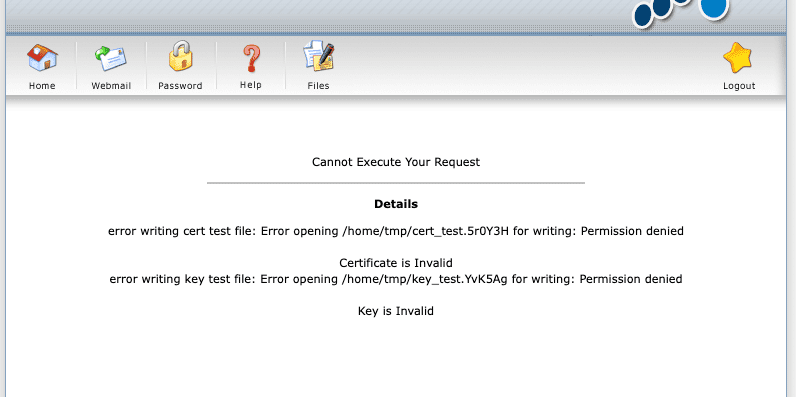
In the process of using DirectAdmin, sometimes I get the error Error opening /home/tmp/xxxx for writing as shown, in this case, I am importing the SSL certificate into the website, but when I import a save, I get the above error.
With this error, the system reports that it cannot write data to the tmp directory at /home/tmp because the directory does not exist or does exist but has the wrong permissions. To fix this problem, you can follow the instructions below.
Implementation Guide
Step 1: SSH into your DirectAdmin system
To fix this error, we first need to SSH or access your VPS/server with root privileges. If you don’t know how to SSH into your VPS/Server, you can refer to the following tutorial:
After successfully SSH, we continue with step 2.
Step 2: Check and create tmp directory
You need to check if your tmp directory is there, if not, you create and authorize the directory with the following command:
mkdir /home/tmp
chmod -R 1777 /home/tmp

Now you can check the results. After creating and authorizing, the import SSL has working properly.

So AZDIGI has completed the steps to fix Error opening /home/tmp/xxxx on DirectAdmin. Hope it helps you if you encounter a similar situation. Wishing you success!
You can refer to other instructions at the link below:
If you need support, you can contact support in the ways below:
- Hotline 247: 028 888 24768 (Ext 0)
- Ticket/Email: You use the email to register for the service and send it directly to: support@azdigi.com .
You might also like
- Fix "Requested icu-uc 50.1 but version of icu-uc is" error on DirectAdmin
- How to fix the error: Request body no files data length is larger on DirectAdmin
- Fix the error: xfs_quota: cannot set limits: Function not implemented Directadmin
- Fix Fatal error: PCRE is not compiled with UTF-8 support on DirectAdmin
- Fix Roundcube Database Error on DirectAdmin
- 401 Unauthorized Error: causes and how to fix
About the author

Thạch Phạm
Đồng sáng lập và Giám đốc điều hành của AZDIGI. Có hơn 15 năm kinh nghiệm trong phổ biến kiến thức liên quan đến WordPress tại thachpham.com, phát triển website và phát triển hệ thống.