When using DirectAdmin control, surely we are no longer strange with the display of system information, also known as System Information. In the System Information section, you will be able to see all the configuration information the server is using (CPU, Ram, Services), whether standing in Admin or User permissions. And some administrators (Admin) wonder how they can hide that information in the sub-user interface for certain reasons.
If you are also wondering and need to find a way to hide the same information, this article is the solution for you.
Implementation Guide
Step 1: SSH into your DirectAdmin system
To hide System Information on DirectAdmin, we first need to SSH or access your VPS/server with root privileges. If you don’t know how to SSH into your VPS/Server, you can refer to the following tutorial:
After successfully SSH, we continue with step 2.
Step 2: Hide the information
To hide information in the System Information section, you need to determine the information that needs to be hidden to operate correctly. For example, if I don’t want users to see the server’s CPU and RAM information, I will do the following:
You open and edit the file according to the path below:
/usr/local/directadmin/conf/directadmin.conf
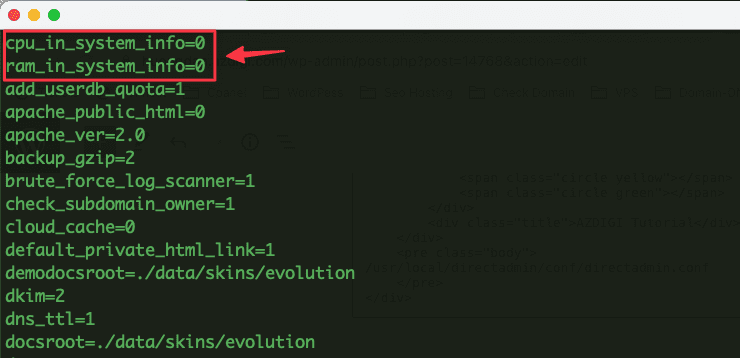
Next, you find the 2 values: CPU and RAM as below and change the value to = 0. If you don’t have these 2 lines, you can add them.
cpu_in_system_info=0
ram_in_system_info=0
Below is the illustration:

Now save the file and restart Directadmin with the following command:
systemctl restart directadmin
Step 3: Check the result
After the configuration is complete in step 2, you access the System Information section in DirectAdmin and check the CPU, RAM information.
Here is my result after adjusting:

As you can see, the CPU and RAM information is hidden and only the Services information is displayed. I recommend that you only hide the CPU and RAM information, the rest of the information like Services, should be for users to see.
Above are detailed instructions on hiding server CPU and RAM information on DirectAdmin. Hopefully, through this article, you can learn how to hide the information required of your system, don’t forget to share if you find this helpful article.
You can refer to other instructions at the link below:
If you need assistance, you can contact support in the ways below:
- Hotline 247: 028 888 24768 (Ext 0)
- Ticket/Email: You use the email to register for the service and send it directly to: support@azdigi.com .
You might also like
- Change the "The system load average" warning on DirectAdmin
- How to configure DKIM on DirectAdmin
- Instructions for configuring user permissions limits in DirectAdmin 1.6
- Change OPcache DirectAdmin configuration
- How to install DirectAdmin on the server
- Integrate Netdata into DirectAdmin for server monitoring
About the author

Thạch Phạm
Đồng sáng lập và Giám đốc điều hành của AZDIGI. Có hơn 15 năm kinh nghiệm trong phổ biến kiến thức liên quan đến WordPress tại thachpham.com, phát triển website và phát triển hệ thống.