
During the process of moving the database from the old server to the new server and importing it, you will encounter an error saying Unknown collation: utf8mb4_0900_ai_ci as shown below:

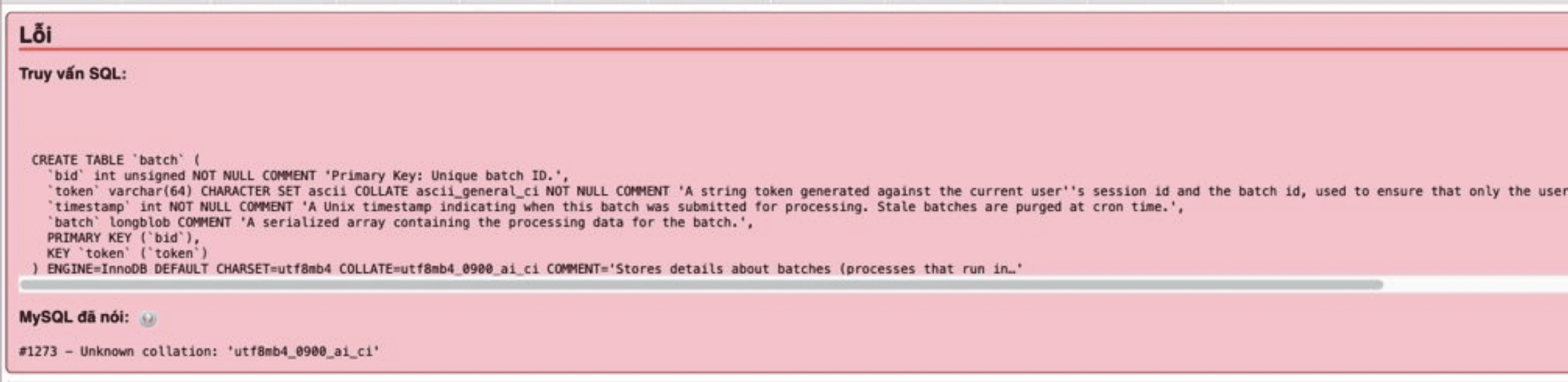
The main and most common cause is that the MySQL/MariaDB versions of the 2 servers are not the same, so when importing to the new server, the collation ID doesn’t match.
You can fix this error in 2 methods:
Method 1: Change MySQL/MariaDB version
In this way, you need to downgrade or upgrade the MySQL/MariaDB version on the new server to the same version as the old server to resolve the issue. However, there is a disadvantage that changing the version is very complicated and the developer does not allow you to downgrade.
You can just uninstall and reinstall. And this will be very risky for the server that has and has an active website.
Method 2: Change the content of the coding table of the Database
In this way, you will change the CHARSET and COLLATE of the database, it will be much simpler and less risky.
- Change
utf8mb4_0900_ai_citoutf8mb4_general_ci - Change
CHARSET=utf8mb4toCHARSET=utf8
On Linux systems, there is a strength that you can change the contents of a file with a command line. Here, I use the command sed
Note:
- Command 1 will look into the
backup.sqlfile. If there is a lineutf8mb4_0900_ai_ci, it will be automatically replaced withutf8_general_ci - Command 2: will look into the
backup.sqlfile. If there is a lineCHARSET=utf8mb4, it will be automatically replaced withCHARSET=utf8
Note: Replace backup.sql with your database file name.
Lệnh 1: sed -i 's/utf8mb4_0900_ai_ci/utf8_general_ci/g' backup.sql
Lệnh 2: sed -i 's/CHARSET=utf8mb4/CHARSET=utf8/g' backup.sql
After running the command, you can use that Database to import again.
Wishing you success!
If you need assistance, you can contact support in the ways below:
- Hotline 247: 028 888 24768 (Ext 0)
- Ticket/Email: You use the email to register for the service and send it directly to: support@azdigi.com .
- Refer to Hosting/VPS service here!
You might also like
- How to fix the Row size too large (> 8126) error when importing the database
- How to downgrade the MariaDB version on DirectAdmin
- Fix Roundcube Database Error on DirectAdmin
- How to fix "Error establishing a database connection" on WordPress
- Fix Database Table Missing Primary Key error on WordPress
- How to install Roundcube Webmail on Ubuntu 22.04 using LAMP Stack
About the author

Thạch Phạm
Đồng sáng lập và Giám đốc điều hành của AZDIGI. Có hơn 15 năm kinh nghiệm trong phổ biến kiến thức liên quan đến WordPress tại thachpham.com, phát triển website và phát triển hệ thống.