
1. Overview
Suddenly one day, all your websites on your VPS/Server failed simultaneously and displayed the same content as shown below:

In this case, your VPS/Server is at full capacity, the cause of full capacity is a lot, but in this article, AZDIGI will guide you through handling full capacity due to mysql-bin on aaPanel.
Refer to AZDIGI’s VPS/Server service here!
Determine the cause and how to handle full capacity due to mysql-bin on aaPanel
To determine the cause and handling of full capacity due to mysql-bin on aaPanel, we need to do the following 3 steps.
Step 1: SSH into your VPS/Server system
To full capacity due to mysql-bin on aaPanel, we first need to SSH or access your VPS/server with root privileges. If you do not know how to SSH into your VPS/Server, you can refer to the following tutorial:
After successfully SSHing, we continue with step 2 to begin to determine the cause of the error.
Step 2: Determine the cause of the full capacity of the VPS/Server
After SSH into your VPS/Server, we use the df-h command to see which partition is 100% full.

In the image above, you can see that your / partition is getting full. Use the command cd / to move into the / partition and check again with the du -sh * command.

You can see that the www directory takes up the most space, continue to use the command cd www to move into this directory and use the command du -sh * to check.

Continue to move into the server directory and use the old command du -sh * to check further.
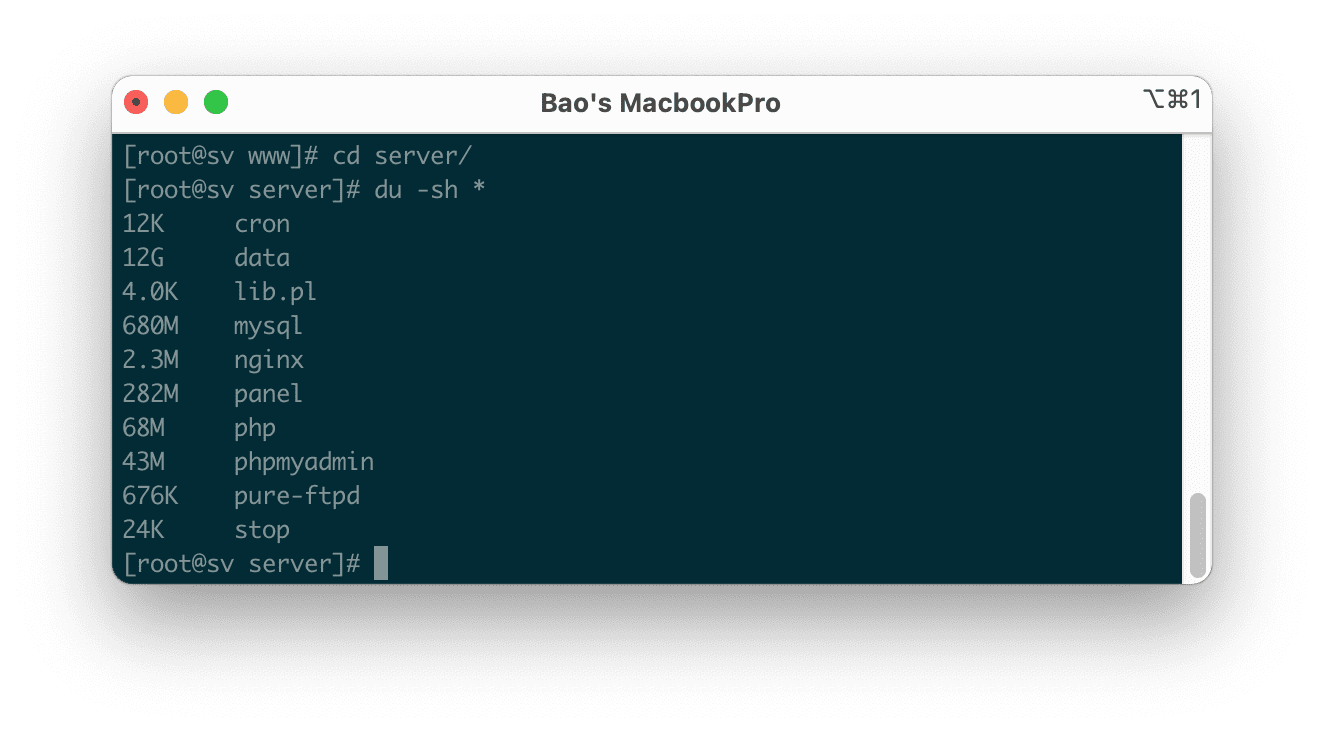
You can see that the data directory takes up the most space, continue to use the command cd data to move into this directory and use the command du -sh * to check.
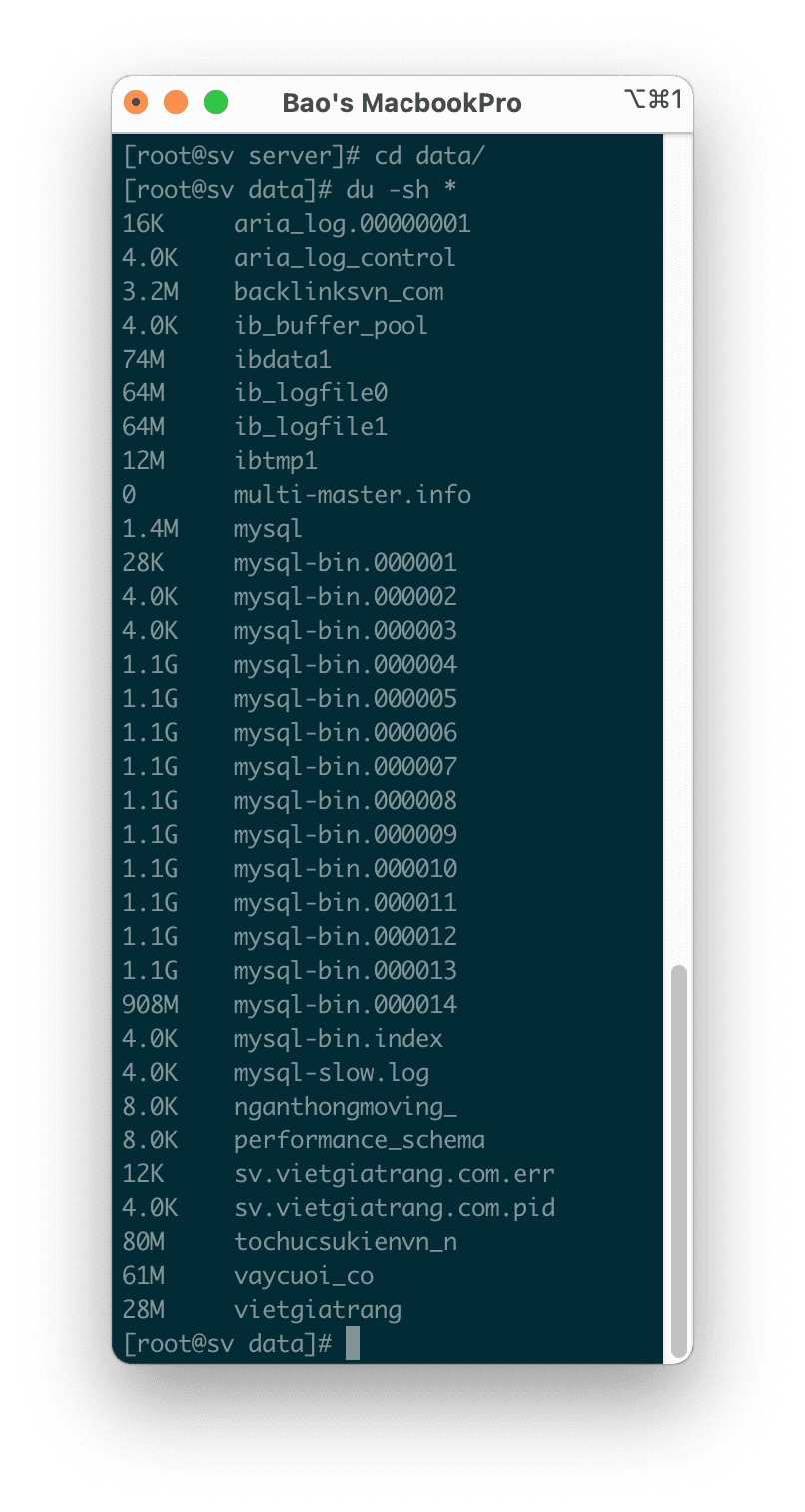
You can see that there is a lot of mysql-bin.* files that take up a lot of space. So determining the cause of taking up a lot of space is caused by mysql-bin (binary logs).
Step 3: Fix the error at full capacity due to mysql-bin on aaPanel
To handle the full capacity due to mysql-bin on aaPanel, we need to modify the configuration of the mysql service to turn off binary logs. To change, we use the following command:
vi /etc/my.cnf
We find the line log-bin=*, press i to modify mode and add # at the beginning of the line as shown below, you can also add # to the binlog_format=* line if you want:

Before modify

After modify
After modifying, you press the : key and then the x characters to save.
Use the service service mysqld restart restart command to get the mysql service to receive the new configuration.

After restarting the mysqld service, you can completely delete the mysql-bin.* files. You can use the rm -f mysql-bin.* command for quick deletion. Then check the VPS/Server capacity with the df -h command.

We can see that the capacity of the / directory has been greatly reduced.
3. Summary
Hopefully, through this article, you have learned how to quickly handle the problem of full capacity due to mysql-bin on aaPanel, as well as how to determine which folders take up a lot of space on your VPS/Server. Although this problem is not unique to aaPanel, with aaPanel currently, mysql-bin(binary logs)
Wishing you success.
If you need assistance, you can contact support in the ways below:
- Hotline 247: 028 888 24768 (Ext 0)
- Ticket/Email: You use the email to register for the service and send it directly to: support@azdigi.com
You might also like
- Disable mysql-bin on DirectAdmin
- How to fix the 500 internal server error in PhpMyAdmin?
- Commands to check large files/directories in Linux
- Troubleshooting Linux VPS - How to Handle Common VPS Issues
- Fix the "Aria engine is not enabled or did not start" error on aaPanel
- How to optimize MySQL on aaPanel
About the author

Thạch Phạm
Đồng sáng lập và Giám đốc điều hành của AZDIGI. Có hơn 15 năm kinh nghiệm trong phổ biến kiến thức liên quan đến WordPress tại thachpham.com, phát triển website và phát triển hệ thống.