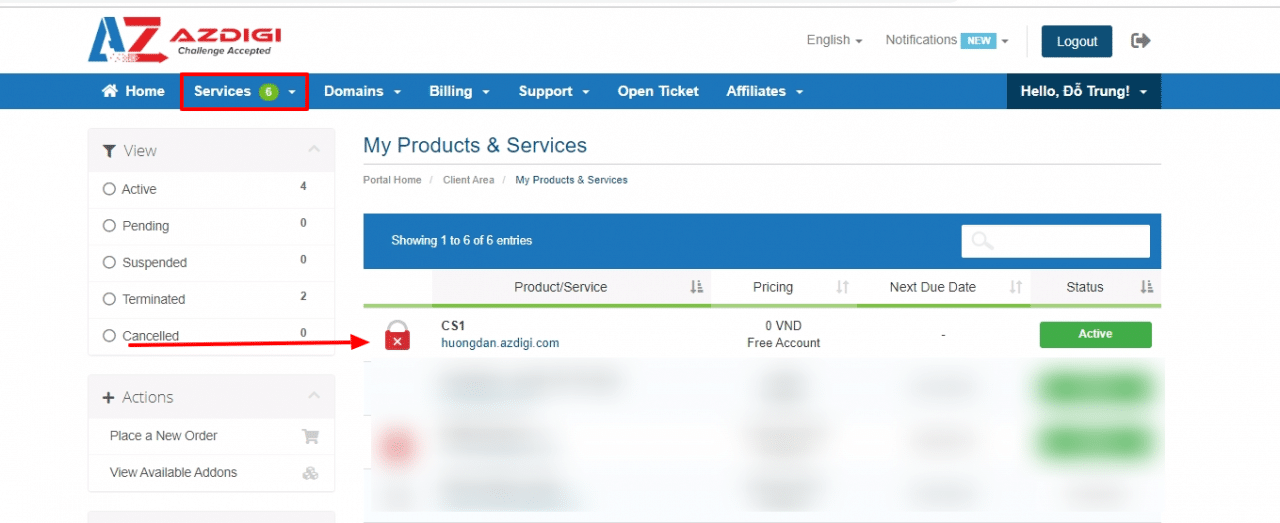
Currently, when using the Cloud Server service at AZDIGI, you have complete control over this service from basic operations such as (Stop, Start, Restart, Suspend) and go deeper. Rebuild this Cloud Server with just a few simple steps as follows.
To do this, you definitely have to access your service administration page, the access link will be below, you access it with the email/password you created before buying the service at AZDIGI.
Make sure you have backed up the data on the server and no longer contain important data on it. When rebuilding, all data will be deleted and cannot be restored.
Step 2: Click Services and select the service to rebuild.
Step 3: Turn off the server by clicking the Stop button.

After turning off the VPS is complete, you proceed to click on the Rebuild menu to reinstall the OS.

Then you choose the operating system version to rebuild.

In the Select OS Template section that allows you to choose a lot of OS, you choose the OS you need to use and click Rebuild, after clicking, you wait for the system to rebuild. It will normally take about 5-7 minutes to complete.
About the author

Thạch Phạm
Đồng sáng lập và Giám đốc điều hành của AZDIGI. Có hơn 15 năm kinh nghiệm trong phổ biến kiến thức liên quan đến WordPress tại thachpham.com, phát triển website và phát triển hệ thống.