You ask ChatGPT about your company's internal processes, and it responds… nonsense. Ask about proprietary technical documents, and it hallucinates with complete confidence. It's not that the LLM is broken – it simply doesn't have your data. RAG was created to solve exactly this problem: letting the LLM “read” your documents before responding.
In this article, I'll explain what RAG is, how it works, and guide you through 2 ways to deploy internal document chatbots on VPS without coding.
What is RAG?
RAG stands for Retrieval Augmented Generation, which roughly translates to “content generation with retrieval assistance”.
Picture this: when you ask a friend a question, instead of answering immediately from memory (which might be wrong), they open Google to search first, then provide an answer. RAG works the same way with LLMs. Instead of letting the model “make up” answers from training knowledge, the system first searches through your documents, retrieves the most relevant passages, then provides them to the LLM as context for generating responses.
The result? More accurate answers based on real data, significantly reducing hallucinations.
How does RAG work?
RAG's workflow consists of 2 main phases:
Phase 1: Data Preparation (run once)
- Document – Collect documents: PDF, DOCX, TXT, Markdown, or website crawling
- Chunking – Split documents into small chunks, typically 500-1000 tokens per chunk
- Embedding – Convert each chunk into vectors (numerical arrays) representing the text's semantic meaning
- Vector DB – Store vectors in specialized databases for fast searching
Phase 2: Answering Questions (each time user asks)
- Query – User's question is also converted into a vector
- Search – Find chunks with vectors “closest” to the question (semantic search)
- LLM – Combine found chunks into the prompt, send to LLM to generate the answer
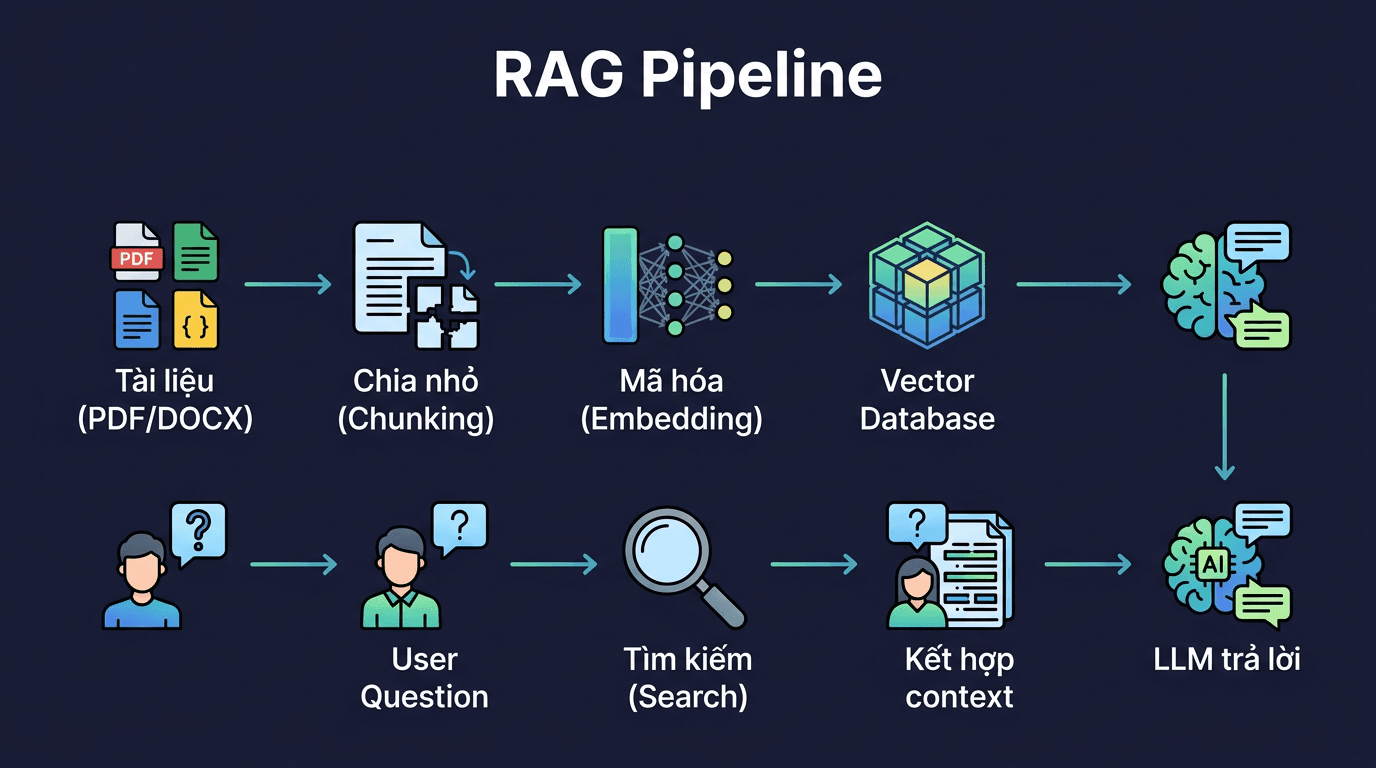
The beauty of RAG is that you don't need to fine-tune the model. Simply add documents to the vector database, and the LLM will know how to use that context to respond. Adding new documents? Just upload more – no retraining required.
Method 1: Open WebUI Built-in RAG (Simplest)
If you've already installed Open WebUI following previous articles in this series, the good news is it already has built-in RAG capabilities. No additional installation needed.
Upload files directly in chat
The fastest way: drag and drop PDF, DOCX, or TXT files into the chat box. Open WebUI will automatically parse, chunk, and embed the content. Then you can ask about the file content right in that chat session.
This method works well when you need to quickly ask about 1-2 specific files. Files are only effective in the current chat session.
Create Knowledge Base
Want to reuse documents across multiple chat sessions? Create a Knowledge Base:
- Go to Workspace → Knowledge
- Create a new collection, give it a name (e.g., “Internal Documents”)
- Upload files to the collection
- When chatting, type
#then select the knowledge base you want to use
Every chat session can access this knowledge base, and you can add/remove files anytime.
Configure RAG Settings
Go to Admin Panel → Settings → Documents to fine-tune:
- Chunk Size: default 1000 characters, increase if documents have long passages that need context preserved
- Chunk Overlap: default 100, helps avoid losing information at chunk boundaries
- Embedding Model: choose appropriate embedding model. For Vietnamese content,
nomic-embed-textorbge-m3are stable choices - Top K: number of chunks retrieved per query, default 4. Increase for more comprehensive answers
Method 2: AnythingLLM (All-in-one RAG)
If you need a more specialized RAG solution with multiple vector database options, separate workspace management, and support for various data sources, AnythingLLM is worth trying.
Docker Installation
docker pull mintplexlabs/anythingllm
docker run -d \
  --name anythingllm \
  -p 3001:3001 \
  -v anythingllm_storage:/app/server/storage \
  --restart unless-stopped \
  mintplexlabs/anythingllm
Access http://VPS-IP:3001, create an admin account and you're done with setup.
Basic Workflow
- Connect LLM – In Settings → LLM Preference, point to Ollama or your API provider
- Choose Embedding Model – Can use Ollama embedding or built-in models
- Create Workspace – Each workspace is a separate “chat room” with its own document set
- Upload documents – Supports PDF, DOCX, TXT, CSV, and website crawling
- Chat – Ask questions, AnythingLLM automatically finds context from uploaded documents
AnythingLLM's strengths include intuitive document management interface, support for multiple vector database backends, and ability to create multiple workspaces for different purposes (e.g., 1 workspace for HR documents, 1 workspace for technical docs).
Vector Database: Which to Choose?
Vector databases store embedding vectors. Both Open WebUI and AnythingLLM have built-in vector DBs, but if you want to scale or use separately, here are 3 popular choices:
pgvector (PostgreSQL extension)
If you're already using PostgreSQL, this is the most natural choice. Just install the pgvector extension and you can store vectors right in your familiar database. No new services needed, backup together with other data, query with familiar SQL. Suitable for most small to medium use cases.
-- Install pgvector extension
CREATE EXTENSION vector;
-- Create table to store embeddings
CREATE TABLE documents (
  id SERIAL PRIMARY KEY,
  content TEXT,
  embedding vector(1536)
);
ChromaDB
Lightweight, runs embedded or client-server. No separate database setup needed, suitable for prototypes and small projects. Open WebUI uses ChromaDB as default backend.
Qdrant
Purpose-built for production. Supports filtering, multi-tenancy, and scales well. If you're building RAG systems serving many users or large datasets (millions of documents), Qdrant is the solid choice.
For most self-hosting cases on VPS, built-in vector DBs from Open WebUI or AnythingLLM are sufficient. Only consider separate vector DBs when you need to share data between multiple applications or datasets exceed a few GB.
RAG Optimization Tips
RAG isn't just “upload files and done”. Answer quality depends heavily on your configuration:
- Chunk size: Too small loses context, too large includes irrelevant information. Start with 500-1000 characters then adjust based on real results
- Chunk overlap: Set 10-20% of chunk size. For example, if chunk is 1000, overlap 100-200. Helps avoid important information being cut at chunk boundaries
- Embedding model: The embedding model determines search quality. For Vietnamese content, try
bge-m3(multilingual, runs on Ollama) ornomic-embed-text - Document formatting: Well-structured documents (headings, bullet points) perform much better than walls of text. If you have messy Word files, consider reformatting before upload
- Top K: Number of chunks put into context. Too many wastes tokens and may cause noise. Too few lacks information. 3-5 is a reasonable starting point
Real-world Use Cases
RAG isn't just a distant concept. Here are practical uses I've seen many people implement:
- Internal FAQ Bot: Upload all FAQs, procedures, policies to knowledge base. New employees ask the chatbot instead of colleagues for the 100th time
- Company Knowledge Base: Technical docs, usage guides, SOPs. Instead of searching Confluence/Notion then reading 10 pages, ask the chatbot for concise answers
- Documentation Chatbot: Feed product/API docs, let customers or developers self-serve. Significantly reduces support team load
- Research Assistant: Upload papers, reports, books. Ask chatbot to summarize, compare, find specific information instead of reading page by page
- Legal/Compliance: Upload contracts, legal regulations. Chatbot helps lookup clauses much faster than manual searching
Conclusion
RAG bridges the gap between LLM capabilities and your private data. Instead of accepting AI “making things up” when it doesn't know, you give it access to the right information sources.
With Open WebUI, you get ready-to-use RAG with just a few upload clicks. With AnythingLLM, you get more customization and flexible workspace management. Both run well on VPS without coding.
Start simple: upload a few document files to Open WebUI, try asking questions. When results aren't good enough, fine-tune chunk size, try different embedding models, or consider switching to AnythingLLM for more options.
In the next article in this series, I'll dive into another practical topic: using AI agents to automate workflows on VPS.
You might also like
- What is Flowise? When Should You Self-Host It on a VPS?
- Installing Dify AI on VPS - Free No-code AI Platform
- What is MCP? How AI agents connect to tools and external data
- n8n + Ollama - Automate Workflows with AI Running on Your Own VPS
- What is vLLM? When should you use vLLM instead of Ollama
- Install Open WebUI + Ollama with Docker Compose - Create Your Own ChatGPT on VPS
About the author

Trần Thắng
Expert at AZDIGI with years of experience in web hosting and system administration.