MCP stands for Model Context Protocol, an open standard that lets AI agents connect to external tools, data, and workflows without building a separate integration for every system. If you have seen an agent read files, call APIs, search internal documents, or work with GitHub, the real problem underneath is almost always context connectivity. MCP exists to solve exactly that layer.
On the AZDIGI blog, we already have related articles about Ollama API, RAG, CrewAI, and OpenClaw/OpenViking. MCP is a very practical piece that ties these parts together in a cleaner and more standardized way.
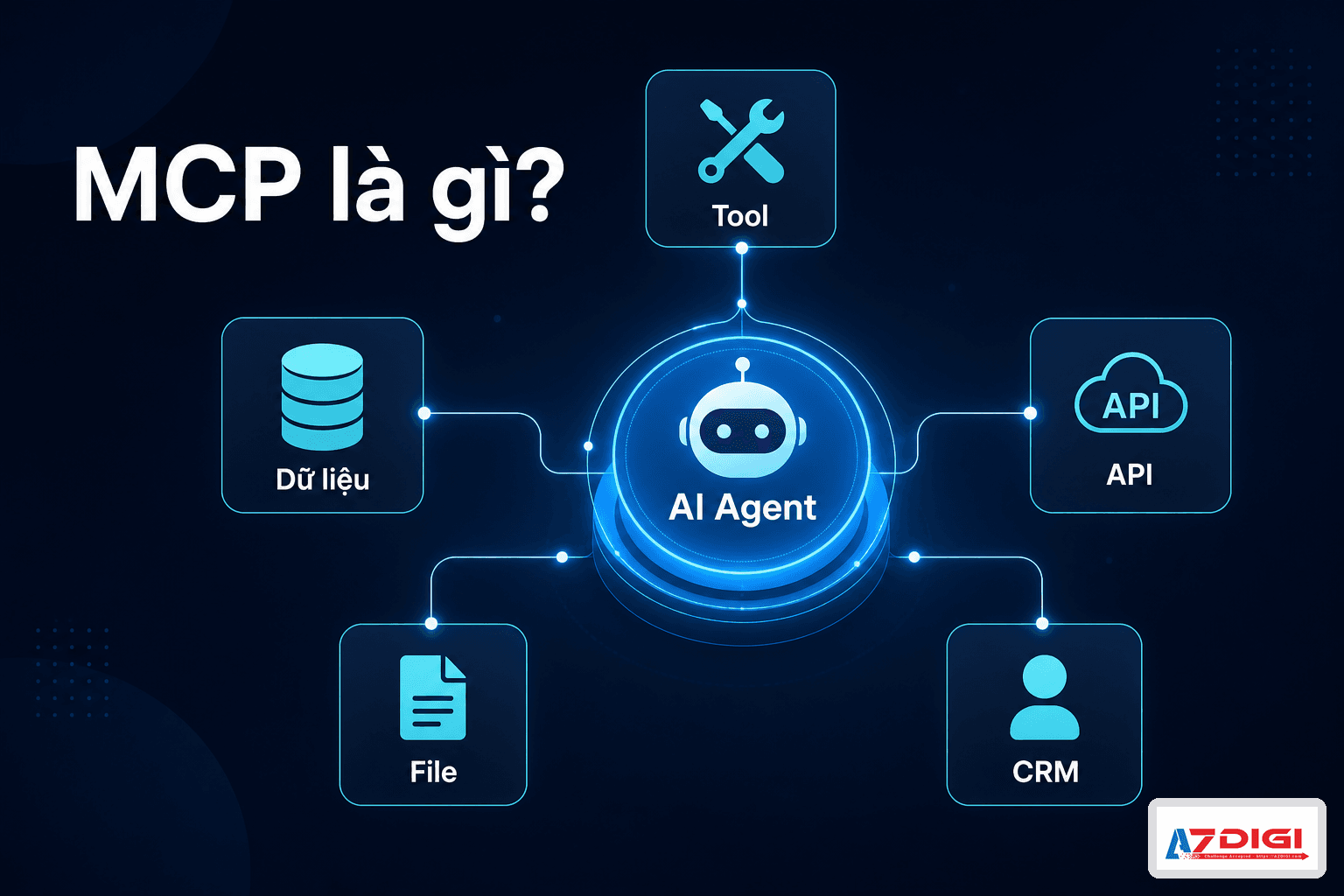
table of contents
- What MCP is
- Why AI agents need MCP
- How MCP architecture works
- The difference between tools, resources, and prompts
- When to use MCP instead of hand-written integrations
- Real-world use cases
- Which infrastructure fits self-hosted agents and MCP servers
- Frequently asked questions
what is mcp
In simple terms, Model Context Protocol is a protocol that gives AI applications and AI agents a shared language for talking to external systems. Instead of app A building one connector for Notion, GitHub, PostgreSQL, and Google Drive, then app B rebuilding all of that from scratch, MCP defines a standard layer that both clients and servers can understand.
According to the official MCP documentation, the model follows a client-server architecture. The MCP host is the AI application itself, such as Claude Desktop, VS Code, or an agent platform. Each connection to an MCP server is managed through a dedicated MCP client. On the server side, MCP servers can run locally over STDIO or remotely over HTTP.
ℹ️ A simple way to picture it: the LLM is the language brain, while MCP is the standard port that lets that brain touch files, APIs, databases, and external actions.
why ai agents need mcp
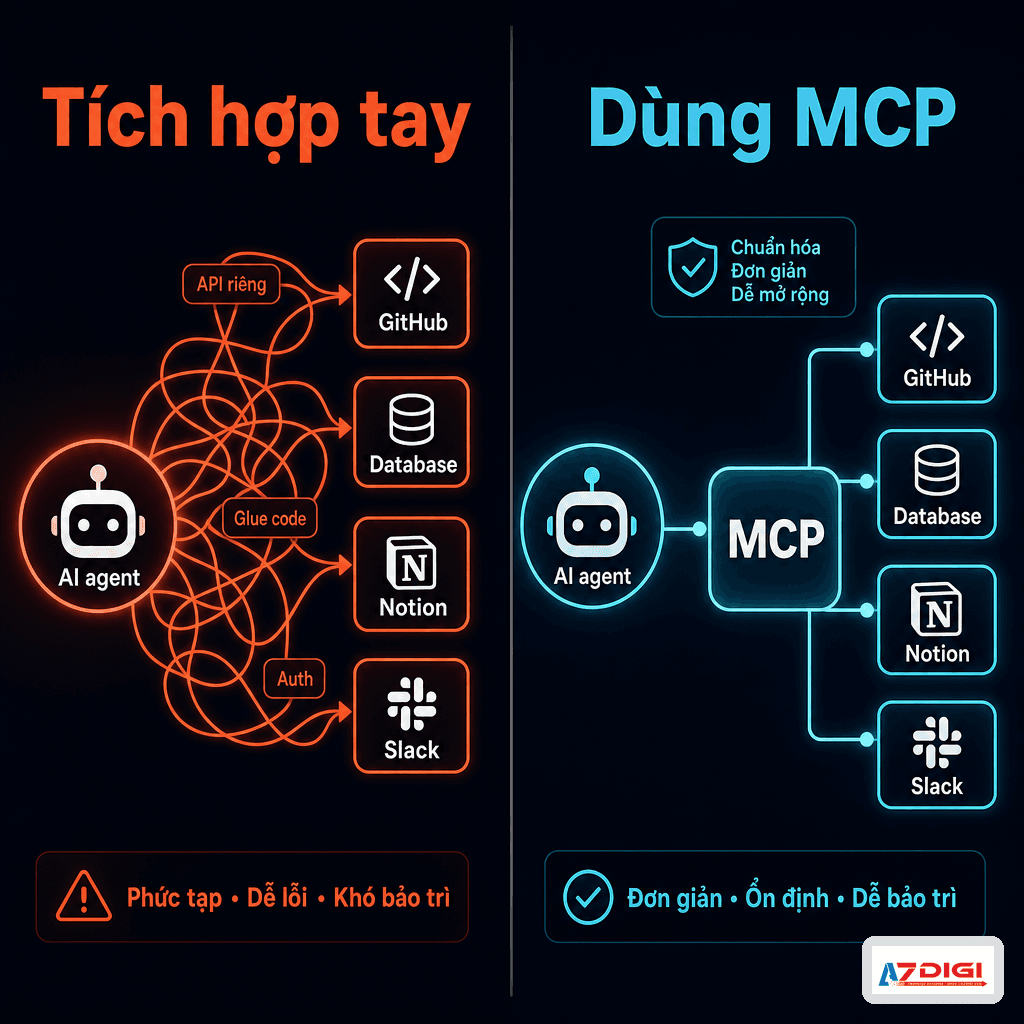
An AI agent with only a model can answer based on what it already knows. To make it actually work, you need to connect it to live data and real tools. Many teams start by writing custom API wrappers. That can work for a while, but once the number of tools grows, the whole thing quickly turns into a messy wiring closet.
- Hard to reuse across multiple agents or AI applications.
- Hard to manage permissions per tool.
- Hard to extend when you add new data sources.
- Time-consuming to keep rewriting schemas, validation, and tool descriptions.
MCP removes much of that repetition. You implement an MCP server once, then many MCP-compatible clients can reuse it. For teams building internal agents, document chatbots, DevOps assistants, or automation workflows, that value shows up pretty quickly.
how mcp architecture works
The MCP architecture docs split the system into two layers. The data layer uses JSON-RPC 2.0 to define messages between client and server. The transport layer handles delivery, with STDIO commonly used for local servers and Streamable HTTP used for remote servers.
- MCP host: the AI application coordinating everything.
- MCP client: the connector that maintains a session with each server.
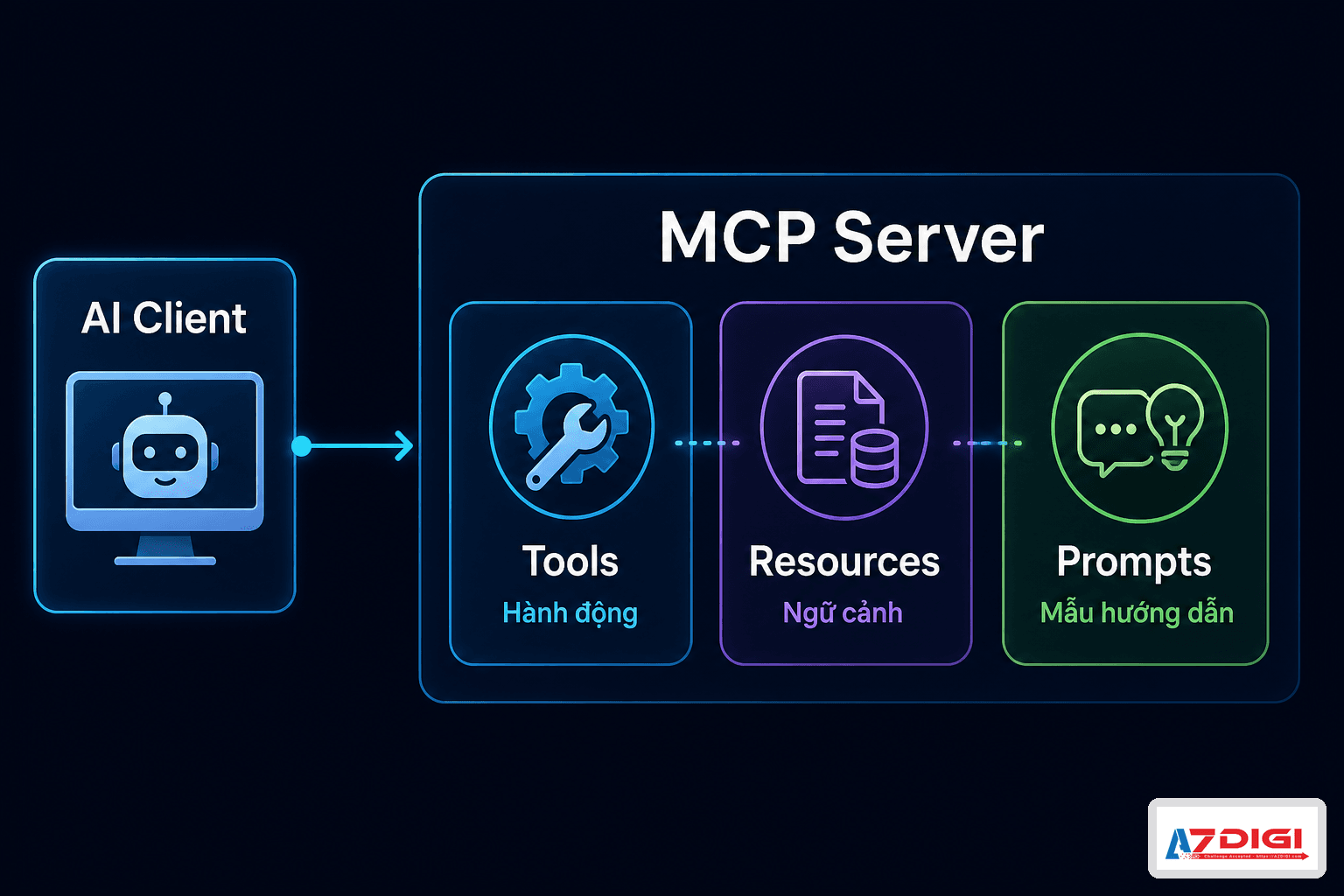
- MCP server: the component that exposes tools, resources, prompts, or other capabilities.
One useful detail is capability negotiation. When a connection starts, the client and server exchange which features they support. That means the ecosystem can evolve over time without forcing every implementation to be identical.
MCP also supports notifications, progress tracking, and long-running tasks. That matters when a tool does not return instantly, such as log analysis jobs, data aggregation, or document synchronization.
what is the difference between tools, resources, and prompts
The three most important MCP primitives are tools, resources, and prompts. If you mix these up, your server can quickly turn into a random API dump.
| Component | What it does | Example |
|---|---|---|
| Tools | Let the agent perform actions | Query a database, create a GitHub issue, call a billing API |
| Resources | Provide data as context | Database schema, markdown files, read-only API results |
| Prompts | Provide reusable instruction templates | Log analysis prompts, reporting prompts |
This is somewhat similar to how many people already use tools in CrewAI, except MCP standardizes how those capabilities are exposed and consumed across different systems.
when to use mcp instead of hand-written integrations
Not every AI project needs MCP on day one. If you have a tiny script that only calls one internal API, writing it directly may still be faster. But MCP starts to pay off once you hit one of these situations.
- You have many tools or many data sources that need to be reused across multiple agents.
- You want to change models or agent frameworks without rebuilding the integration layer.
- You need a standard way to describe tools and permissions.
- You want to separate the team building agents from the team exposing data and tools.
💡 A very obvious sign: if your team has a growing integrations, connectors, or tool_wrappers folder, it is probably time to think about MCP.
real-world mcp use cases for ai agents
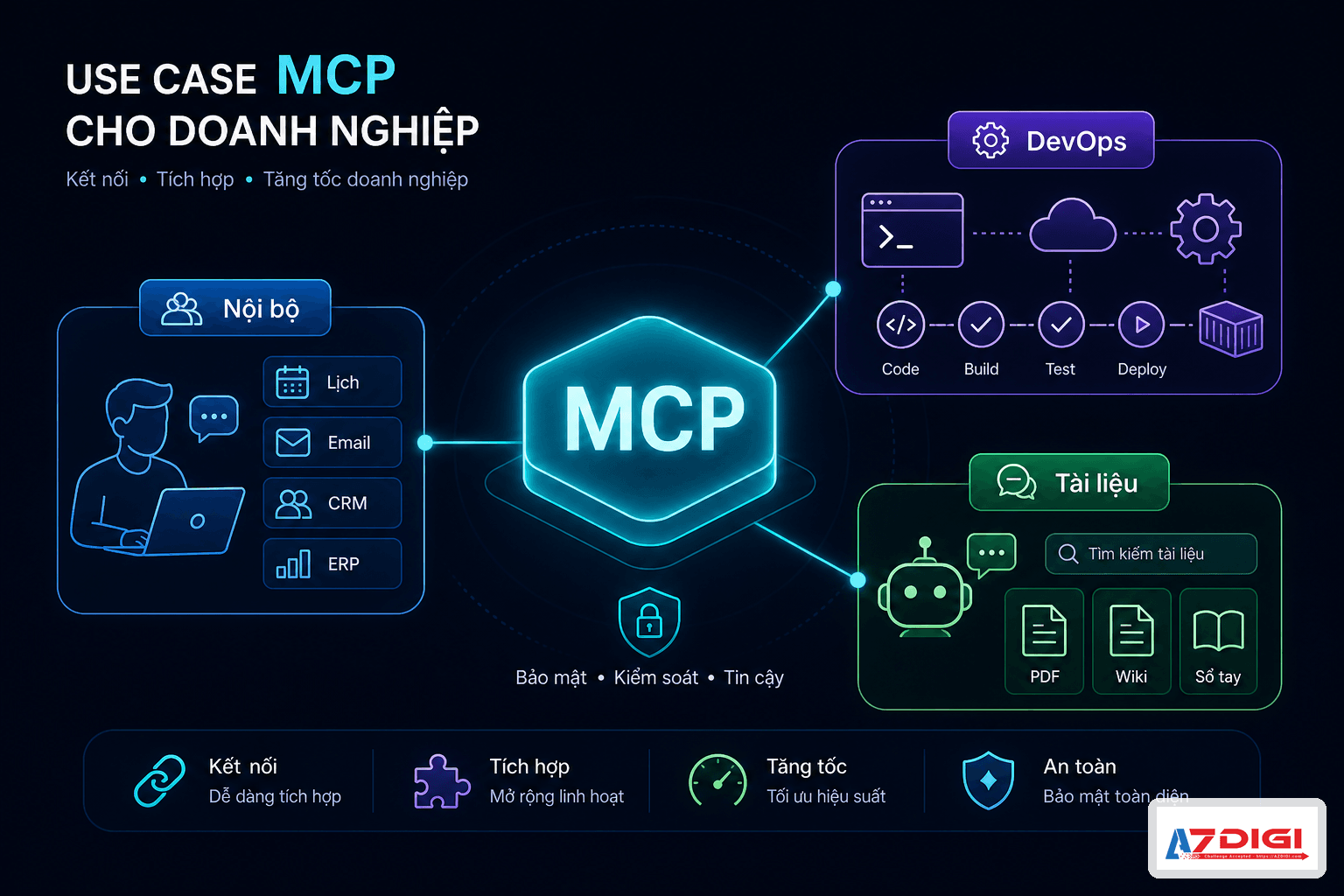
- Internal assistants: read process documents, search Notion, open tickets, check work calendars.
- DevOps agents: read logs, inspect containers, open monitoring dashboards, run controlled playbooks.
- Customer support agents: fetch CRM data, look up orders, update ticket status.
- Advanced RAG systems: combine resources for schema context, tools for live queries, and prompts for stable output formatting.
If you are building a document chatbot, read What is RAG next. If you are coordinating multiple agents, the article What is Claude Code Agent Teams and the CrewAI series are a good continuation.
does mcp replace normal apis
No. APIs are still a core backend interface. MCP does not replace REST or gRPC. It sits closer to the AI client side and standardizes how an agent discovers and uses tools. Put simply, your backend can stay as REST APIs, and you can add an MCP server on top so AI agents can consume it more naturally.
which infrastructure fits self-hosted agents and mcp servers
MCP servers themselves are usually not very GPU-heavy. The heavier part is often the inference model or the vector search layer behind them. So if you are self-hosting agents, workflows, and internal MCP servers, you can start with X-Platinum VPS or AMD Cloud Server to get strong CPU performance, NVMe storage, and full control. When you need to add self-hosted AI, you can pair that with a stack such as Open WebUI + Ollama or connect applications through Ollama API.
If your workload has already moved into many users, many workflows, and more service separation, a cloud server setup becomes easier to scale than a small single VPS. If the tools behind the agent rely on GPU inference, it is also better to separate model serving from the agent and MCP layer so they do not fight for the same resources.
frequently asked questions about mcp
what is an mcp server
An MCP server is a program that exposes tools, resources, or prompts for AI clients. It can run locally over STDIO or remotely over HTTP.
is mcp mandatory for ai agents
No. But if you have many tools, many agents, or want reusable integrations across different AI applications, MCP is worth considering.
how is mcp different from rag
RAG is a technique for bringing relevant data into the model context so answers improve. MCP is a protocol for connecting AI to tools and data. They are not competing ideas. In practice, they often work together.
closing thoughts
If you want the short answer to “what is MCP,” it is a connectivity standard that lets AI agents touch the outside world in a more consistent way. If you look at it from an implementation angle, the real value is that it reduces repetitive connector work, makes client changes easier, expands tool access more cleanly, and gives teams a more manageable foundation as AI systems grow.
A good next step is to combine MCP with an existing self-hosted AI stack. You can continue with Ollama API, RAG on VPS, or CrewAI to build a more complete agent stack.
You might also like
- What is vLLM? When should you use vLLM instead of Ollama
- What Is Hermes Agent? Installation and Usage Guide
- n8n + Ollama - Automate Workflows with AI Running on Your Own VPS
- What is vLLM? When should you use vLLM instead of Ollama
- What is Claude Code Channels? Complete Guide to Connecting Claude Code with Telegram and Discord
- Some Skills Worth Considering for OpenClaw
About the author

Trần Thắng
Expert at AZDIGI with years of experience in web hosting and system administration.