
Hermes Agent is an open-source AI agent developed by Nous Research. Instead of working only inside a chat window, Hermes can read and edit files, run commands, search the web, use APIs, schedule recurring tasks, and send results through Telegram or Discord.
Skills and Memory are two of its most useful features. Hermes can save a workflow that worked well and reuse it later. It can also remember stable details about the user across sessions. This guide was tested with Hermes Agent v0.18.2 in Docker on Ubuntu 24.04. The terminal images below were created from real installation output.
ℹ️ Lab version: Hermes Agent v0.18.2 (2026.7.7.2), Python 3.11.15, Ubuntu 24.04. Official documentation: hermes-agent.nousresearch.com.
Table of contents
- What is Hermes Agent?
- Core components
- Choosing local, Desktop, VPS, or Docker
- Installing Hermes Agent
- Setting up a model and starting your first session
- Useful everyday commands
- Connecting Telegram and Discord
- Automating tasks with cron
- Security configuration
- Updates, backups, and rollback
- Common errors
- Frequently asked questions
What is Hermes Agent?
Hermes Agent is an AI agent framework that runs on a computer or server you control. It supports several model providers, multiple user interfaces, and a broad tool system. You can use Hermes in a terminal, the Desktop app, a web dashboard, an IDE through ACP, or a messaging platform.
The model handles reasoning, while Hermes provides the operating layer around it. That layer controls which tools the agent can use, which directories it can access, where sessions are stored, when approval is required, and where results are delivered.
| Criteria | Typical chatbot | Hermes Agent |
|---|---|---|
| Environment | Runs on the provider’s service | Runs locally, on a VPS, or through a remote backend |
| System actions | Mainly returns text | Can use the terminal, files, web, browser, and APIs |
| Memory | Depends on the product | Memory, user profiles, and FTS5 session search |
| Repeatable workflows | Prompts or custom GPTs | Document-based Skills that can be created, edited, and reused |
| Automation | Usually requires an external service | Built-in cron, webhooks, and gateways |
Hermes and OpenClaw are both self-hosted agents, but they are organized differently. If you’re exploring this ecosystem, read the OpenClaw guide to compare their installation and operating models.
Core components of Hermes Agent
Models and providers
Hermes doesn’t lock you into one model. You can sign in to Nous Portal or OpenAI Codex, or configure an API from OpenRouter, Anthropic, Google, DeepSeek, or another OpenAI-compatible endpoint. Models with long context windows and reliable tool calling are generally better suited to multi-step tasks.
Tools and Toolsets
A Tool performs a specific action, such as reading a file, running a command, searching the web, or generating an image. A Toolset groups tools by purpose. Disabling Toolsets you don’t need reduces the number of schemas in the prompt and narrows the agent’s permissions.
Skills
A Skill is a Markdown document that explains how to handle a type of task. It can include steps, commands, common errors, and verification checks. A Skill is procedural memory, not a plugin that executes arbitrary code. This format keeps workflows readable and reviewable, and lets you move them to agents compatible with agentskills.io.
For a closer look at this type of procedural memory, see the guide to creating and installing Skills. Hermes uses different syntax, but the idea of separating reusable workflows from everyday prompts is similar.
Memory and sessions
Hermes stores sessions in SQLite and provides FTS5 full-text search. Memory is intended for stable facts such as how you prefer to be addressed, project conventions, or details about your environment. Temporary details for a particular task belong in its session rather than long-term memory.
Session history, Memory, Skills, SOUL.md, and AGENTS.md
All of these layers provide context to the agent, but they have different lifecycles. Putting information in the wrong layer can bloat the prompt or mix a global personality with rules that belong to one project.
| Component | Purpose | When to use it |
|---|---|---|
| Session history | Stores the conversation and tool calls for one session | Continue current work or retrieve it through session search |
| Context compression | Condenses a long conversation to leave room for new turns | Automatically at the configured threshold or when requested |
| Persistent Memory | Stores stable facts about the user and environment | Information that should be reused across sessions |
| Skills | Stores procedural knowledge for a type of task | Repeatable workflows with steps, commands, pitfalls, and verification |
SOUL.md | Defines global identity, personality, and communication style | Set the overall persona of the instance |
AGENTS.md or another context file | Defines repository rules, stack, test commands, and conventions | Apply rules only while Hermes works in that project |
Gateway, cron, and MCP
The Gateway connects Hermes to Telegram, Discord, Slack, WhatsApp, and other platforms. Cron runs scheduled tasks in fresh sessions. MCP extends Hermes with external tool servers. If MCP is new to you, the article What is MCP? explains how agents connect to tools and data.
Where should you run Hermes Agent?
| Environment | Best suited to | Notes |
|---|---|---|
| Desktop | People who want a visual interface on Windows, macOS, or Linux | Good for testing and work on a personal computer |
| Local CLI | Programming, system administration, and terminal-focused work | Tools can act directly on the machine |
| Linux VPS | Always-on gateways and cron jobs | Use a dedicated user, back up data, and limit permissions |
| Native Windows | Direct installation with PowerShell | Hermes now has a native Windows installer; WSL2 is still useful for Linux workflows |
| Docker backend | Running terminal tools in a sandbox | This differs from packaging all of Hermes in one container |
A VPS makes sense when you want to message the agent from your phone, receive scheduled reports, or keep the Gateway running around the clock. Read the VPS rental guide before choosing an operating system and resources.
⚠️ Docker can be used in two different ways. You can run all of Hermes inside a container, or install Hermes on the host and set terminal.backend: docker so commands executed by the agent run in a sandbox. The second approach doesn’t automatically put the Gateway in a container.
Installing Hermes Agent on Linux, macOS, and WSL2
The official installer sets up uv, Python, a virtual environment, the launcher, and the required dependencies. On a new VPS, you only need Git and curl.
curl -fsSL https://hermes-agent.nousresearch.com/install.sh | bashTo test the installer in a temporary environment without running the configuration wizard, use these options:
curl -fsSL https://hermes-agent.nousresearch.com/install.sh | bash -s -- --skip-setup --skip-browser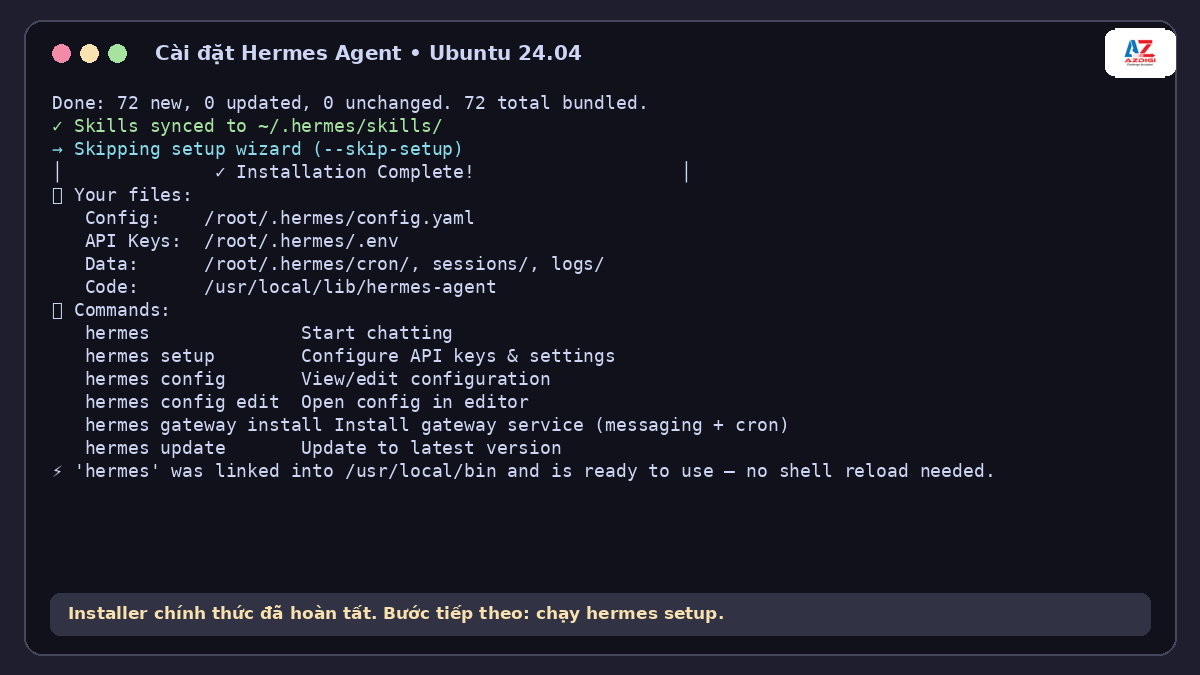
After the installer finishes, the main files are in Hermes Home. For a regular user, the default location is ~/.hermes/. Configuration is stored in config.yaml, while environment variables and API keys go in .env. Sessions, Skills, logs, and cron jobs each have their own directories.
Installing on native Windows
Open PowerShell and run the Windows installer:
iex (irm https://hermes-agent.nousresearch.com/install.ps1)If your workflow needs Linux tools, Docker, or shell scripts, WSL2 is still easier to keep in sync with a VPS. Native Windows is simpler if you mainly use Desktop and PowerShell.
Setting up a model and starting your first session
Run the full wizard:
hermes setupIf you want to use Nous Portal, one account can provide both models and Tool Gateway services:
hermes setup --portalRun hermes model whenever you want to change providers or models. OAuth methods and credential pools are managed through hermes auth. Avoid putting API keys directly in your shell history. Enter them in the wizard or store them in ~/.hermes/.env with restricted read permissions.
hermes model
hermes auth
hermes doctor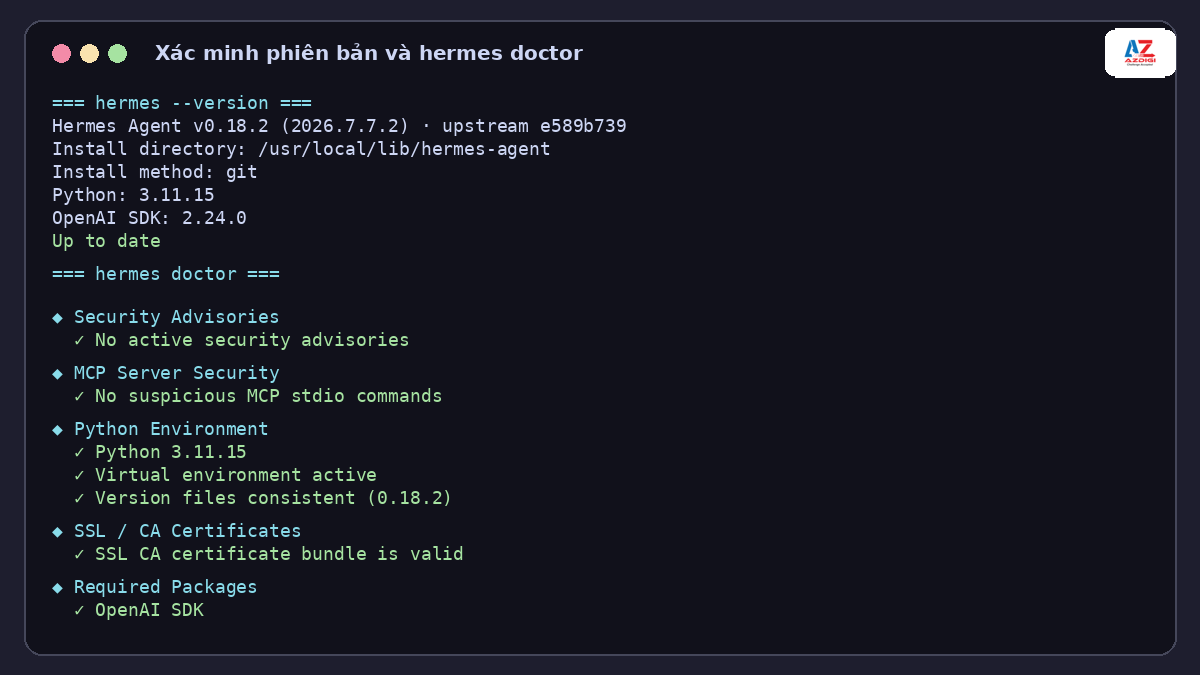
hermes doctor checks the Python version, package, configuration, command symlink, tools, and missing credentials. The lab used --skip-setup, so warnings about providers or the Gateway are expected. On a production machine, resolve each warning and run doctor again.
To open the terminal chat interface, run:
hermesOr send a non-interactive query:
hermes chat -q "Kiểm tra thư mục hiện tại và cho biết dự án dùng ngôn ngữ gì"Useful Hermes Agent commands
| Command | Purpose |
|---|---|
hermes --version | Show the version, installation path, and Python version |
hermes doctor | Diagnose configuration and dependencies |
hermes status --all | View the status of all components |
hermes tools list | See which Toolsets are enabled or disabled |
hermes skills list | View installed Skills |
hermes sessions list | List recent sessions |
hermes profile list | View independent profiles |
hermes config check | Check for outdated or missing configuration |
hermes update | Update Hermes |
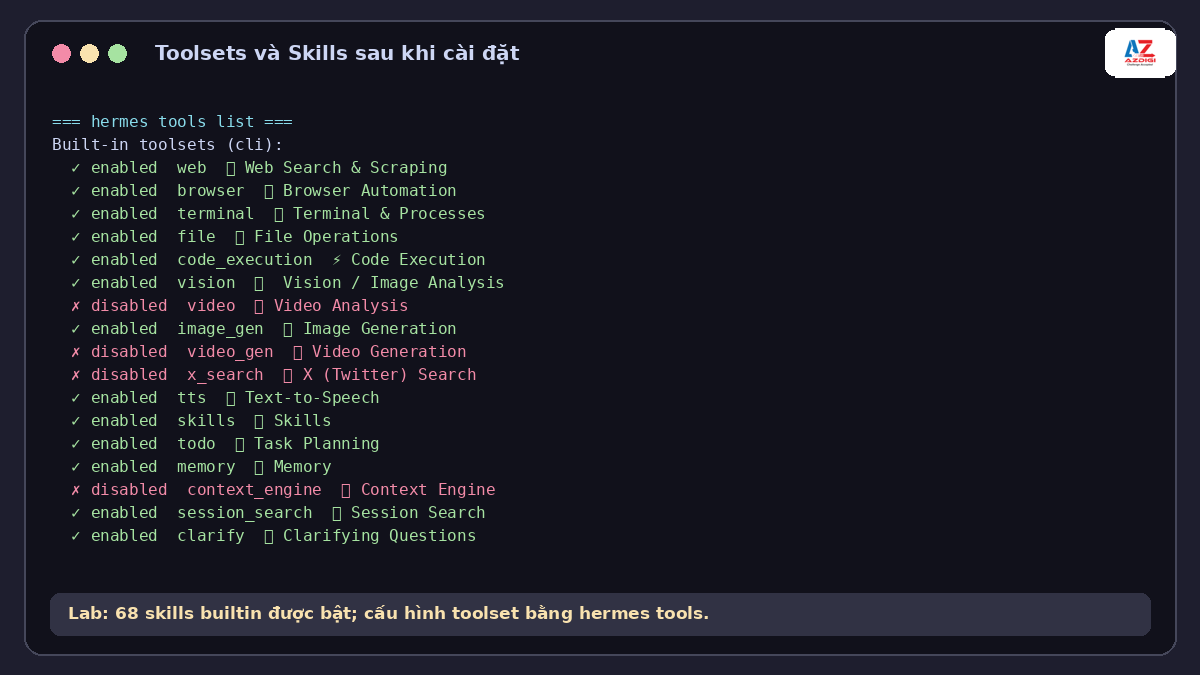
Tool changes take effect in a new session. After enabling or disabling a Toolset, use /reset in chat or reopen Hermes. This keeps the system prompt stable and prevents changes from invalidating the prompt cache during a conversation.
Managing Skills
hermes skills search docker
hermes skills inspect <skill-id>
hermes skills install <skill-id>
hermes skills check
hermes skills update
⚠️ A Skill is content loaded into the agent’s context. Install Skills only from sources you trust, preview them with hermes skills inspect, and review any included scripts or commands.
Using Profiles for multiple agents
Profiles separate configuration, models, sessions, Skills, and Memory. For example, you can create one profile for work and another for testing:
hermes profile create work
hermes --profile work
Opening the Web Dashboard
The Web Dashboard lets you manage configuration, API keys, and sessions in a browser. By default it binds only to 127.0.0.1 on port 9119:
hermes dashboard
hermes dashboard --status
hermes dashboard --no-open
⚠️ Do not expose the Dashboard port directly to the Internet. For remote access, prefer an SSH tunnel, VPN, or Tailscale. A non-loopback bind now requires an authentication provider, and --insecure no longer disables authentication.
Connecting Hermes to Telegram and Discord
The Gateway lets Hermes receive messages when the terminal isn’t open. Run the wizard, choose a platform, and enter the credentials as prompted:
hermes gateway setup
hermes gateway install
hermes gateway start
hermes gateway status
For Telegram, create a bot through BotFather and restrict access with allowed users or DM pairing. For Discord, create an application and bot token, then enable Message Content Intent in the Developer Portal. Check this setting first if the bot joins your server but doesn’t respond.
🚨 A Gateway bot can call tools and access the system within the permissions granted to Hermes. Don’t leave the bot publicly accessible. Use an allowlist or pairing, restrict Toolsets, and run the service under a dedicated Linux user.
After editing the Gateway configuration, run hermes gateway restart. Logs are stored in ~/.hermes/logs/. Check them before replacing a token or reinstalling everything.
Automating tasks with cron
Hermes has its own scheduler. You can schedule a task using an interval, cron expression, or specific time. Provide a self-contained prompt and a clear name when you create it:
hermes cron create "0 7 * * *" "Read errors from the last 24 hours, report only new alerts, and include the source" --name error-report --deliver telegram
hermes cron list
hermes cron status
Each cron run starts a new session, so the job does not inherit the current conversation. Specify the data source, output format, time zone, delivery target, silence conditions, and stopping criteria. If the task belongs to a repository, add --workdir /absolute/path so Hermes loads the project context files and runs tools in the correct directory.
After creation, get the job ID from the list and trigger one test run before relying on the real schedule:
hermes cron list
hermes cron run <job-id>
hermes cron status
💡 Start with read-only tasks such as news summaries, disk space checks, or log reports. No one is sitting at the terminal to approve every cron prompt, so keep dangerous commands denied, observe several runs, and grant write access only when the workflow is predictable.
Security settings for running Hermes 24/7
- Run Hermes under a dedicated Linux user. Don’t use root unless it is genuinely necessary.
- Keep secret redaction enabled and store keys in
~/.hermes/.env. - Use
manualorsmartapproval mode for risky commands. - Enable only the Toolsets required for the job.
- Use pairing or an allowlist for Telegram, Discord, and other channels.
- Don’t mount the Docker socket into a container unless you understand that it can provide root-equivalent access to the host.
- Back up
~/.hermes/and check file permissions regularly.
hermes config set approvals.mode smart
hermes config set security.redact_secrets true
hermes doctor
The approvals.mode: off setting and --yolo flag skip command approval. Use them only in a disposable sandbox or an environment where you have already limited the potential impact. They don’t replace backups, access controls, or output review.
To isolate terminal commands, install Docker on the host and choose the backend through the wizard:
hermes setup terminalYou can also set terminal.backend through the config, but the wizard makes it easier to review related parameters. With the Docker backend, file and terminal tools can operate inside the container rather than directly on the host, depending on the version and configuration.
Updates, backups, and rollback
Hermes changes quickly, so check for an update and create a backup before upgrading. The backup command stores configuration, Skills, sessions, and Hermes data, but it does not archive the codebase:
hermes update --check
hermes backup --quick --label before-update
hermes update --backup
hermes config check
hermes config migrate
hermes doctor
After an update, run Doctor, check the Gateway, and try a read-only task again. For repository work, start chat with checkpoints so you can use /rollback if a file change is incorrect:
hermes chat --checkpoints
hermes security audit
⚠️ A backup may contain .env, authentication data, and session content. Store it privately, restrict read permissions, and never commit it to a repository or place it behind a public sharing link.
Common Hermes Agent installation and usage errors
xz: Cannot exec on a minimal Ubuntu image
On the minimal ubuntu:24.04 image, the installer downloads Node.js as a .tar.xz archive, but the xz extraction utility isn’t installed. Here is the actual output from the lab:
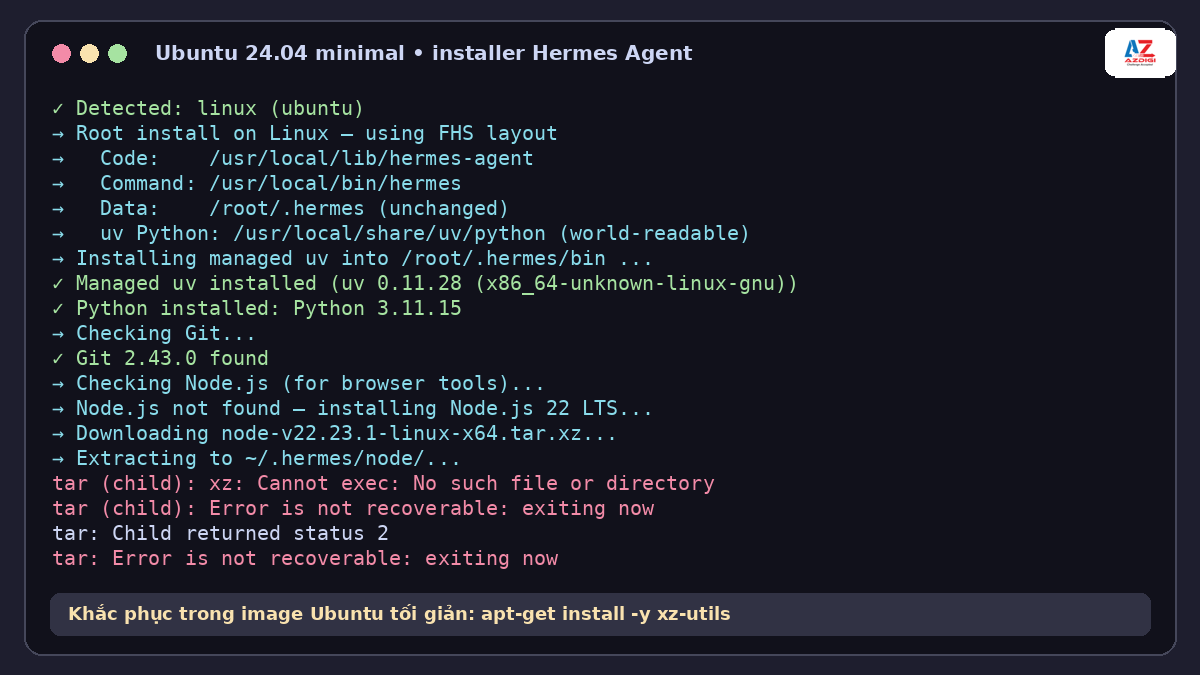
Install xz-utils, then run the installer again:
apt-get update
apt-get install -y curl git ca-certificates xz-utils
The hermes command is not found
Open a new terminal or check your PATH. Then run hermes doctor --fix to repair the symlink if doctor reports that it is missing.
hermes doctor --fix
hermes --version
Outdated configuration after an update
hermes config check
hermes config migrate
hermes doctor
The Discord bot doesn’t respond
Check Message Content Intent, the token, the allowlist, and Gateway status. After making changes, restart the Gateway and review the logs.
hermes gateway restart
hermes gateway status
A Tool doesn’t appear in the current session
Check with hermes tools list. If you just enabled the Toolset, start a new session with /reset. Some tools are available only when their corresponding environment variables or dependencies are present.
VPS deployment tips
A Linux VPS is a good fit when Hermes needs to receive messages and run cron jobs continuously. Choose a supported operating system, use a dedicated user and SSH key, configure a firewall and backups, and allow enough free space for sessions, logs, and working files.
If you don’t have a lab machine, consider Pro VPS from AZDIGI. Choose resources based on the tools you plan to use. A basic Gateway that calls a model API needs far fewer resources than a local model, browser automation, or several parallel subagents.
A 15-minute Hermes Agent setup checklist
If this is your first self-hosted AI agent, avoid enabling every feature at once. The sequence below separates installation, model, and Gateway problems into layers that are easier to test.
- Install from the official source: use the Nous Research installer rather than an image or script with no clear maintainer.
- Record the version: run
hermes --versionso you know exactly which release you tested. - Choose one provider: start with a single model through
hermes setuporhermes model. - Run Doctor: fix required errors first. Warnings for tools you have not configured can wait.
- Try a read-only task: ask Hermes to inspect a directory or explain a configuration file. Check that it uses the expected tool and stays within scope.
- Try one small write: create a temporary file in a lab directory, read it back, then remove it manually.
- Check approvals: keep
smart, or usemanualif the machine contains important data. - Enable the Gateway last: configure an allowlist or pairing before leaving the bot online.
- Create a read-only cron job: run it manually, inspect its output and delivery target, then make it recurring.
- Back up Hermes Home: save the configuration, sessions, Memory, and Skills before major upgrades.
ℹ️ Start a new session after important configuration changes. Settings such as secret redaction are loaded when the process starts and should not be changed halfway through a session.
Three practical workflows to start with
Summarize system logs every morning
Create a read-only script for the logs you need to watch, have it print only relevant changes to stdout, then use cron to deliver a summary. This is safer than letting a model scan the entire server because the data source and permissions are bounded in advance.
A research assistant in Telegram
Enable the web tool, connect Telegram with pairing, and require Hermes to save sources with URLs. Start with short questions and use a separate session for each subject so history remains searchable. If the result will be published, verify the original source and its update date.
A project assistant with dedicated Skills
Create a profile for the project, set the working directory to the correct repository, and write a Skill for the test or release procedure. The profile keeps sessions, Memory, and Skills separate from your personal assistant. For important repositories, combine Git branches, worktrees, or checkpoints with the workflow so larger changes have a recovery path.
💡 A workflow is ready for automation when you can state its input, output, required permissions, stopping conditions, and verification method. Keep a human approval step when the task still depends on judgment that is difficult to check.
Frequently asked questions
Is Hermes Agent free?
Hermes Agent is open-source software released under the MIT License. You may still have costs for model APIs, a VPS, storage, bandwidth, or hardware if you run a local model.
Does Hermes Agent run on Windows?
Yes. Hermes now has a native Windows installer and a Desktop app. WSL2 is still useful if your workflow needs a Linux environment or should match a VPS.
Do I need Docker to use Hermes Agent?
No. Hermes can run directly on Linux, macOS, and Windows. Docker is useful when you want to sandbox terminal commands or create an isolated lab environment.
Can Hermes Agent use a local model?
Yes. You can configure a custom OpenAI-compatible endpoint such as Ollama, LM Studio, or vLLM. The model needs enough context and suitable tool-calling support for your workload.
Should I start with Telegram or Discord?
Telegram is usually quicker to set up for a personal bot. Discord is better suited to servers and group threads, but its bot permissions and Message Content Intent need careful configuration.
Conclusion
The simplest way to get started is to install Hermes with the official installer, run hermes setup, choose a provider, check the installation with hermes doctor, and try a read-only task. Add the Gateway, cron, browser, or file write permissions only after that works.
When you deploy Hermes on a VPS, treat it as a process with real system access. Use a dedicated user, restrict its tools, enable approvals, keep secret redaction on, and back up ~/.hermes/. These precautions take a few extra minutes at the start but reduce the risk once the agent begins handling automated work.
You might also like
- OpenClaw hybrid: Gateway on VPS + Node on local Mac
- What is MCP? How AI agents connect to tools and external data
- OpenClaw Security: Step-by-Step Safe Configuration Guide
- What is Claude Code Channels? Complete Guide to Connecting Claude Code with Telegram and Discord
- Some Skills Worth Considering for OpenClaw
- Complete OpenClaw Guide: Step-by-Step Tutorial from A to Z
About the author

Trần Thắng
Expert at AZDIGI with years of experience in web hosting and system administration.