Fixing the robots.txt file is not writable error when using Rank Math with 2 steps.
Introduction
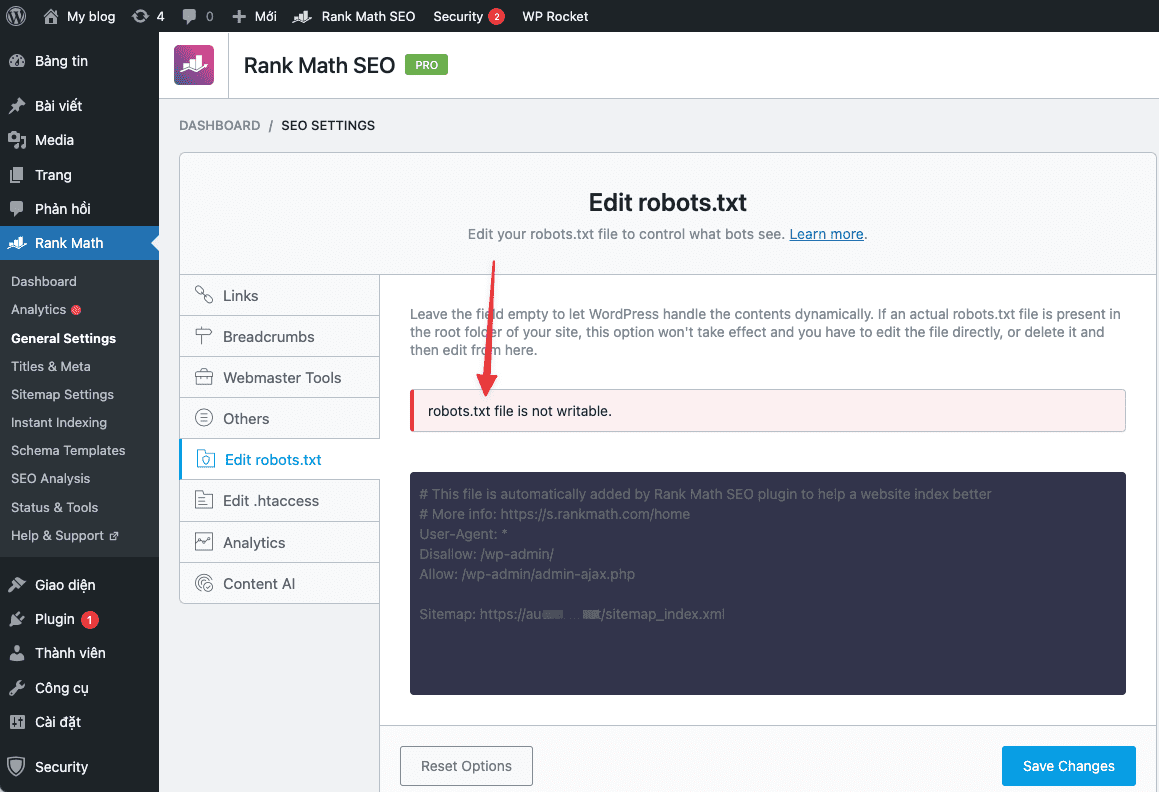
Recently AZDIGI has supported customers to handle an error case recorded on the Rank Math Plugin that is the error of not being able to edit the robots.txt file and the error message robots.txt file is not writable as shown below:
This error is not too common, but in this article, AZDIGI will guide you on handling it if you accidentally encounter it.
Implementation Guide
This error will notify you that you currently do not have permission to edit the content of the robots.txt file, please check as below:
- Check the permissions of the robots.txt file
In this case, you need to access the Host/VPS containing your website. Next, at the robots.txt file, you check its Permissions to see if it is correctly set to 644, if not, you need to re-authorize it to correct 644.

- Check the wp-config.php file
With 90% of cases I encounter, it will often fall into this case. First, you need to access the Host/VPS containing your website, then you open and edit wp-config.php.

After opening the file, you can look in the wp-config.php file to see if there is a paragraph similar to the content below. If so, you can delete this line or add a # character at the beginning of the line, to disable it. Since this option means it will not allow you to edit the Theme and Plugin in the WordPress dashboard (Usually this line will be automatically added when you install Security Plugins, for example: iThemes Security).
define( 'DISALLOW_FILE_EDIT', true );
After you have deleted or added the # character for the above line, now try to check and edit your Robot.txt file.
And below are my results, now editing the robot.txt file is working properly.

You can refer to other instructions at the link below:
If you need support, you can contact support in the ways below:
- Hotline 247: 028 888 24768 (Ext 0)
- Ticket/Email: You use the email to register for the service and send it directly to: support@azdigi.com .
You might also like
- Fixing the error of not posting posts when scheduling on WordPress
- Rank Math and Elementor Plugin - The Perfect SEO Duo for WordPress
- How to fix the error of not uploading images on WordPress
- Index posts instantly with Rank Math SEO
- Rank Math integrates the Index Now feature for WordPress websites
- How to fix "Error establishing a database connection" on WordPress
About the author

Thạch Phạm
Đồng sáng lập và Giám đốc điều hành của AZDIGI. Có hơn 15 năm kinh nghiệm trong phổ biến kiến thức liên quan đến WordPress tại thachpham.com, phát triển website và phát triển hệ thống.