
Cloudflare Tunnel is quite convenient when you want to expose internal services to the outside without opening ports directly on your router or VPS. The approach is clean, integrates well with the Cloudflare ecosystem, and suits many needs from homelabs to small environments. But if you want more autonomy, less dependency, or simply want an option that better fits your own infrastructure, there are still several tools worth considering.
In this article, I focus on just one comparison table: free or open-source tools that can be self-hosted and serve the reverse tunnel or publish internal services use case. Each tool has a different philosophy, so rather than trying to find a perfect replica of Cloudflare Tunnel, it’s better to see which tool fits your deployment approach.
When to Look for Cloudflare Tunnel Alternatives
Cloudflare Tunnel works well when you’re already using Cloudflare and want to quickly set up a tunnel for websites, dashboards, or internal applications. But there are several situations that make users want to look at other tools. For example, you want to have full control over the entire tunnel server. Or you need a solution with fewer constraints from a specific provider. Or you’re running a homelab and just need a lightweight, easy-to-configure tool.
If you plan to self-host a reverse tunnel or public gateway for internal services, you should prepare a Pro VPS or X-Platinum VPS as an intermediate point. This is usually the simplest way to maintain stable connections and easy management.
frp: A Powerful Choice if You Want Full Control Over Reverse Tunnels
frp is one of the most easily mentioned names when talking about self-hosted reverse tunnels. This tool has been around for quite a while, is used by many people, and is flexible in many different types of connections. If what you want is a powerful solution with many types of forwarding that doesn’t depend on external platforms, frp is a very worthy candidate.
frp’s strength lies in its control capabilities. You build your own server, manage your own tunnel, and decide your own deployment model. For sysadmins or developers already familiar with working with configuration files, this is a big advantage. frp works well with lab environments, homelabs, reverse proxies for internal applications, or even controlled models for publishing services to the Internet.
The trade-off is a higher technical complexity than Cloudflare Tunnel. frp doesn’t give you a ready-made ecosystem of edge, DNS, WAF, or access control. If you like the “turn on and use” approach, frp will require more operational effort.
Rathole: Clean, Fast, and Suitable for Simple Tunnels
Rathole suits people who like a clean tool focused on doing exactly what it says: creating tunnels. Compared to frp, Rathole is often mentioned for being lightweight, having fewer components, and good performance. If your needs aren’t too broad, this is a very easy option to put on your must-try list.
The good thing about Rathole is that it doesn’t try to become too many things at once. It’s suitable when you just need a clear tunnel between internal and external machines, without needing many additional feature layers. For people who already have their own reverse proxy or security layer, this approach makes quite a bit of sense.
The limitation is that the ecosystem and feature scope aren’t as broad as frp, and certainly can’t compare to an integrated service like Cloudflare Tunnel. Therefore, Rathole suits simple tunnel needs, rather than being a replacement for the entire Cloudflare ecosystem.
Boringproxy: Suitable for Homelabs and Personal Web App Publishing Needs
Boringproxy is an option that easily suits homelab enthusiasts or those self-hosting personal applications. It doesn’t try to become a large-scale edge security platform, but goes in a simpler direction: helping you publish internal services to the outside in an understandable and cleaner way.
Boringproxy’s strength lies in how easy it is to visualize use cases. If you’re running a dashboard, a personal app, or a few services that need to be opened to the Internet for a small group, this is quite a practical type of tool. It suits people who want to reduce configuration complexity while still being able to self-host.
The limitation is that the community scale and feature depth can’t compare to Cloudflare Tunnel or frp. Therefore, if you need more layers of control, Boringproxy will suit smaller environments rather than strict production systems.
zrok: Worth Considering if You Want a More Modern Way to Share Services
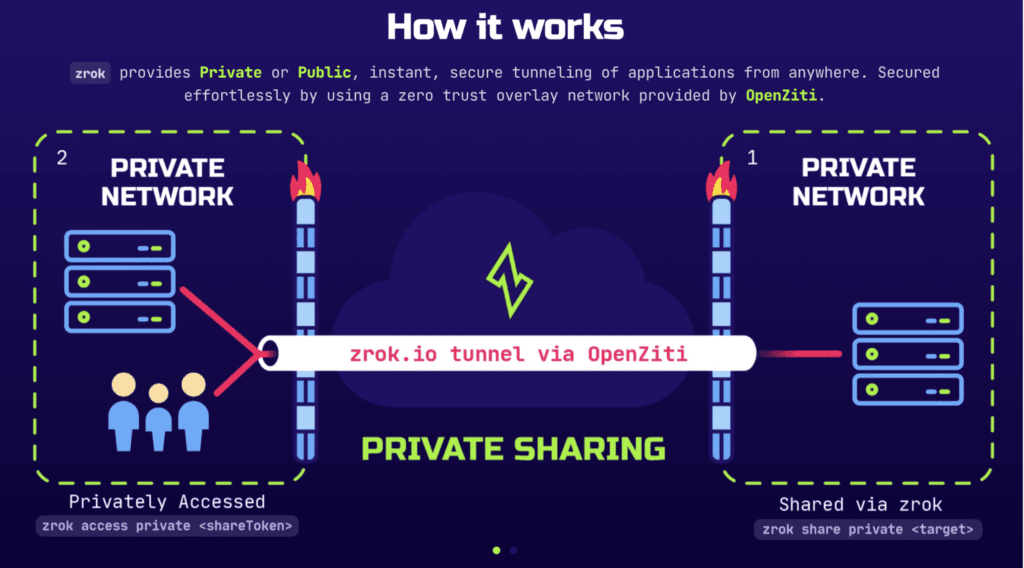
zrok is quite an interesting name because it doesn’t just talk about tunnels in the old way, but also goes in the direction of sharing internal services, private apps, and endpoints according to a more modern model. This is a noteworthy option if you don’t just need to “open a port to the outside,” but also want a management and sharing experience that’s more product-like.
zrok’s strength is its quite new approach and easy extension of use cases. It suits developers, small teams, or lab environments that need to share services quickly while still wanting to maintain self-hosting capabilities. In some situations, zrok feels closer to modern workflows than just pure tunneling.
The consideration point is that zrok isn’t a direct replacement in the style of “Cloudflare Tunnel but completely open source at every layer.” To use it effectively, you should still understand clearly where your needs lie: simple reverse tunnel, sharing internal applications, or a hybrid model between self-host and managed.
Which Tool Should You Choose
- Choose frp if you want strong control, many tunnel types, and don’t mind technical configuration.
- Choose Rathole if you need a clean, fast tunnel solution with few components.
- Choose Boringproxy if you’re running a homelab or a few personal web apps and want a simpler way to publish services.
- Choose zrok if you need a more modern, more flexible way to share internal services than traditional tunneling.
Cloudflare Tunnel is still a very convenient choice if you’re already in the Cloudflare ecosystem and want to move fast. But if you prioritize infrastructure autonomy or want a different model that better fits labs, homelabs, or self-hosted environments, all four tools above are worth looking at. In conclusion, look at how you want to operate long-term, not just at which tool gets up and running fastest.
If you plan to self-host a reverse tunnel gateway on a VPS, spend time doing the security part thoroughly: firewall, authentication, monitoring, and configuration backup. This is where many people finish setting up the tunnel and only then start worrying about access control, when they should have thought about it from the beginning.
You might also like
- 4 Free and Open Source Zimbra Alternatives Worth Considering
- 4 Free and Open-Source Coolify Alternatives for Self-Hosting Applications
- Cloudflare Tunnel: Access Your Home Computer Remotely Without Port Opening
- Comparison: Google Workspace, Microsoft 365, Zoho Workplace, Proton for Business, and Fastmail
- What is Flowise? When Should You Self-Host It on a VPS?
- What Is Hermes Agent? Installation and Usage Guide
About the author

Trần Thắng
Expert at AZDIGI with years of experience in web hosting and system administration.