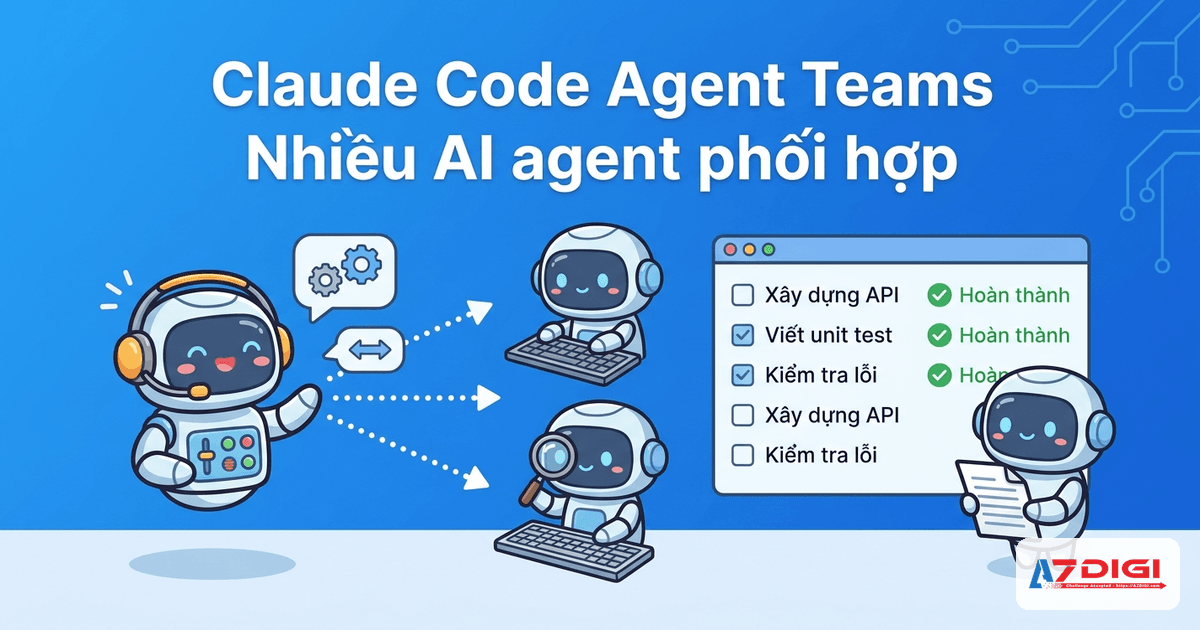
Claude Code already has quite a few powerful features such as Slash Commands, Agent Skills, and Channels. But with Agent Teams, the way you use Claude Code changes more noticeably: instead of one main agent doing everything, you can have multiple Claude Code sessions coordinate like a small team, with someone leading, someone taking tasks, and someone reviewing or challenging the work.
I tested this feature directly on my machine before writing this article. The Claude Code version installed locally was 2.1.92, which is sufficient to enable Agent Teams. Two small lab rounds showed that this feature really works, creates local state in ~/.claude/teams/ and ~/.claude/tasks/, and produces fairly sensible results when work is split across multiple parallel hypotheses.
ℹ️ Agent Teams is still an experimental feature at the moment. You need to enable the CLAUDE_CODE_EXPERIMENTAL_AGENT_TEAMS=1 flag before using it.
What is Agent Teams in Claude Code?
In simple terms, Agent Teams is a mechanism that lets multiple Claude Code sessions work at the same time on one shared problem. One session acts as the team lead, responsible for creating the team, assigning tasks, tracking progress, and consolidating the results. The remaining sessions are teammates, each with its own context, able to work independently and send messages to one another.
The key difference is that teammates do not just report back to the lead. They can all see the same shared task list, pick up work, complete it, and coordinate with each other when needed. For problems with multiple research branches or separate workstreams, this approach makes more sense than having one main agent carry the entire context alone.
How is Agent Teams different from Subagents?
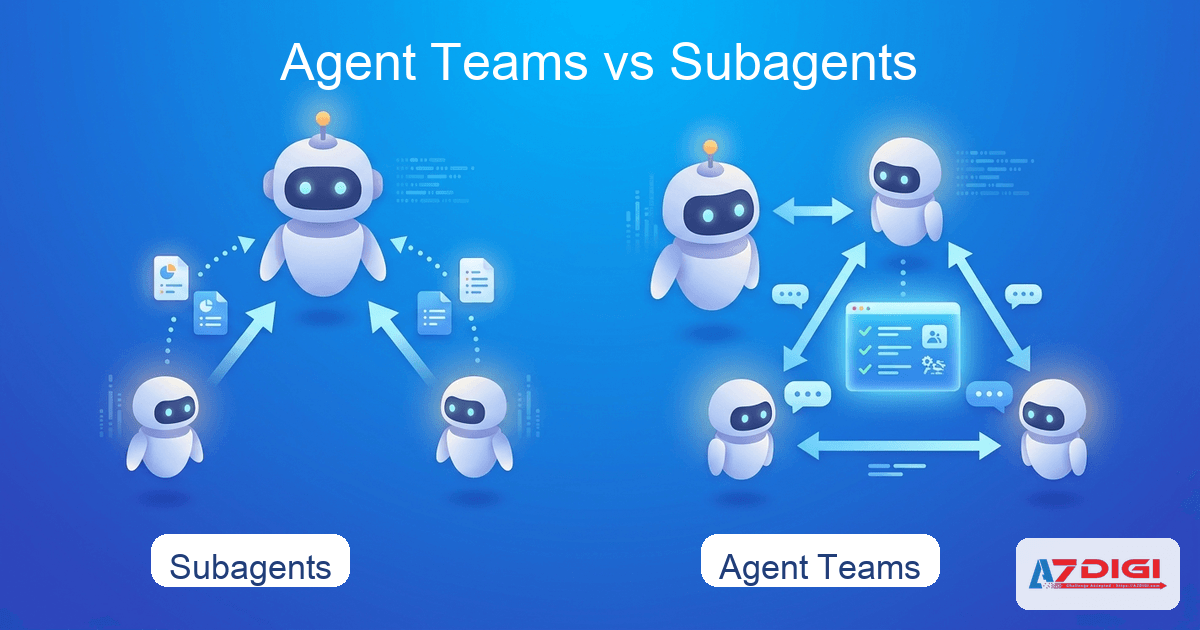
If you have already read the article on Subagents in Claude, this part will be easier to visualize.
| Criteria | Subagents | Agent Teams |
|---|---|---|
| Communication style | Only return results to the main agent | Teammates can message each other directly |
| Coordination | The main agent manages everything | There is a shared task list, and the lead and teammates coordinate together |
| Best suited for | Small, clear tasks that only need a final result | Larger tasks with multiple branches that need agent-to-agent collaboration |
| Token cost | Lower | Clearly higher because each teammate is a separate session |
That is the simple version: Subagents are like assigning work to an assistant and waiting for a report. Agent Teams are like setting up a small group where each person owns a part and they communicate back and forth while working.
💡 If you only need one helper agent to gather information or quickly inspect one part of a codebase, subagents are usually a better fit. Agent Teams is better reserved for tasks that can truly be parallelized.
When should you use Agent Teams?
Based on both the official docs and my real lab experience, Agent Teams works well in a few situations like these.
- Parallel research and review: each teammate handles one perspective, such as security, performance, or test coverage.
- Debugging with multiple hypotheses: each teammate follows a different line of investigation so you do not get locked into the first assumption.
- Features split into relatively independent parts: frontend, backend, documentation, and testing.
- Cross-layer coordination: one change affects the application, API, and testing layer at the same time.
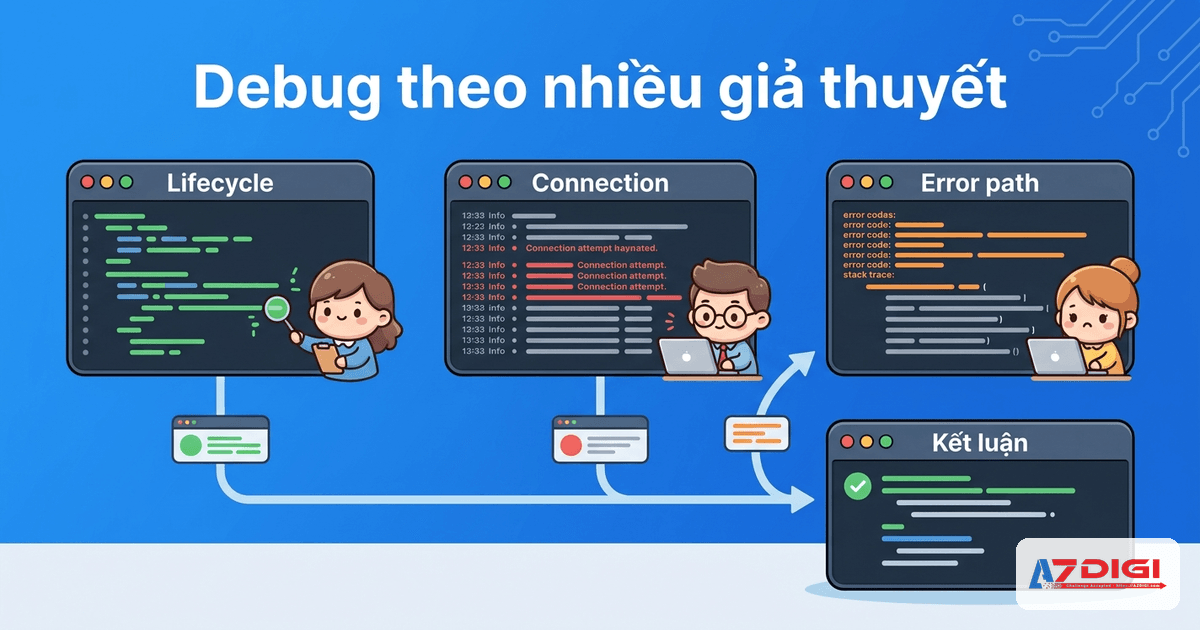
In my lab, the second test round used 3 teammates to debug a hypothetical issue: after handling one message, a terminal assistant would sometimes exit on its own. Each teammate followed a separate hypothesis, covering lifecycle, connection, and error-path. The result was quite interesting: all 3 branches converged on the strongest root-cause group, namely a broken main loop or a race condition in async handling. For this kind of problem, Agent Teams feels more natural than forcing a single session to walk through each hypothesis one by one.
When should you not use it?
Agent Teams is not the default mode for everything. If you use it in the wrong place, you will spend more tokens without getting proportional benefit.
- Short tasks with only a few steps and no need for separate roles.
- Multiple tasks that touch the same file or depend on the same intermediate result.
- Sequential work where step 1 must be completed before step 2 can begin.
- Cases where you need to save tokens and reduce operational complexity.
Lab round 2 also showed a very practical point: when the input is still vague, multiple teammates may make overlapping inferences. The result can still be useful, but adding more teammates does not automatically increase quality.
⚠️ For small tasks or work with little branching potential, Agent Teams often adds coordination overhead without delivering any clear benefit.
Requirements for enabling Agent Teams
At the time of writing, Agent Teams requires Claude Code version 2.1.32 or later. On top of that, this is still an experimental feature, so you need to enable it through an environment variable or in the configuration file.
{
  "env": {
    "CLAUDE_CODE_EXPERIMENTAL_AGENT_TEAMS": "1"
  },
  "teammateMode": "in-process"
}
If you want to check the Claude Code version you are using, you can run the following command:
# Check the Claude Code version
claude --version
In my local lab, this command returned 2.1.92, so it met the requirement to enable and test Agent Teams.
How to start your first Agent Team
If you want a clear step-by-step guide, this is the shortest workflow I used to run the lab directly on my machine.
Step 1: create a settings file to enable Agent Teams
# Create a dedicated settings file for the Agent Teams lab
mkdir -p temp/agent-teams-lab
cat > temp/agent-teams-lab/settings.json <<'JSON'
{
  "env": {
    "CLAUDE_CODE_EXPERIMENTAL_AGENT_TEAMS": "1"
  },
  "teammateMode": "in-process"
}
JSON
I kept a separate settings file for the lab to make control easier. This is more convenient than editing the global config if you only want to try the feature in one run.
Step 2: run a small prompt so Claude Code creates a team automatically
# Run Claude Code with Agent Teams enabled
export CLAUDE_CODE_EXPERIMENTAL_AGENT_TEAMS=1
claude --print --permission-mode bypassPermissions \
  --settings temp/agent-teams-lab/settings.json \
  'Create a very small agent team with 2 teammates: one UX, one architecture. Work only in ~/workspace/temp/agent-teams-lab. Evaluate a tiny CLI TODO tracker idea. Write concise findings to ~/workspace/temp/agent-teams-lab/lab-report.md. Then summarize in your final response. Keep it small.'
The prompt above is intentionally narrow: only 2 teammates, one looking from a UX angle and one from an architecture angle. The goal is to verify whether Claude Code really creates a team, actually runs work in parallel, and writes the result to a file.
Step 3: read the actual output in the report file
# Agent Team Lab Report: CLI TODO Tracker
## UX Evaluation
- Fuzzy matching for completion/deletion (`todo done milk` instead of IDs)
- Colorized summary mode with counts by priority
- Support piping (`todo list | grep shopping`)
## Architecture Evaluation
- Stack: Node.js + Commander.js, native fs, JSON file storage
- Concurrent writes can corrupt JSON, so atomic writes are needed
- Keep dependencies minimal
## Combined Takeaway
The CLI TODO tracker is a viable micro-tool for developer workflows.
This section is condensed real output from the lab file on my machine. It shows that the team lead received results from both teammates and merged them into one shared conclusion. For idea reviews or evaluations from multiple perspectives, Agent Teams handles this part quite neatly.
Step 4: inspect the local artifacts Claude Code creates
# Inspect team config and task storage after the lab
cat ~/.claude/teams/idea-eval-lab/config.json
ls -la ~/.claude/teams/idea-eval-lab
ls -la ~/.claude/tasks/idea-eval-lab
This was one of the most notable parts of the lab. Agent Teams is not just a concept in the docs. Claude Code really creates local state on the machine. For example, in the team config.json file I could clearly see members such as team-lead, ux-reviewer, arch-reviewer, along with the model in use, each teammate’s prompt, and the working directory.
{
  "name": "idea-eval-lab",
  "leadAgentId": "team-lead@idea-eval-lab",
  "members": [
    {
      "name": "team-lead",
      "agentType": "team-lead"
    },
    {
      "name": "ux-reviewer",
      "agentType": "general-purpose",
      "backendType": "in-process"
    },
    {
      "name": "arch-reviewer",
      "agentType": "general-purpose",
      "backendType": "in-process"
    }
  ]
}
ℹ️ In this lab, Claude Code created local state in ~/.claude/teams/idea-eval-lab/ and a lock file in ~/.claude/tasks/idea-eval-lab/.lock.
Step 5: try a debugging use case with multiple hypotheses
Use 3 teammates with these roles:
- lifecycle investigator
- connection investigator
- error-path investigator
Investigate why a terminal chat assistant sometimes exits after one message.
Have them produce concise findings and synthesize a final conclusion.
This was the second lab round I used to test a more realistic use case. What I wanted to see was this: when there are multiple competing hypotheses, does Agent Teams help split the thinking into branches more effectively?
## Investigation Team
| Investigator | Hypothesis | Confidence |
|---|---|---|
| Lifecycle | Session lifecycle / shutdown bug | Medium |
| Connection | Transport or connection management issue | Medium |
| Error-Path | Error handling path that ends the main loop | Low-to-Medium |
## Most Likely Root Cause Candidates
1. Broken or missing main loop
2. Async race condition / task cancellation
3. Non-deterministic error swallowed silently
The real output from round 2 showed the three teammates following three different branches, then converging on the strongest group of root causes. If you want to use Agent Teams for debugging, this is a pattern well worth trying.
💡 For multi-hypothesis debugging, you should brief each teammate with a very specific investigation direction. If the brief is vague, teammates can overlap too easily and you lose the parallel advantage.
Display mode, task list, and how to control the team
Agent Teams currently supports two main display modes:
- in-process: all teammates run in the main terminal, and you switch between them.
- split panes: each teammate has its own pane, which is useful when you want to watch multiple branches at the same time. This method requires tmux or iTerm2.
According to the docs, Claude Code will automatically use split-pane mode if the environment supports it. In my lab, I deliberately used in-process to keep the scope tighter and reduce extra variables introduced by tmux.
One nice thing about Agent Teams is the shared task list. The lead can assign tasks, and teammates can also pick up open tasks on their own as long as they are not blocked by dependencies. The system uses file locking to prevent two teammates from grabbing the same task.
What can Agent Teams actually do in a real lab?
This is the part I found most valuable when writing about Agent Teams. If you only read the docs, you understand the theory. But once you run a real lab, several practical points become very obvious.
- The team is genuinely created and has local state in
~/.claude/teams/. - The task list also exists locally in
~/.claude/tasks/. - Teammates can run in parallel and produce results that are different enough to be synthesized.
- The overhead is real: runtime and token cost increase as the number of teammates grows.
In round 2, I also noticed a very ordinary limitation: if the prompt lacks real data, many agents still have to infer things and may overlap with each other. Agent Teams does not magically turn vague input into better data. It simply helps you branch your thinking and test hypotheses in a more organized way.
A few use cases developers should try
If you are already using Claude Code in your daily work, you can start with these three kinds of use cases.
- Code review using multiple criteria: assign one teammate to security, one teammate to performance, and one teammate to test review.
- Multi-hypothesis debugging: each teammate follows a separate line of investigation, then the lead consolidates which direction is worth pursuing next.
- Building multi-layer features: one teammate handles the API, one teammate handles the frontend, and one teammate handles testing or documentation.
For people working with WordPress or server administration, this model also has room to shine. For example, if you want to inspect an internal plugin, one agent can read the code to find likely failure points, one agent can review performance, and one agent can prepare a testing checklist. Compared to cramming everything into one long prompt, this approach puts less pressure on the context window.
Should you use Agent Teams every day?
Yes, but as a specialized tool. Agent Teams fits problems that are large enough, branch enough, and are independent enough to split apart. For everyday work, a normal Claude Code session or Subagents is still cleaner and more efficient.
If you need a stable environment to run CLI tools, AI workflows, or long-term labs like this, you can check out X-Platinum VPS or Pro VPS from AZDIGI. For testing command-line tools, running terminal multiplexing, or setting up a separate environment to try multiple AI workflows, a clean VPS is still easier to control than piling everything onto your personal machine.
What is Claude Code Agent Teams?
This is a feature that lets multiple Claude Code sessions coordinate with each other on a shared task list. One session acts as the team lead, while the others act as teammates with their own context.
How is Agent Teams different from Subagents?
Subagents only report back to the main agent, while Agent Teams allows teammates to communicate directly with each other and coordinate through a shared task list.
When should you use Agent Teams?
You should use it when a task can be split into multiple independent branches such as parallel research, multi-perspective review, debugging with multiple hypotheses, or implementing a multi-layer feature.
Does Agent Teams use more tokens?
Yes. Each teammate is a separate session with its own context, so token usage increases with the number of active agents.
Do you need separate configuration to use Agent Teams?
Yes. At the moment, you need to enable the CLAUDE_CODE_EXPERIMENTAL_AGENT_TEAMS=1 configuration variable and use a Claude Code version that supports this feature.
If you are already comfortable with basic Claude Code, have used a few real workflows, and are starting to feel that one agent is not enough, Agent Teams is a feature well worth trying. It is not a replacement mode for everything yet, but for multi-branch research, review, and debugging, it is a fairly clear upgrade for Claude Code.
You might also like
- What is MCP? How AI agents connect to tools and external data
- What Is Hermes Agent? Installation and Usage Guide
- What is Claude Code Channels? Complete Guide to Connecting Claude Code with Telegram and Discord
- Integrating OpenViking into OpenClaw: Upgrading AI Agent Memory, Reducing Token Costs by 83%
- Some Skills Worth Considering for OpenClaw
- OpenClaw hybrid: Gateway on VPS + Node on local Mac
About the author

Trần Thắng
Expert at AZDIGI with years of experience in web hosting and system administration.