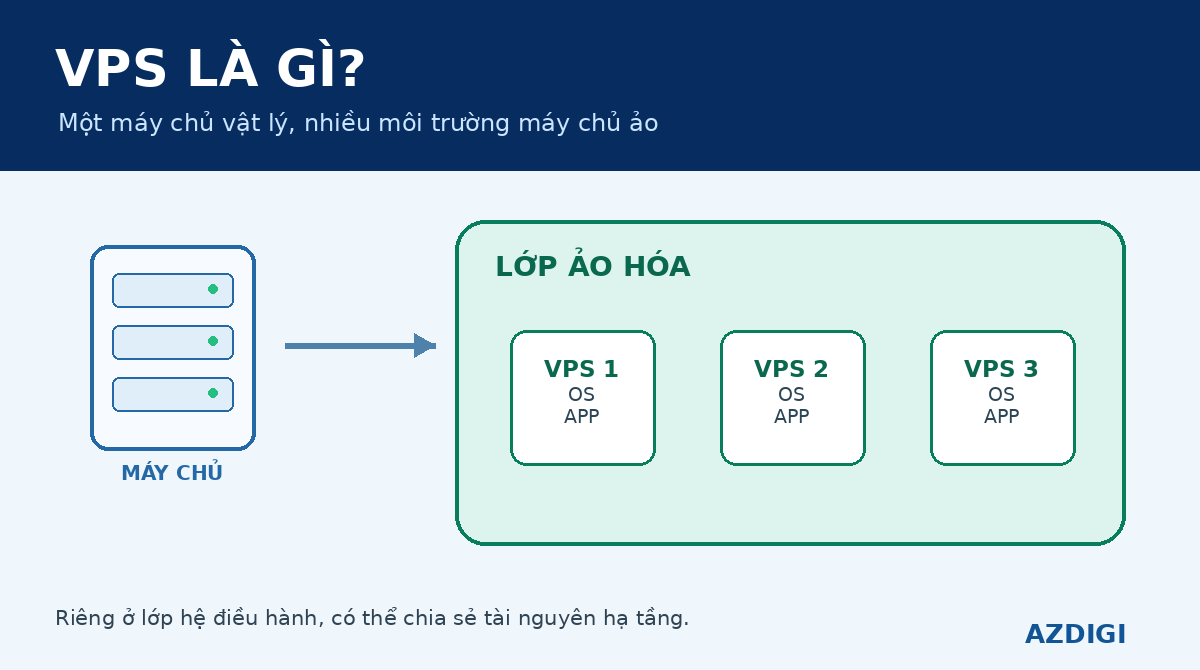
A VPS, or Virtual Private Server, is a virtual server that runs on physical infrastructure through a virtualization layer. Each VPS has its own operating system, storage space, network configuration and administrative environment. CPU, memory, disk and network capacity still come from underlying hardware, so the extent to which each resource is dedicated or shared depends on the technology and the provider’s allocation policy.
A VPS is useful when a website or application needs more control than Shared Hosting provides but does not require an entire physical server. It can run a custom web stack, database, Docker, VPN or background services. In return, the administrator takes on more responsibility for operating-system updates, security, backups and resource monitoring.
| Requirement | Often suitable option |
|---|---|
| Small website with no server administration | Shared Hosting or Managed Hosting |
| Root access, custom software or several services | VPS |
| Lower dependence on one physical host | A Cloud Server service with appropriate HA |
| The full physical server and consistent hardware access | Dedicated Server |
What is a VPS, and is it a private server?
VPS stands for Virtual Private Server. The word “virtual” means that it is not a separate physical machine. A VPS is a computing environment created in software on top of physical infrastructure.
The word “private” needs more context. A VPS has a filesystem, accounts, processes and operating-system environment isolated from other VPS instances. Users commonly receive root access on Linux or Administrator access on Windows. However, several underlying resources can still be provided by the same physical host to multiple virtual machines.
A VPS is therefore private at the operating-system and administrative-environment level, but that does not mean every vCPU, disk queue or network port is absolutely dedicated. To understand the actual isolation boundary, check the resource agreement, storage architecture, IOPS limits, CPU policy and provider design.
A hosted VPS also differs from a virtual machine running in VirtualBox on a laptop. Both are virtual machines, but a VPS is delivered as a server service in a data center, stays connected to the network and normally has public or private networking for remote applications.
How does a VPS work?
A physical server has processors, memory, disks and network interfaces. A virtualization layer sits between this hardware and the virtual machines, creating several environments that can run independently on the same host.
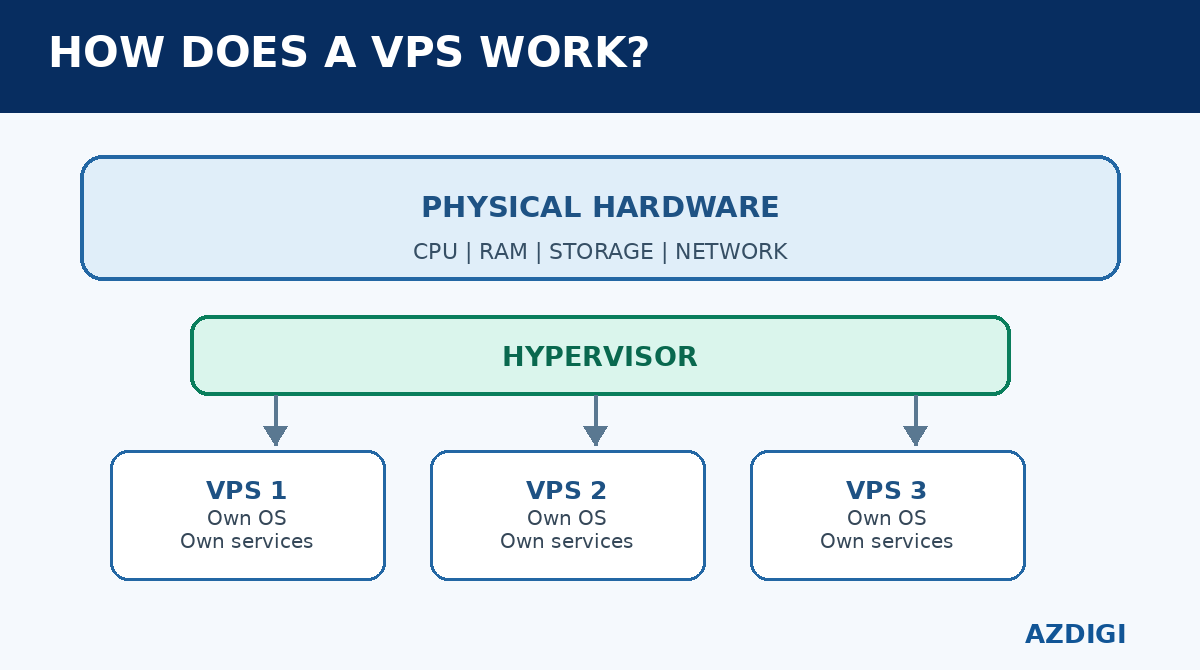
Physical host
The host is the actual server in the data center. It provides compute capacity, memory, storage and network connectivity. If a VPS uses local disks, its virtual disk data is stored on drives attached to that host. If the service uses shared or distributed storage, the data may live on a storage system separated from the compute host.
Hypervisor
The hypervisor creates, starts, stops and allocates resources to virtual machines. Red Hat describes a hypervisor as software that pools processing, memory and storage, then assigns those resources to VMs. KVM, Microsoft Hyper-V and VMware vSphere are common examples in server environments.
KVM is built into the Linux kernel and provides the foundation for Linux to run virtual machines with virtual hardware. Using KVM does not by itself guarantee that a provider never overcommits CPU or shares I/O. The hypervisor creates and runs VMs; resource-allocation policy is a separate layer.
Guest operating system
Each full VM runs its own guest operating system. A Linux VPS has the kernel and userspace of the selected distribution inside the VM. A Windows VPS runs Windows Server and provides the corresponding Administrator environment. This separation allows users to configure packages, firewalls, services and runtimes independently of neighboring VMs.
Provisioning and networking
When a VPS is created, the platform normally selects a host, attaches an operating-system image, creates a virtual disk, assigns vCPU and memory, and configures a virtual network interface. IP addresses, gateways, DNS and firewall rules are applied according to the platform.
Increasing capacity later may require stopping or rebooting the VM, especially when changing CPU, memory or the system partition. Some platforms support hot-add for selected resources, but it is unsafe to assume that every VPS can be resized without interruption.
Are CPU, memory, storage and bandwidth really private?
The short answer is that some boundaries are private while others are shared. The exact model depends on the service plan.
vCPU
A vCPU is the logical processor visible to the guest operating system. The hypervisor schedules vCPU execution time on physical cores. Some services provide dedicated vCPU or pin vCPUs to cores. Many general-purpose services use shared vCPU and may overcommit capacity to use otherwise idle resources efficiently.
Shared vCPU is not automatically slow. It works well for workloads with moderate average CPU use and occasional peaks. Performance becomes less predictable when the host has too many VMs or several instances become CPU-heavy at the same time.
Memory
The memory shown inside a VPS usually has a clearer boundary than CPU, but ballooning, swap, memory overcommit or container limits may still matter depending on the platform. When Linux runs out of memory, it may use swap or invoke the OOM killer. Administrators should watch the application’s actual working set instead of relying only on the plan’s total memory figure.
Storage
A VPS may use local SSD/NVMe, a SAN, Ceph or another distributed storage system. Local NVMe normally has a short I/O path and low latency. Shared or distributed storage can separate data from a compute host and make infrastructure recovery easier, but storage traffic then crosses a network and can be affected by replication, recovery or congestion.
Capacity in gigabytes does not describe full storage performance. Databases and write-heavy systems also need suitable IOPS, throughput, latency, fsync behavior and burst limits. The guide to VPS SSD and VPS NVMe covers that decision in more detail.
Network
A VPS uses a virtual network interface connected to the host’s network fabric. An advertised port speed may be a maximum link rate rather than continuously guaranteed Internet bandwidth for each VM. Port speed, domestic capacity, international bandwidth, transfer quotas and acceptable-use limits are different measurements.
What is a VPS used for?
A VPS can run many services that need continuous availability and remote administration.
Websites and web applications
A VPS can run Nginx or Apache, PHP, Node.js, Python, Java, databases and caches. It is a reasonable upgrade when Shared Hosting no longer supports the required software versions, process counts, resource limits or access controls.
Moving to a VPS does not automatically make a website faster. Performance still depends on code, database queries, caching, storage, networking and web-server configuration. An application that is not optimized may simply move its bottleneck from hosting to a server that the user now has to manage.
APIs, workers and background jobs
Small APIs, queue workers, cron jobs, webhook receivers and automation services can run in an isolated VPS environment. The administrator can select runtime versions, system packages, process managers and firewall rules rather than relying on a shared hosting stack.
Development and CI environments
A VPS can be used as a staging server, CI runner, small registry or test environment. Development teams can control users, SSH keys, containers and pipelines without changing production. Test data should still be separated from real customer data and cleaned up under a defined policy.
VPN, proxy and bastion host
A VPS is often used for WireGuard/OpenVPN, a reverse proxy or a bastion host into a private network. These services require careful firewall configuration, key rotation, logging and operating-system updates. A public VPS should not become a shared administrative entry point without source restrictions and access controls.
Databases and internal services
Small and medium databases can run on a VPS when storage, memory and backups fit the workload. Important data needs tested restore procedures, replication where appropriate, and clear RPO/RTO targets. Production databases with heavy writes should be benchmarked for latency and fsync behavior before a plan is selected.
Game servers, remote desktops and specialized software
Some game servers, Windows applications and software that must run continuously can use a VPS. Suitability depends on single-thread CPU performance, memory, GPU availability, operating-system support and licensing. A general-purpose VPS does not include a GPU unless the service explicitly says so.
Running a mail server is technically possible, but delivery reputation, reverse DNS, spam control and queue operations make it a difficult first VPS project.
What types of VPS are available?
A VPS can be classified by virtualization technology, management model and storage architecture. These are separate dimensions rather than a single best-to-worst ranking.
Full virtual machines with KVM, Hyper-V or VMware
A full VM has its own guest operating system and virtual hardware. KVM is widely used on Linux. This model supports flexible operating systems and kernels and is suitable when the user needs deep configuration or diverse workloads.
A full VM can still use shared CPU, shared storage or overcommitted resources. The claim that “KVM means real resources that can never be oversold” is not technically valid without a separate provider commitment.
System containers with LXC, OpenVZ or Virtuozzo
System containers isolate processes through kernel namespaces, cgroups and security controls. LXC describes containers as environments close to a standard Linux installation but without a separate kernel. Sharing the host kernel makes them lightweight and quick to start.
Running Docker inside a system container depends on nesting support, kernel modules, cgroups and provider policy. It is inaccurate to say that every OpenVZ or container VPS cannot run Docker, and equally unsafe to assume that nested containers are always enabled.
Managed and unmanaged VPS
This classification describes support scope rather than virtualization technology.
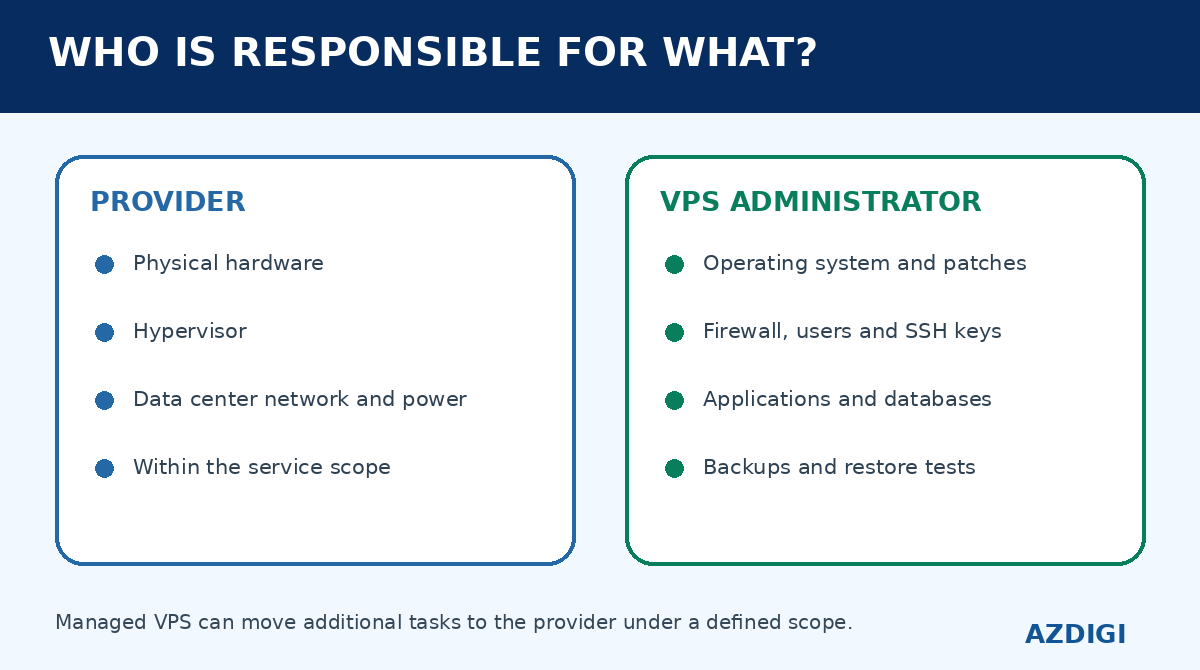
- Unmanaged VPS: the provider operates the infrastructure; the customer manages the operating system, software, firewall, backups and application incidents.
- Managed VPS: the provider accepts additional administration work within a defined service scope.
“Managed” does not have one universal checklist. Confirm whether the service covers OS updates, web servers, control panels, backups, malware and application troubleshooting.
Cloud VPS
Cloud VPS is a commercial label that may describe a VPS on cloud infrastructure or a Cloud Server with a VPS-like user experience. The name alone does not prove HA, distributed storage or automatic scaling.
If both models are under consideration, use the VPS vs Cloud Server architecture and workload comparison rather than relying on the phrase “Cloud VPS.”
Advantages of a VPS
More control than hosting
Users can choose the operating system, packages, runtime, web server and database. Root or Administrator access enables software that is unavailable on a standard Shared Hosting plan.
Isolated environment
Processes, filesystems and accounts are isolated at the VM or container level. A configuration mistake in another customer’s website does not directly change the operating system inside your VPS. The underlying host, storage and network may still be shared.
Lower cost than a dedicated server
Virtualization uses physical infrastructure efficiently, so a VPS often fits workloads that do not need an entire server. Teams can start with a measured configuration and resize once monitoring data shows a real bottleneck.
Reproducible environments
Images, provisioning scripts, containers and Infrastructure as Code can make services easier to rebuild consistently than a manually configured one-off server. Snapshots may help operational recovery, but they do not replace independent backups and restore testing.
Limitations and responsibilities of a VPS
Dependence on underlying infrastructure
A VPS normally depends on a physical host, storage and provider network. If the service has no suitable HA or recovery design, a host failure may interrupt the VM until it is restored.
Variable performance
Shared CPU, I/O and network contention can create noisy-neighbor effects. The provider manages VM density and resource controls. The customer should monitor CPU steal, load, disk latency, IOPS and network behavior rather than looking only at the vCPU count.
Administration belongs to the customer
For an unmanaged VPS, OS patching, SSH security, package updates, firewall configuration, logs, backups and restore testing are the customer’s responsibility. A public server that has not been hardened can be scanned within minutes of exposing a port to the Internet.
More resources do not solve every problem
Adding memory does not fix a slow database query. Adding vCPU does not fix lock contention. Faster storage does not compensate for sequential API calls in application code. Identify the bottleneck through metrics and logs before upgrading a plan.
How does a VPS compare with Shared Hosting, Cloud Server and Dedicated Server?
| Criterion | Shared Hosting | VPS | Cloud Server | Dedicated Server |
|---|---|---|---|---|
| OS administration | No | Usually | Usually | Yes |
| Resource boundary | Shared hosting account | VM/container on physical infrastructure | VM on a cloud pool, depending on architecture | Entire physical server |
| Custom software | Limited | Flexible | Flexible | Most flexible |
| Operational responsibility | Low | Medium to high | Medium to high | High |
| HA after host failure | Platform-specific | Not a default VPS property | Possible when the service is designed for HA | Requires a separate cluster/DR design |
| Common workload | Small standard website | Web/app/API, development, private services | Systems needing HA and flexible capacity | Large or specialized workloads needing a full machine |
Shared Hosting is convenient for a standard website when the user does not want to administer an OS. A VPS provides more control and responsibility. A Cloud Server runs compute on cloud infrastructure, but HA and storage behavior still need to be checked for the exact service. A Dedicated Server gives one customer the entire machine but does not create HA on its own.
When should you use a VPS?
A VPS is usually a good fit when one or more of these conditions apply:
- Root or Administrator access is required.
- The application needs custom packages, runtimes or services.
- Shared Hosting has reached process, memory, worker or configuration limits.
- APIs, workers, Docker or automation must run continuously.
- Staging, development and production environments need separation.
- Someone can take responsibility for patching, security and backups.
- The workload fits on one VM but needs more control than hosting provides.
For a small website with stable traffic and no server customization, Managed Hosting may require less operational work. If the system cannot depend on one host, evaluate Cloud Server infrastructure or design application-level HA. If the workload needs all physical CPU, memory, specialized devices or hardware-bound licensing, a Dedicated Server may be a better fit.
How to choose an initial VPS configuration
There is no universal configuration for every website. Start with the workload and measure after a realistic test.
Identify the workload
- PHP/WordPress websites need estimates for concurrent requests, PHP workers, cache and database load.
- APIs need request rate, processing time and dependency latency.
- Databases need working-set memory, IOPS, fsync latency and data-growth estimates.
- Container hosts need the combined overhead of each service plus room for the OS.
- Windows Remote Desktop needs memory for Windows, user sessions and applications.
Choose CPU and memory
A light application can often begin with modest resources and scale from monitoring data. CPU-bound software needs suitable processor generation, single-thread performance and a clear shared/dedicated vCPU policy. Databases and Java applications may depend heavily on memory for caching or garbage collection.
Choose storage and backups
Estimate capacity from current data, logs, images, temporary files and growth. Assess storage through latency and a representative workload. Backups should live outside the VPS, use a defined retention policy and be restored in tests.
Choose an operating system and management scope
Linux fits most web stacks and container workloads. Windows is appropriate when the application depends on Windows Server, IIS or Windows-only software. If no one can manage the server, a managed service or appropriate hosting plan is safer than an unmanaged VPS left unpatched.
Once requirements are clear, review VPS configurations available from AZDIGI. The Vietnamese guide to renting a VPS for the first time covers plan selection and initial setup in more detail.
Checklist after receiving a VPS
- Replace or disable default credentials.
- Create a separate administrator account and use SSH keys where possible.
- Update the operating system and packages.
- Expose only ports that are genuinely required.
- Configure a firewall and restrict administrative source addresses.
- Enable time synchronization, logs and CPU, memory, disk and network monitoring.
- Set up off-server backups and run a restore test.
- Document configuration, dependencies and recovery steps.
This is a starting checklist, not a replacement for operating-system and application-specific hardening guides.
Frequently asked questions
Is a VPS a private physical server?
No. A VPS is a virtual machine or system container on physical infrastructure. It has its own operating-system environment but may share underlying CPU, storage or network capacity with other VPS instances.
Is a VPS faster than Shared Hosting?
Not in every case. A VPS offers more control and clearer resource boundaries, but performance still depends on host capacity, CPU policy, storage, networking and application optimization. Well-managed hosting can outperform a poorly configured VPS.
Can a KVM VPS be oversold?
Yes. KVM creates full virtual machines but does not prevent a provider from overcommitting CPU or placing a high number of VMs on a host. Review the resource policy and measure actual behavior.
Can a VPS run Docker?
A full VM with a suitable kernel normally can. For a container VPS, support depends on nesting, cgroups, kernel modules and provider policy. Confirm this before purchasing.
Do I need backups if the VPS has snapshots?
Yes. Snapshots commonly remain on the same platform and provide a quick point-in-time rollback. Independent backups need retention, off-platform copies and restore testing. One mechanism does not replace the other.
Does a VPS automatically scale when traffic increases?
Not by default. A VPS is normally scaled up by changing its configuration. Auto-scaling requires a load balancer, multiple instances, automated provisioning and an application designed to scale out.
Do I need Linux knowledge to use a VPS?
An unmanaged Linux VPS requires familiarity with SSH, packages, services, firewalls, logs and backups. Users who do not want to administer an operating system can choose Managed VPS or Managed Hosting where appropriate.
Technical references
You might also like
- How to Choose a Budget VPS: Specifications, Costs and Common Traps
- VPS vs Cloud Server: Which One Should You Choose?
- How to Rent a VPS: Choose a Configuration and Set It Up Safely
- What is Cloud Hosting? How Does It Differ from Shared Hosting and VPS?
- Seven VPS Providers in Vietnam: Criteria and Evaluation Guide
- What is hosting? How it works and how to choose the right type
About the author

Thạch Phạm
Đồng sáng lập và Giám đốc điều hành của AZDIGI. Có hơn 15 năm kinh nghiệm trong phổ biến kiến thức liên quan đến WordPress tại thachpham.com, phát triển website và phát triển hệ thống.