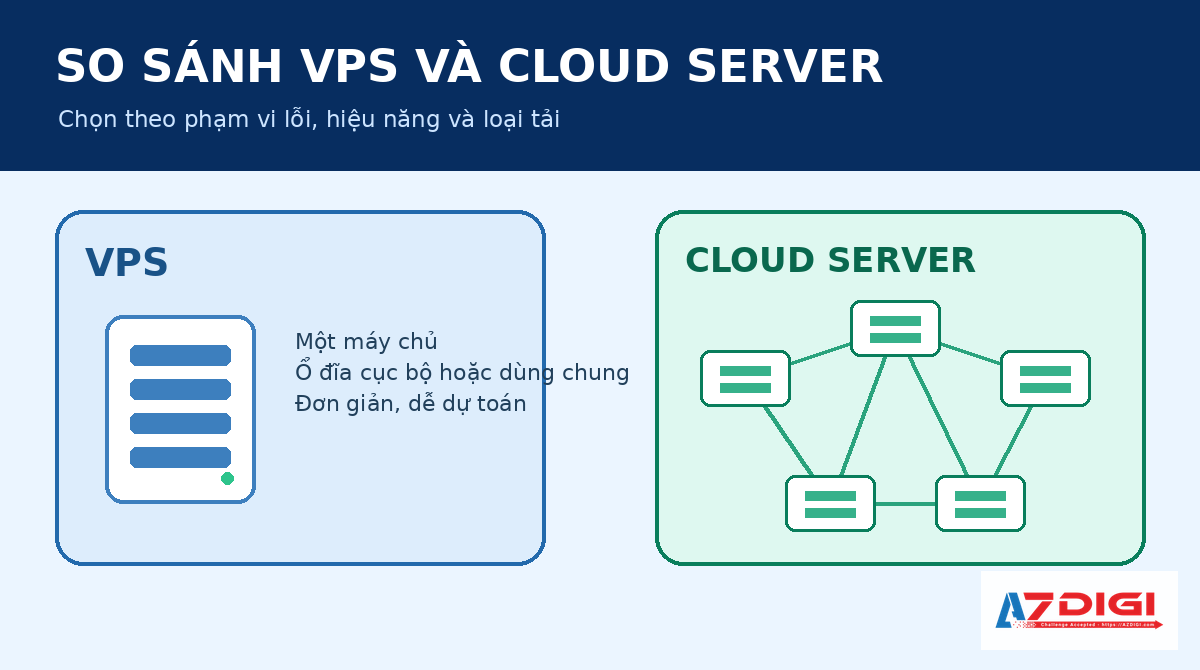
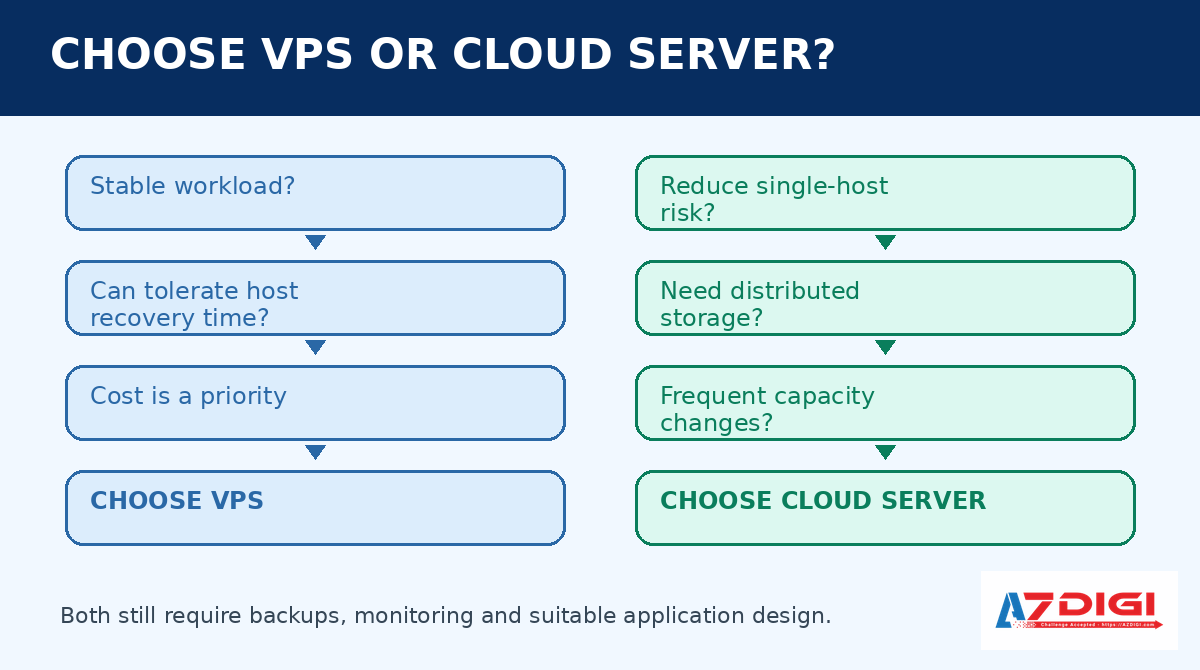
A VPS is a practical choice when demand is stable, cost needs to stay predictable and the system can tolerate recovery time after a physical host failure. A Cloud Server makes more sense when the workload needs protection from a single compute node, distributed storage and frequent capacity changes. Cloud Server does not automatically mean zero downtime, auto-scaling or no need for backups.
The table gives a quick answer before the architectural details.
| Requirement | Prefer | Reason |
|---|---|---|
| Small website, staging, bot, VPN or lab environment | VPS | Lower cost, simpler configuration and full administrative access |
| Website or API with fairly stable demand | VPS or Cloud Server | Decide by acceptable downtime and recovery requirements |
| E-commerce, production API or important internal system | Cloud Server | It can reduce the impact of a compute-node failure when the platform is designed for HA |
| Database that needs very high IOPS and low latency | Benchmark first | Local NVMe may be faster, while distributed storage provides better fault tolerance |
| Multiple instances added or removed with traffic | A complete cloud architecture | One Cloud Server is not auto-scaling; the system also needs a load balancer, images, health checks and orchestration |
| Long-term backup or recovery after accidental deletion | Both still need backups | HA and storage replicas do not replace independent backups |
Are VPS, Cloud VPS and Cloud Server really three separate products?
A VPS is a virtual machine created by a hypervisor on a physical server. Each VM has its own operating system, virtual CPU, memory and disk. The article about how a VPS works provides more background on virtualization.
In a traditional VPS model, the VM is often tied to one compute host and uses that host’s local disks. A provider may still back up, replicate or migrate the VM, but recovery depends on how the infrastructure is built. It is inaccurate to assume that every VPS has no redundancy.
A Cloud Server is also a virtual machine. The difference is in the infrastructure below it. Compute, storage and networking are organized as resource pools with orchestration and failure-handling mechanisms. VM disks are commonly stored on shared or distributed storage instead of existing only on the compute host running the instance.
“Cloud VPS” is not a separate technical standard. Some providers use the term for a VPS running on cloud infrastructure. Others use it as a marketing label for Cloud Server. A comparison based only on product names can therefore be misleading.
Ask five specific questions when evaluating a service:
- Does the VM use local or distributed storage?
- When the compute host fails, where and how is the VM restarted?
- Does increasing CPU or memory require a restart?
- Where are backups stored, how long are they retained and how are they restored?
- Does the SLA measure infrastructure, VM or application availability?
A product with “cloud” in its name is not automatically better than a well-operated VPS if the provider cannot answer these questions.
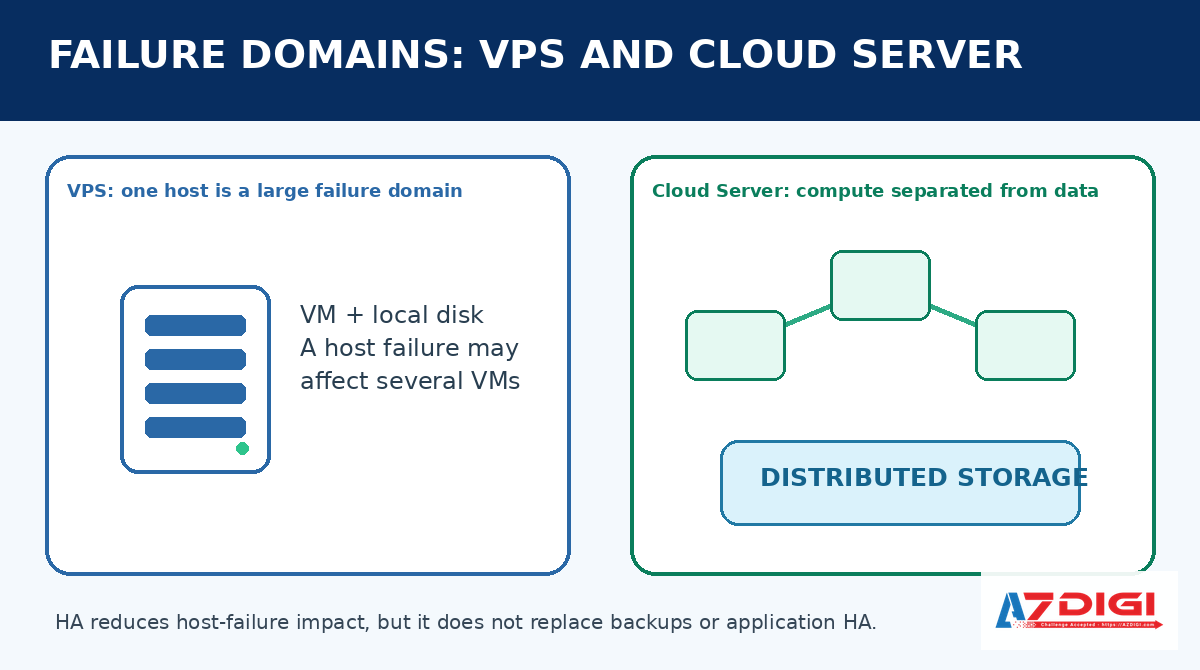
The core difference is the failure domain
A failure domain is the scope affected when one component fails. It is more useful than comparing only vCPU count or memory capacity.
With a VPS that uses local storage, the compute host is usually a large failure domain. A CPU, motherboard, memory module or controller failure can stop several VPS instances on that host. The provider may need to repair the host, move disks, restore a backup or follow another recovery process.
With a Cloud Server that uses distributed storage, the VM’s compute placement and data are separated. If the host fails, the platform can bring the VM up on another host because its disk remains accessible from the storage cluster. OpenStack calls this process evacuation. It is not live migration. The failed source host cannot transfer its running memory state, so the VM normally has to start on the destination host.
Successful recovery still depends on several conditions:
- Storage and networking remain available.
- A replacement host has enough CPU and memory.
- Orchestration detects the failure correctly.
- The VM can boot successfully.
- The application and database recover consistently.
The claim that an application will have no interruption when a node fails is too broad. Infrastructure HA can shorten recovery, but users may still lose connections while the VM starts elsewhere.
What HA protects and what it does not
High availability at the Cloud Server layer mainly handles infrastructure failures such as power loss or hardware failure on a compute host. It does not automatically correct errors inside the guest VM.
| Failure | Can infrastructure HA help? | What is still required? |
|---|---|---|
| Compute host fails | Yes, if capacity and failover mechanisms are available | Health checks and application verification after the VM restarts |
| A storage disk fails | Potentially, if replicas and quorum remain healthy | Degradation monitoring, recovery and spare capacity |
| Guest kernel panics | Not always | Guest monitoring, watchdog or restart policy |
| Web server is misconfigured | No | Configuration management, testing and rollback |
| Database records are accidentally deleted | No | Independent backup and point-in-time recovery |
| An account is compromised | No | MFA, least privilege, logs and incident response |
| An entire site loses connectivity | Not by default | DR in another failure domain |
HA, backup and disaster recovery solve different problems. HA reduces interruption when a component fails. Backup restores an earlier data state. Disaster recovery prepares the organization for the loss of a site or a much larger group of systems.
NIST SP 800-34 recommends deriving contingency plans from business impact, recovery objectives and tested procedures. Storage replicas alone do not constitute a complete DR plan.
Comparing CPU, memory and I/O performance
A Cloud Server is not automatically faster than a VPS with the same vCPU and memory specifications. Performance depends on the physical CPU, overcommit policy, scheduler, NUMA placement, storage, networking and the activity of other tenants.
CPU and memory
Both VPS and Cloud Server products can use KVM or a comparable hypervisor. Resources may be guaranteed or shared according to the service plan. The word “cloud” does not tell you whether a vCPU is a dedicated or shared physical core.
Check the following details:
- CPU model and generation.
- vCPU sharing policy.
- Single-core clock rate and multi-core performance.
- Memory ballooning or overcommit policy.
- Burst and throttling limits.
A VPS on a fast CPU with reasonable sharing may respond better than a Cloud Server using an older or heavily overcommitted platform. A Cloud Server resource pool, however, often makes capacity upgrades easier.
Local NVMe and distributed storage
Local NVMe connects directly over PCIe and usually provides low latency. This can benefit databases with random I/O, build servers and workloads that issue many small writes.
Distributed storage such as Ceph sends I/O over a network and maintains copies according to cluster policy. The VM’s data no longer depends on one disk or compute host. The trade-off is additional network hops, replication work and recovery traffic when the cluster is degraded.
One provider benchmark cannot represent every workload. Test the block size, queue depth and read-write ratio that resemble the real application. For databases, fsync latency is often more useful than sequential throughput.
For more context about storage types, see SSD and NVMe differences on VPS.
Scale-up, scale-out and auto-scaling are different
Cloud Server platforms often provision capacity quickly because compute and storage are managed as pools. Fast provisioning does not mean the application scales automatically.
Scale-up adds CPU, memory or disk capacity to one VM. Some changes can be applied online, but many operating systems or service plans still require a restart before the VM sees the new allocation.
Scale-out adds more VMs and distributes traffic between them. It requires a load balancer, suitable session management, data synchronization and a deployment process for multiple nodes.
Auto-scaling adds or removes instances based on metrics or schedules. It also needs standardized images, health checks, quotas, scaling rules, bootstrap logic and external state storage.
One Cloud Server mainly makes scale-up more convenient. If the application stores sessions and files on one instance, creating a second VM may not distribute traffic correctly.
Backup, snapshot, replica and DR
These four terms are often grouped together even though their objectives differ.
- Replica: Maintains several data copies so storage can survive device failures. If a user deletes a file, that deletion can be replicated too.
- Snapshot: Records a volume state at a point in time. A crash-consistent snapshot does not necessarily guarantee database consistency.
- Backup: Keeps a copy with defined retention and a restore procedure. It should be separated from the primary failure domain and tested regularly.
- Disaster recovery: Includes alternate infrastructure, data, DNS and networking, runbooks, assigned roles and exercises.
Define RPO and RTO for both VPS and Cloud Server deployments. RPO describes how much data loss is acceptable. RTO describes how quickly service must return. Without those objectives, it is difficult to know whether a backup plan is sufficient.
Cost and operational complexity
A VPS usually has a lower and more predictable bill. For blogs, test environments, small internal services and stable applications, this is a practical advantage. There is little reason to pay for a failure domain the workload does not require.
Cloud Server pricing reflects distributed storage, redundant networking, reserve capacity and orchestration. The additional cost can be justified when downtime affects revenue or customer SLAs.
Infrastructure cost is only one part of the calculation. Include:
- Operating-system management and security work.
- Backup retention and capacity growth.
- Monitoring and alerting.
- Software licenses.
- Incident investigation time.
- Downtime cost.
- Migration effort during upgrades.
A cheap VPS that repeatedly runs out of disk or memory can cost more operational time than a properly sized Cloud Server. A small workload placed on an unnecessarily complex cloud architecture can also cost more without providing a useful benefit.
Choosing VPS or Cloud Server by workload
Company website, blog and staging
Choose a VPS when traffic is stable, backups are reliable and some recovery time after a host failure is acceptable. A Pro VPS configuration for stable workloads is often simpler to budget and operate.
E-commerce website
Cloud Server deserves consideration when every minute of downtime can affect transactions. Host-level HA does not remove the application’s single points of failure. Database, cache, queues and payment callbacks still require their own recovery design.
API and business application
Recovery from a compute-host failure and quick capacity upgrades matter when many systems depend on an API. Add health checks, monitoring and a deployment rollback process. For scale-out, the application should be stateless or move session data to a shared service.
Database
Do not choose by product name alone. Benchmark latency, IOPS, throughput, fsync and behavior during storage recovery. A small database may run very well on local NVMe. An important production database may benefit from distributed storage, but it can still require database-level replication and independent backups to meet RPO and RTO targets.
CI/CD, builds and media processing
Burst workloads care about multi-core performance and the ability to add capacity. A VPS can be economical when jobs run continuously at a stable level. Cloud Server is more convenient when concurrency and capacity change often.
Systems that need infrastructure HA
When the failure of one physical host is not acceptable, review Cloud Server architecture and ask about failover, SLA, storage and backups. AZDIGI’s Cloud Server platform for HA workloads currently describes HA infrastructure, distributed NVMe and redundant networking. These are platform characteristics, not a substitute for application HA.
Checklist before moving from VPS to Cloud Server
Do not start a migration by copying the whole server. First define the problem the migration must solve.
- Record the reason for moving. Host failures, capacity limits, maintenance downtime and deployment speed require different solutions.
- Measure the current workload. Collect CPU, memory, disk latency, IOPS, networking and growth data over a representative demand cycle.
- Define RPO and RTO. These objectives determine backup and recovery architecture.
- List dependencies. Include IP allowlists, cron jobs, licenses, DNS, mail relays, object storage and external services.
- Benchmark the destination. Use data and access patterns similar to production rather than one sequential test.
- Prepare rollback. Keep the old VPS available during the migration window.
- Lower DNS TTL before cutover. Do not wait until the migration starts.
- Perform a final data sync. Use replication or a suitable maintenance window for databases.
- Validate after cutover. Monitor error rates, latency, queues, backups and application logs.
- Retire the old system after an observation period. Confirm that the new backup has run and a restore test succeeds.
If the only problem is insufficient memory or disk capacity, a VPS upgrade may cost less and involve less risk than a full migration. Cloud Server is valuable when its architecture addresses the existing failure mode.
Frequently asked questions
Is Cloud Server always faster than VPS?
No. Physical CPU, overcommit, storage and networking determine performance. A VPS with local NVMe can have lower I/O latency than a Cloud Server backed by distributed storage. Cloud Server usually provides stronger infrastructure recovery and easier capacity changes, not guaranteed benchmark superiority.
Does Cloud Server automatically scale with traffic?
A single Cloud Server normally does not create more VMs automatically. Auto-scaling requires metrics, rules, images, health checks, a load balancer and an application designed for scale-out. Manually adding CPU or memory is only scale-up.
Does Cloud Server replace backups?
No. Replicas and HA maintain service through hardware failures, but accidental deletion, ransomware and corrupted data can affect every replica. Independent backups and restore tests are still required.
Are Cloud VPS and Cloud Server different?
There is no universal definition across providers. Many use the two names for similar VMs running on cloud infrastructure. Compare storage, failure domains, failover, SLA and billing instead of relying on the label.
When is VPS the better choice?
VPS is appropriate when the workload is small or stable, budget is important, HA requirements are modest and the team already has suitable backup and monitoring. Choosing VPS does not mean choosing poor infrastructure. It may be the correct match for the actual risk.
Choose by failure mode, not by product name
VPS and Cloud Server are both virtual machines. The useful differences are where data is stored, the scope of a failure, recovery behavior, capacity changes and the service contract.
When demand is stable and recovery of several minutes or hours stays within acceptable limits, a VPS is usually more economical. When a compute host is a failure point that must be reduced and capacity changes frequently, Cloud Server has a clearer advantage. Backup, monitoring and application design remain separate requirements in either case.
Technical sources
You might also like
- What Is a VPS? How It Works, Pros, Cons and Use Cases
- How to Rent a VPS: Choose a Configuration and Set It Up Safely
- How to Choose a Budget VPS: Specifications, Costs and Common Traps
- VPS SSD vs VPS NVMe: What's the difference, which one to choose?
- Vietnam VPS vs International VPS Comparison: Which to Choose?
- Seven VPS Providers in Vietnam: Criteria and Evaluation Guide
About the author

Trần Thắng
Expert at AZDIGI with years of experience in web hosting and system administration.